
Key takeaways
- Compare the best photo printers for home studios, from 13-inch pigment-ink models to supertank all-in-ones, with specs on ink sets, media and print sizes.
- Top Pick: Canon imagePROGRAF PRO-300
- Runner-up: Epson SureColor P700
- Also consider: Epson EcoTank Photo ET-8550
The best photo printer for most home studios is the Canon imagePROGRAF PRO-300, because its 10-color LUCIA PRO pigment ink set, borderless 13 x 19 inch output and manual feed for fine art media cover the work a small studio actually sells: portfolio prints, client proofs and exhibition pieces. Studios that prefer Epson should look at the SureColor P700, a 13-inch pigment printer with a 10-color UltraChrome PRO10 ink set and roll paper support for panoramas. If running cost matters more than archival pigment ink, the Epson EcoTank Photo ET-8550 prints borderless 13 x 19 inch photos from refillable ink tanks and adds scanning and copying, while its smaller sibling, the EcoTank Photo ET-8500, suits studios that rarely print beyond letter size. The Epson Expression Photo HD XP-15000 is the budget route into 13 x 19 inch printing, with a six-color dye ink set in a compact body.
A home studio printer is judged on different criteria than a family all-in-one. Print width comes first, because 13 x 19 inch output covers most portfolio and small exhibition work without sending files to a lab. Ink chemistry comes next: pigment inks are the standard for fine art and matte media, while dye inks sink into glossy coatings and deliver the most saturated color on photo paper. Media handling matters too, since studio work involves thick fine art sheets a basic front tray cannot manage. The five printers below were chosen from published manufacturer specifications to cover those needs at budget, mid-range and premium tiers.
As an Amazon Associate, we earn from qualifying purchases.
Table of Contents
- Canon imagePROGRAF PRO-300
- Epson SureColor P700
- Epson EcoTank Photo ET-8550
- Epson Expression Photo HD XP-15000
- Epson EcoTank Photo ET-8500
- How to Choose a Photo Printer for a Home Studio
- FAQ
- Conclusion
Canon imagePROGRAF PRO-300

The imagePROGRAF PRO-300 is Canon’s premium 13-inch desktop photo printer and the most complete home studio package in this roundup. Its LUCIA PRO ink system uses nine pigment colors plus a Chroma Optimizer cartridge that levels the printed surface, reducing gloss unevenness on glossy media and deepening black density on matte paper. Because matte black and photo black live in separate tanks with dedicated nozzles, the printer moves between matte sheets and glossy photo paper without an ink swap. Borderless printing is supported on matte and fine art media as well as glossy paper, which is unusual at this size.
Paper handling suits studio work. The top tray takes sizes up to 13 x 19 inches, and a manual feed slot at the back accepts thicker fine art media one sheet at a time. Canon rates a bordered 13 x 19 inch color print on its Photo Paper Pro Premium at roughly four minutes and fifteen seconds, and the 3.0-inch color LCD shows ink levels without a computer. The trade-offs are size and ink capacity: the printer is a wide, heavy desktop unit, and the PFI-300 tanks hold 14.4 mL each, so high-volume studios will swap tanks often.
Specs
- Maximum print size: 13 x 19 inches (A3+), borderless
- Ink system: 10-color LUCIA PRO pigment (9 colors plus Chroma Optimizer), PFI-300 tanks
- Maximum resolution: 4800 x 2400 dpi
- Display: 3.0-inch color LCD
- Connectivity: Wi-Fi, Ethernet, USB
- Media handling: top tray plus manual feed for fine art media
- Dimensions: 25.2 x 15.0 x 7.9 inches
- Weight: 31.6 pounds
- Tier: premium
Epson SureColor P700
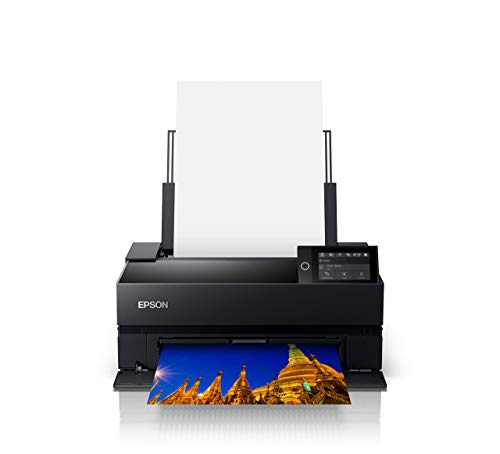
The SureColor P700 is Epson’s answer to the PRO-300 and the other premium pick here. It prints up to 13 x 19 inches from sheet media and uses the 10-color UltraChrome PRO10 pigment ink set, which adds a violet channel to widen the blue and purple gamut. Like the Canon, it carries separate matte black and photo black channels, so there is no ink switching when changing paper types. Epson’s Carbon Black Mode raises black density on glossy media, and the Black Enhance Overcoat function applies a light gray ink layer to deepen blacks on reflective papers.
Where the P700 pulls ahead is format flexibility. An included roll paper adapter holds 13-inch rolls and supports prints up to 129 inches long, making it the natural choice here for panoramas. The front manual feed accepts media up to 1.5 mm thick, covering rigid fine art boards that rear slots on cheaper printers cannot take. A 4.3-inch color touchscreen handles setup and ink status. The P700 is a substantial machine at roughly 30 pounds, and its ink cartridges, while larger than the Canon’s tanks, still suit moderate rather than production-level volume.
Specs
- Maximum print size: 13 x 19 inches sheet; roll prints up to 13 x 129 inches
- Ink system: 10-color UltraChrome PRO10 pigment, including violet
- Maximum resolution: 5760 x 1440 dpi
- Display: 4.3-inch color touchscreen
- Connectivity: Wi-Fi, Ethernet, USB
- Media handling: front manual feed for media up to 1.5 mm thick; roll paper adapter included
- Weight: approximately 30 pounds
- Tier: premium
Epson EcoTank Photo ET-8550
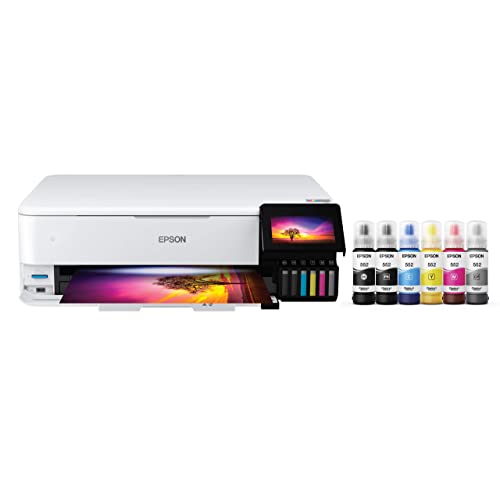
The EcoTank Photo ET-8550 takes a different approach: instead of small cartridges, it uses refillable tanks filled from 70 mL EcoFit bottles, which suits studios that print proofs and client work every week. The six-color Claria ET Premium ink set mixes dye colors with a pigment black for text and adds a gray ink that smooths black-and-white gradations. Output is borderless up to 13 x 19 inches, matching the two premium pigment printers on size, and the all-in-one body adds a scanner and copier.
A rear feed handles specialty media up to 1.3 mm thick, and the printer can also print on CDs and DVDs. Epson lists document speeds of 16 ISO pages per minute in black and 12 in color. The honest limitation is ink chemistry: dye inks are right for glossy photo output, but studios selling archival fine art prints on matte media should stay with the pigment models above. For proofing, portfolios and everyday photo work, the ET-8550 is the mid-range pick that keeps consumables simple.
Specs
- Maximum print size: 13 x 19 inches, borderless
- Ink system: 6-color Claria ET Premium, refillable EcoFit 552 bottles, 70 mL
- Maximum resolution: 5760 x 1440 dpi
- Functions: print, scan, copy
- Display: 4.3-inch color touchscreen
- Connectivity: Wi-Fi, Ethernet, USB, SD card slot
- Media handling: rear feed for specialty media up to 1.3 mm thick; CD and DVD printing
- Tier: mid-range
Epson Expression Photo HD XP-15000
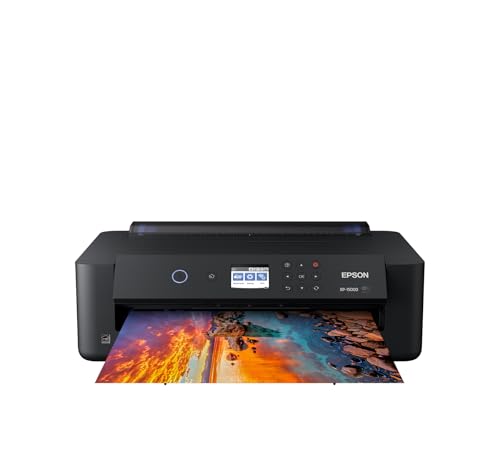
The Expression Photo HD XP-15000 is the budget entry point to wide-format studio printing. It reaches the same 13 x 19 inch maximum size as the premium models but uses a six-color Claria Photo HD dye ink set, which adds red and gray cartridges to widen the gamut and improve monochrome shading. The body is about a third smaller than the model it replaced, so at 18.7 x 14.5 x 6.3 inches it fits shelves and desks where the PRO-300 and P700 would crowd out other equipment.
A 50-sheet rear tray feeds specialty media such as cardstock and fine art paper, and the printer handles CD and DVD printing for studios that still deliver client work on disc. Document speeds are modest, at 9.2 ISO pages per minute in black and 9.0 in color. The compromises are predictable at this tier: dye ink is less suited to archival matte prints than pigment, and cartridge capacity is small. As a first wide-format printer for a home studio, it covers the format that matters at the lowest tier here.
Specs
- Maximum print size: 13 x 19 inches, borderless
- Ink system: 6-color Claria Photo HD dye (adds red and gray), 312 and 314 cartridges
- Maximum resolution: 5760 x 1440 dpi
- Connectivity: Wi-Fi, Ethernet, USB
- Media handling: 50-sheet rear tray for specialty media; CD and DVD printing
- Dimensions: 18.7 x 14.5 x 6.3 inches
- Tier: budget
Epson EcoTank Photo ET-8500

The EcoTank Photo ET-8500 is the ET-8550’s smaller sibling and the pick for compact studios that print mostly at letter size. It shares the six-color Claria ET Premium ink set, fed by the same 70 mL EcoFit bottles: a pigment black for documents alongside dye photo black, cyan, magenta, yellow and gray for images. Borderless printing tops out at 8.5 x 11 inches, although the trays accept legal-size paper, and a 4 x 6 inch photo takes as little as 15 seconds in draft mode on premium glossy paper.
Despite the smaller format, the media handling is properly studio-grade. A rear feed takes specialty media up to 1.3 mm thick, including cardstock, and there is a tray for printable CDs and DVDs. The scanner, copier, 4.3-inch touchscreen and SD card slot round out a machine that can serve as the only printer in a small studio. The reason to step up to the ET-8550 instead is purely print width: the moment a studio needs 13 x 19 inch output, the 8500 is out of the running. For studios whose largest work is 8 x 10 inches, it delivers the same ink system in a smaller body.
Specs
- Maximum print size: 8.5 x 11 inches borderless (accepts legal paper)
- Ink system: 6-color Claria ET Premium, refillable EcoFit 552 bottles, 70 mL
- Maximum resolution: 5760 x 1440 dpi
- Functions: print, scan, copy
- Display: 4.3-inch color touchscreen
- Connectivity: Wi-Fi, Ethernet, USB, SD card slot
- Media handling: rear feed for specialty media up to 1.3 mm thick; CD and DVD printing
- Tier: budget
How to Choose a Photo Printer for a Home Studio
Start with the largest print you realistically sell or display. If that is 13 x 19 inches, four of the five printers here qualify and the ET-8500 drops out. If your work is mostly 8 x 10 inches and smaller, a letter-size machine saves desk space while giving up nothing in ink quality.
Next, match the ink to the paper. Pigment inks, as used by the imagePROGRAF PRO-300 and the SureColor P700, are the standard for matte and fine art media and for prints expected to last in portfolios and on walls. Dye inks, used by the XP-15000 and both EcoTank Photo models, produce their best results on glossy and luster paper and are the practical choice for proofing and everyday prints. Studios that print black-and-white work should look for a gray ink channel, which all five printers here include.
Then consider how the printer feeds your media. Thick fine art sheets need a manual or rear feed with a straight path: the P700 accepts media up to 1.5 mm thick from the front, while the EcoTank models and the PRO-300 feed specialty sheets from the rear. Panorama work points to the P700 and its roll adapter.
Finally, think about ink supply. Cartridge printers such as the PRO-300, P700 and XP-15000 use small tanks, so frequent printing means frequent swaps. The EcoTank models trade that for large refillable tanks that suit steady weekly output. All five models here offer Wi-Fi, Ethernet and USB, so each can join a shared studio network.
FAQ
Is pigment or dye ink better for a home studio?
Pigment ink is better for matte and fine art paper and for prints that need to hold up over years of display, which is why the imagePROGRAF PRO-300 and SureColor P700 use it. Dye ink usually looks more saturated on glossy photo paper, so it suits proofing and everyday prints.
What print size should a home studio printer handle?
A maximum size of 13 x 19 inches covers most portfolio, proofing and small exhibition work, and four of the five printers in this guide reach it. Studios that only print up to 8 x 10 inches can choose the letter-size EcoTank Photo ET-8500 instead. Anything larger means moving to a 17-inch or wider machine, a bigger investment in both the printer and the desk space it needs.
Why do these printers have both matte black and photo black inks?
Matte black ink is formulated for uncoated matte and fine art papers, while photo black is made for glossy and luster coatings. Printers that carry both, such as the PRO-300 and P700, switch between paper types automatically through dedicated nozzles. Without both, prints on one paper family lose depth in the darkest tones.
Can a home studio photo printer also handle documents?
Yes. The EcoTank Photo ET-8550 and ET-8500 are all-in-one machines with scanners and copiers, pigment black ink for text, and document speeds of 16 ISO pages per minute. The PRO-300, P700 and XP-15000 are print-only designs, so a studio that needs scanning should pick an EcoTank model or keep a separate office machine.
Conclusion
For most home studios, the Canon imagePROGRAF PRO-300 is the strongest all-round choice: pigment inks with no black switching and borderless output on matte and glossy media alike. The Epson SureColor P700 matches it on ink quality and adds roll printing for panoramas. Studios that print constantly should choose between the EcoTank Photo ET-8550 for 13 x 19 inch output and the ET-8500 for letter-size work, while the Expression Photo HD XP-15000 remains the budget way to start printing at 13 x 19 inches. Pick by the largest print you sell and the paper you print it on.
FAQ
Is pigment or dye ink better for a home studio?
What print size should a home studio printer handle?
Why do these printers have both matte black and photo black inks?
Can a home studio photo printer also handle documents?
More from Amazon
Programs that pair well with the guide above. Offers and eligibility are set by Amazon and may change.
A free business account with business pricing and bulk-buying tools for work, shop or home office.
Create a business accountFree shipping on eligible items, Prime Video and more. Eligible new members can start with a free trial.
Start a Prime free trialAudiobooks and podcasts to listen to on the go. Eligible new members can start with a free trial.
Try Audible freeAd-free music streaming. Eligible new subscribers can start with a free trial.
Try Music Unlimited freeAs an Amazon Associate we earn from qualifying purchases.


Write Your Review
No reviews yet. Be the first to share your experience!