
Key takeaways
- Best all-in-one printers for home offices compared on print speed, scanning, duplex, paper capacity and running costs, from budget inkjet to color laser.
- Top Pick: HP OfficeJet Pro 9125e
- Runner-up: Brother MFC-L3720CDW
- Also consider: Brother MFC-J1010DW
A home office all-in-one has to do four jobs well: print sharp documents, scan multi-page paperwork, copy on demand, and handle the occasional fax, all from one corner of a desk. The five printers below cover the main ways to fill that role, from a budget Canon inkjet to a premium HP OfficeJet Pro, and each one is described from its published specifications so you can match print speed, paper handling, and ink system to the way you actually work.
The short answer: choose the HP OfficeJet Pro 9125e for the fastest and most complete inkjet feature set, the Epson EcoTank ET-3850 if low ink costs matter most, the Brother MFC-L3720CDW for color laser output with quick scanning, the Brother MFC-J1010DW for a compact machine with a document feeder in the budget tier, and the Canon PIXMA TR4720 if you want the simplest, lowest-commitment way to get printing, scanning, copying, and faxing at home.
As an Amazon Associate, we earn from qualifying purchases.
Table of Contents
- HP OfficeJet Pro 9125e
- Epson EcoTank ET-3850
- Brother MFC-L3720CDW
- Brother MFC-J1010DW
- Canon PIXMA TR4720
- How to Choose
- FAQ
- Conclusion
- Product and ASIN Reference
HP OfficeJet Pro 9125e
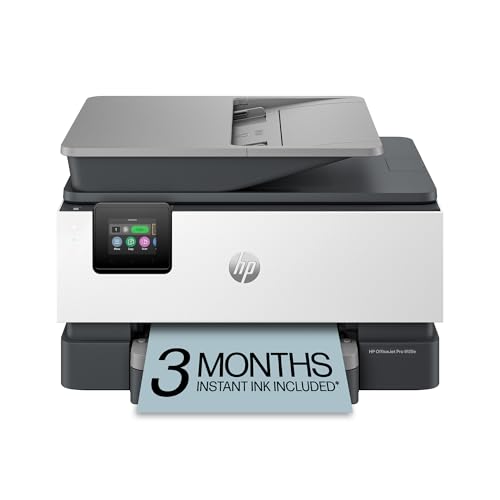
The OfficeJet Pro 9125e is the premium pick here, and it earns that spot with speed and paper handling. HP rates it at up to 22 pages per minute in black and 18 pages per minute in color, with the first page out in as fast as 11 seconds, so both long reports and one-page jobs move quickly. A 250-sheet input tray keeps refills occasional, and the 35-sheet automatic document feeder scans both sides of a page, which is the feature that saves the most time on contracts, tax paperwork, and signed forms. Automatic two-sided printing is standard.
Connectivity covers every home office setup: dual-band Wi-Fi that reconnects itself after a drop, Ethernet for a wired desk, USB, and printing from phones through the HP app or AirPrint. The 2.7-inch color touchscreen handles walk-up copying and scanning without a computer. The 9125e runs on HP 936 cartridges, with higher-yield 936e EvoMore cartridges available, and it is eligible for HP’s Instant Ink subscription. One decision to make at setup: activating the HP+ offer extends the warranty to two years, but it also commits the printer to original HP ink for its working life, so weigh that before you opt in.
Specs
- Functions: print, scan, copy, fax
- Print speed: up to 22 ppm black, 18 ppm color
- First page out: as fast as 11 seconds
- Paper capacity: 250-sheet input tray
- ADF: 35 sheets, two-sided scanning
- Duplex: automatic two-sided printing
- Print resolution: up to 4800 x 1200 optimized dpi color, 1200 x 1200 dpi black
- Display: 2.7-inch color touchscreen
- Connectivity: dual-band Wi-Fi, Ethernet, USB, HP app, AirPrint
- Ink system: HP 936 cartridges, 936e EvoMore high-yield available
- Duty cycle: up to 25,000 pages per month, recommended up to 1,500
- Weight: 20.5 pounds
- Warranty: 1-year limited, extendable to 2 years with HP+
Epson EcoTank ET-3850
The EcoTank ET-3850 is the pick for home offices that print a lot and are tired of cartridge shopping. Instead of cartridges, it uses refillable ink tanks filled from Epson 502 bottles, and the set of bottles included in the box is rated by Epson for up to 7,500 pages in black and 6,000 pages in color. That shifts the running-cost math firmly in its favor for anyone printing hundreds of pages a month, even though the printer itself sits in the mid-range tier.
Day-to-day hardware is complete for document work: ISO print speeds of 15.5 pages per minute in black and 8.5 in color, a 250-sheet paper tray, a 30-sheet automatic document feeder, and automatic two-sided printing. The flatbed scanner and 4800 x 1200 dpi print resolution handle graphics, charts, and the occasional photo without trouble. Connectivity includes Wi-Fi, Ethernet, and USB, plus the Epson Smart Panel app for printing and scanning from a phone. The one gap to note is fax: the ET-3850 prints, scans, and copies only, so if you still send faxes from a phone line, look at the other four models in this roundup instead.
Specs
- Functions: print, scan, copy (no fax)
- Print speed: 15.5 ppm black, 8.5 ppm color (ISO)
- Paper capacity: 250-sheet tray
- ADF: 30 sheets
- Duplex: automatic two-sided printing
- Print resolution: up to 4800 x 1200 dpi
- Display: 2.4-inch color LCD
- Connectivity: Wi-Fi, Ethernet, USB, Epson Smart Panel app, AirPrint
- Ink system: EcoTank 502 refill bottles, included set rated up to 7,500 pages black and 6,000 color
- Print technology: PrecisionCore MicroPiezo inkjet
- Maximum media size: 8.5 x 14 inches
- Warranty: 1-year limited
Brother MFC-L3720CDW

The MFC-L3720CDW is the color laser option, built for home offices that want crisp text, fast scanning, and a machine that is ready after sitting idle for a week. Laser toner does not dry out the way inkjet ink can, which suits irregular printing patterns. Brother rates it at up to 19 pages per minute in both black and color, and its scanner is the quickest here, rated at up to 29 images per minute in black and 22 in color through the 50-sheet automatic document feeder. A 250-sheet tray and automatic two-sided printing round out the paper handling.
The 3.5-inch color touchscreen is the largest display in this group and supports shortcuts to cloud services for scan-and-file workflows. Dual-band Wi-Fi covers both router bands, with Wi-Fi Direct and USB as fallbacks; note that there is no Ethernet port, so plan on a wireless connection. It runs on Brother TN229 toner cartridges, with TN229XL and TN229XXL high-yield options for heavier volume. At 44 pounds it is a set-it-down-and-leave-it machine rather than something you move between rooms. It is ENERGY STAR compliant and EPEAT Silver rated, and Brother backs it with a 1-year limited warranty.
Specs
- Functions: print, scan, copy, fax
- Print speed: up to 19 ppm black and color
- Scan speed: up to 29 ipm black, 22 ipm color
- Paper capacity: 250-sheet tray
- ADF: 50 sheets, two-sided scanning
- Duplex: automatic two-sided printing
- Print resolution: up to 2400 x 600 dpi
- Display: 3.5-inch color touchscreen
- Connectivity: dual-band Wi-Fi, Wi-Fi Direct, USB, Brother Mobile Connect app
- Toner system: TN229 cartridges, TN229XL and TN229XXL high-yield available
- Weight: 44 pounds
- Certifications: ENERGY STAR compliant, EPEAT Silver
- Warranty: 1-year limited
Brother MFC-J1010DW

The MFC-J1010DW is the compact budget pick that still behaves like an office machine. Brother rates it at up to 17 pages per minute in black and 9.5 in color, with the first page out in about 6.9 seconds, and it includes the two features budget printers most often skip: a 20-sheet automatic document feeder and automatic two-sided printing. The 150-sheet adjustable tray handles letter and legal paper, and the whole unit weighs 16.4 pounds, so it fits on a small desk or a sturdy shelf where the bigger models here would not.
A 1.8-inch color display covers basic walk-up copying and settings, while most control happens through the Brother Mobile Connect app, which also reports ink levels. Brother’s Page Gauge feature estimates how many pages of ink remain, which helps avoid mid-job surprises. The MFC-J1010DW uses LC401 cartridges, with XL high-yield versions available, and it connects over Wi-Fi, Wi-Fi Direct, or USB. It also works with Alexa for voice status checks. For a solo home office printing a modest daily volume, it covers print, scan, copy, and fax without paying for capacity you will never use.
Specs
- Functions: print, scan, copy, fax
- Print speed: up to 17 ppm black, 9.5 ppm color
- First page out: about 6.9 seconds
- Paper capacity: 150-sheet adjustable tray
- ADF: 20 sheets
- Duplex: automatic two-sided printing
- Print resolution: up to 6000 x 1200 dpi (Windows)
- Display: 1.8-inch color display
- Connectivity: Wi-Fi, Wi-Fi Direct, USB, Brother Mobile Connect app, Alexa
- Ink system: LC401 cartridges, XL high-yield available
- Weight: 16.4 pounds
- Warranty: 1-year limited
Canon PIXMA TR4720

The PIXMA TR4720 is the entry-level pick: a full four-in-one with fax in the budget tier, sized for apartments, dorm-adjacent desks, and spare-room offices. Its standout feature at this level is the 35-sheet automatic document feeder, which is larger than the feeder on the Brother above and unusual on a printer this small. Automatic two-sided printing is also included, along with a 100-sheet front paper tray. The body measures about 17.2 by 11.7 inches with the trays closed, so it fits where a full-size office machine will not.
The trade-offs are speed and ink layout. Canon rates it at about 8.8 images per minute in black and 4.4 in color, which is fine for homework, forms, and a handful of pages a day but slow for long documents. It uses a two-cartridge system, one PG-275 black and one CL-276 tri-color cartridge, with XL versions available; the tri-color design is simple to manage, though one empty color means replacing all three. Wi-Fi, AirPrint, Mopria, and the Canon PRINT app cover phone printing, and a small LCD panel handles basic copying at the machine.
Specs
- Functions: print, scan, copy, fax
- Print speed: about 8.8 ipm black, 4.4 ipm color
- Paper capacity: 100-sheet front tray
- ADF: 35 sheets
- Duplex: automatic two-sided printing
- Print resolution: up to 4800 x 1200 dpi
- Display: 1.5-inch segment LCD
- Connectivity: Wi-Fi, USB, AirPrint, Mopria, Canon PRINT app
- Ink system: PG-275 black and CL-276 color cartridges, XL versions available
- Dimensions: about 17.2 x 11.7 x 7.5 inches with trays closed
- Weight: about 12.7 pounds
- Warranty: 1-year limited
How to Choose
Start with the print engine. Inkjet models like the HP 9125e, Epson ET-3850, Brother MFC-J1010DW, and Canon TR4720 print better color graphics and photos, while the Brother MFC-L3720CDW laser produces especially crisp text and never has ink drying in the nozzles between jobs. If your printing comes in bursts with quiet weeks between, laser has a real convenience edge.
Next, look at the ink or toner system, because that decides long-term running costs more than the sticker tier does. Refillable tanks, as on the ET-3850, give the lowest cost per page for steady volume. Standard cartridges suit light use, high-yield cartridges and toner suit heavier use, and subscription ink plans trade a monthly routine for never thinking about supplies. Match the system to your monthly page count rather than to the purchase day.
Then check the scanner side. An automatic document feeder matters if you scan multi-page documents, and two-sided scanning, offered by the HP and the Brother laser, removes the flip-and-rescan routine. Feeder capacity runs from 20 sheets on the compact Brother inkjet to 50 on the laser model. Finally, confirm the basics: a 250-sheet tray if you print daily, dual-band Wi-Fi or Ethernet if your router placement is awkward, and a fax modem only if you still fax, since four of these five include one and the Epson does not.
FAQ
Is an inkjet or a laser all-in-one better for a home office?
It depends on what you print. Inkjets handle color graphics, charts, and photos better and cover most home office needs. A color laser like the Brother MFC-L3720CDW produces very sharp text, prints at a steady rated speed, and its toner does not dry out during quiet weeks, which suits document-heavy work with irregular volume.
How big an automatic document feeder do I need?
For occasional scanning of a few pages, a 20- to 35-sheet feeder, like those on the Brother MFC-J1010DW, Canon TR4720, and HP 9125e, is plenty. If you regularly scan long contracts or stacks of forms, the 50-sheet feeder on the Brother MFC-L3720CDW and two-sided scanning on the HP and Brother laser save time.
Do I need a phone line to use the fax function?
Traditional faxing on these machines uses a standard telephone line or a compatible VoIP line. If you do not have one, you can still scan documents and send them through email or an online fax service instead. Note that the Epson ET-3850 has no fax function at all, while the other four models include one.
How much paper capacity does a home office printer need?
Light users who print a few pages a day are fine with the 100- to 150-sheet trays on the Canon TR4720 and Brother MFC-J1010DW. If you print daily or in long runs, a 250-sheet tray, as fitted to the HP 9125e, Epson ET-3850, and Brother MFC-L3720CDW, means refilling paper becomes a weekly task instead of a daily one.
Conclusion
Every model here prints, scans, and copies; they differ in speed, running costs, and how much paper handling they automate. The HP OfficeJet Pro 9125e is the most complete inkjet package for a busy home office, the Epson EcoTank ET-3850 keeps ink costs down for steady volume, and the Brother MFC-L3720CDW is the color laser alternative with the fastest scanner. On tighter budgets, the Brother MFC-J1010DW keeps a feeder and duplex printing in a compact body, and the Canon PIXMA TR4720 covers all four functions for the lightest workloads. Match the machine to your monthly page count and scanning habits, and any of the five will run a home office well.
FAQ
Is an inkjet or a laser all-in-one better for a home office?
How big an automatic document feeder do I need?
Do I need a phone line to use the fax function?
How much paper capacity does a home office printer need?
More from Amazon
Programs that pair well with the guide above. Offers and eligibility are set by Amazon and may change.
A free business account with business pricing and bulk-buying tools for work, shop or home office.
Create a business accountFree shipping on eligible items, Prime Video and more. Eligible new members can start with a free trial.
Start a Prime free trialAudiobooks and podcasts to listen to on the go. Eligible new members can start with a free trial.
Try Audible freeAd-free music streaming. Eligible new subscribers can start with a free trial.
Try Music Unlimited freeAs an Amazon Associate we earn from qualifying purchases.


Write Your Review
No reviews yet. Be the first to share your experience!