
Key takeaways
- Compare the best inkjet printers for home offices, from the fast HP OfficeJet Pro 9125e to EcoTank and budget picks, with speeds, trays and ink yields.
- Top Pick: HP OfficeJet Pro 9125e
- Runner-up: Brother MFC-J1010DW
- Also consider: Epson EcoTank ET-2800
The best inkjet printer for most home offices is the HP OfficeJet Pro 9125e, because it prints at up to 22 pages per minute in black, scans two-sided documents in a single pass, and holds 250 sheets. If running costs matter more than raw speed, the Epson EcoTank ET-3850 replaces cartridges with refillable ink tanks and adds an automatic document feeder and Ethernet. On a budget, the Brother MFC-J1010DW covers printing, scanning, copying, and faxing in a compact body, while the EcoTank ET-2800 and Canon PIXMA TS7720 suit lighter, photo-friendly workloads.
What separates a home office inkjet from a basic home printer is headroom: an automatic document feeder for multi-page scans, automatic two-sided printing, a tray that holds at least 150 sheets, and ink yields measured in thousands of pages. All five printers below connect over Wi-Fi and support mobile printing, so the real decision is how much volume and scanning your week involves.
As an Amazon Associate, we earn from qualifying purchases.
Table of Contents
- HP OfficeJet Pro 9125e
- Epson EcoTank ET-3850
- Brother MFC-J1010DW
- Epson EcoTank ET-2800
- Canon PIXMA TS7720
- How to Choose an Inkjet Printer for a Home Office
- FAQ
- Conclusion
- Product and ASIN Reference
HP OfficeJet Pro 9125e
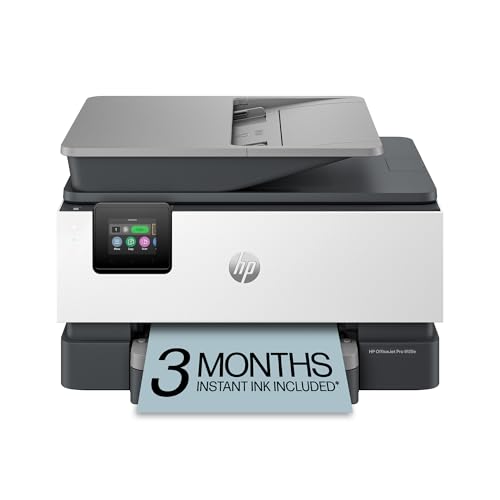
The OfficeJet Pro 9125e is the premium pick in this roundup and the closest an inkjet gets to laser-class office pace. HP rates it at up to 22 pages per minute in black and 18 in color, and the 35-sheet automatic document feeder scans both sides of a page in one dual pass, which matters when a signed contract or a stack of receipts needs digitizing. A 250-sheet input tray, automatic two-sided printing, fax, and a 2.7-inch color touchscreen round out a feature set aimed at daily printing.
Connectivity covers Wi-Fi, Ethernet, and USB, and the printer works with the HP Smart app for printing and scanning from a phone. It uses HP 936 cartridges and is Instant Ink ready, so replacement ink can ship automatically based on pages printed. HP also builds in its Wolf Pro security features, which help protect the printer on a network that doubles as a work network.
The trade-offs are size and cartridge economics. At 20.5 pounds, it needs a dedicated spot rather than a corner of a small desk, and heavy color printing will cost more per page than a tank model. For a busy home office that prints reports, invoices, and handouts daily, though, the speed and two-sided scanning justify the premium tier.
Specs
- Functions: Print, scan, copy, fax
- Print speed: Up to 22 ppm black, 18 ppm color
- Paper capacity: 250-sheet input tray
- Document feeder: 35-sheet ADF with dual-pass two-sided scanning
- Duplex: Automatic two-sided printing and scanning
- Connectivity: Wi-Fi, Ethernet, USB
- Display: 2.7-inch color touchscreen
- Ink: HP 936 cartridges, Instant Ink ready
- Memory: 512 MB
- Weight: 20.5 pounds
Epson EcoTank ET-3850
The EcoTank ET-3850 is the mid-range pick for home offices that print a lot and are tired of cartridge prices. Instead of cartridges, it uses refillable ink tanks filled from EcoFit 502 bottles, and Epson rates a replacement bottle set at up to 7,500 pages in black and 6,000 in color. That yield changes the math for anyone printing client documents or flyers every week.
It is also a genuinely productive machine. Epson rates print speeds at 15.5 ISO pages per minute in black and 8.5 in color, the paper tray holds 250 sheets, and a 30-sheet automatic document feeder handles multi-page scanning and copying. Automatic two-sided printing is standard, and connectivity includes Wi-Fi, Ethernet, and USB, plus voice-activated printing. A 2.4-inch color display handles setup and maintenance from the printer itself.
There is no fax, which rules it out for the few offices that still send them. Like most inkjets, it also prefers to print something every week or two rather than sit idle for months. For a high-volume home office, the combination of tank yields, a real document feeder, and wired networking makes it the strongest lifetime value in the group.
Specs
- Functions: Print, scan, copy
- Print speed: 15.5 ISO ppm black, 8.5 ISO ppm color
- Ink system: Refillable EcoTank with EcoFit 502 ink bottles
- Ink yield: Up to 7,500 pages black and 6,000 pages color per replacement bottle set
- Paper capacity: 250-sheet tray
- Document feeder: 30-sheet ADF
- Duplex: Automatic two-sided printing
- Connectivity: Wi-Fi, Ethernet, USB
- Display: 2.4-inch color display
- Dimensions: 19.8 by 14.8 by 7.4 inches
Brother MFC-J1010DW

The MFC-J1010DW is the budget pick that still behaves like an office machine. Brother rates it at up to 17 pages per minute in black and 9.5 in color, brisk for its class, and it includes a 20-sheet automatic document feeder, automatic two-sided printing, and fax alongside print, scan, and copy. The 150-sheet tray is generous for a compact printer, and at 15.7 inches wide and 16.4 pounds it fits on a desk shelf where larger all-in-ones cannot.
A 1.8-inch color display handles walk-up copying and scanning, and the Brother Mobile Connect app covers phone printing and scan management. The printer works with Alexa for ink-level notifications and supports Brother’s Refresh EZ Print subscription for automatic ink delivery. It uses LC401 cartridges in standard and high-yield XL versions, and Brother’s Page Gauge feature estimates remaining ink in pages rather than vague bars.
The compromises are predictable at this tier. There is no Ethernet port, so network printing runs through Wi-Fi or Wi-Fi Direct, and print quality on plain paper is aimed at documents, not photo enlargements. For a home office that prints a few dozen pages a week and needs an occasional fax or batch scan, it covers the essentials for the least money in this roundup.
Specs
- Functions: Print, scan, copy, fax
- Print speed: Up to 17 ppm black, 9.5 ppm color
- Paper capacity: 150-sheet tray
- Document feeder: 20-sheet ADF
- Duplex: Automatic two-sided printing
- Connectivity: Wi-Fi, Wi-Fi Direct, USB 2.0
- Display: 1.8-inch color display
- Ink: Brother LC401 cartridges, standard and high-yield XL
- Weight: 16.4 pounds
- Dimensions: 15.7 by 13.5 by 6.6 inches
Epson EcoTank ET-2800
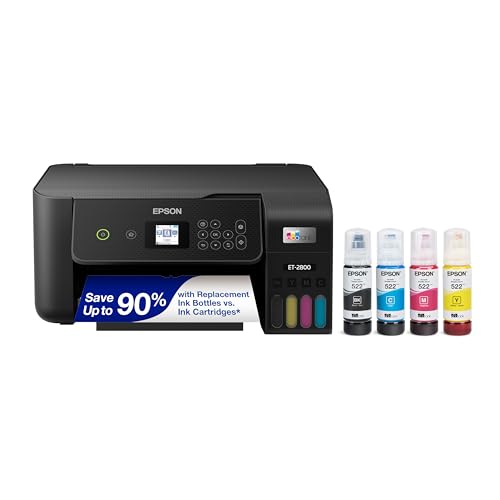
The EcoTank ET-2800 is the budget entry into cartridge-free printing, aimed at home offices with light but steady output. It shares the refillable tank design of its bigger sibling, using EcoFit 522 bottles that Epson rates at up to 4,500 pages in black and 7,500 in color per replacement set — roughly 90 individual cartridges’ worth of ink, so ink stops being a recurring errand.
Print speeds are modest at 10 ISO pages per minute in black and 5 in color, and the flatbed scanner resolves up to 1200 by 2400 dpi for sharp document and photo scans. Maximum print resolution reaches 5760 by 1440 dpi, so the occasional photo or presentation graphic comes out clean. The rear feed holds 100 sheets, and Wi-Fi with Wi-Fi Direct covers printing from laptops, phones, and tablets.
What you give up versus the ET-3850 is office hardware: there is no automatic document feeder, no fax, no Ethernet, and no automatic two-sided printing, so multi-page scans happen one sheet at a time on the flatbed. That is a fair trade for a one-person office printing invoices and paperwork a few times a week. If your scanning is mostly single pages and your printing is steady rather than heavy, the ET-2800 keeps running costs at the floor of this category.
Specs
- Functions: Print, scan, copy
- Print speed: 10 ISO ppm black, 5 ISO ppm color
- Ink system: Refillable EcoTank with EcoFit 522 ink bottles
- Ink yield: Up to 4,500 pages black and 7,500 pages color per replacement bottle set
- Paper capacity: 100-sheet rear feed
- Scanner: Color flatbed, up to 1200 by 2400 dpi hardware resolution
- Max print resolution: 5760 by 1440 dpi
- Connectivity: Wi-Fi, Wi-Fi Direct, USB
- Fax: No
- Document feeder: None
Canon PIXMA TS7720

The PIXMA TS7720 is the mid-range pick for home offices that split their output between documents and photos. Canon rates it at 15 images per minute in black and 10 in color, and its two-cartridge FINE hybrid ink system pairs a pigment black cartridge for crisp text with dye-based color for vivid photos, including borderless prints up to 8.5 by 11 inches. A 2.7-inch color touchscreen makes walk-up copying straightforward.
Paper handling is flexible for its size: a 100-sheet front cassette for plain paper plus a 100-sheet rear tray that takes photo paper, envelopes, and other specialty media without emptying the main supply. Automatic two-sided printing is included, and the flatbed scanner handles books and bound documents. At 13.8 pounds, it is the lightest printer here and the easiest to move between rooms.
The limits show up in office-specific tasks. There is no automatic document feeder and no fax, so scanning a ten-page agreement means ten trips to the flatbed, and the two-cartridge design means replacing the color cartridge when any single color runs out. This is a printer for tens of pages a week, not hundreds. For a home office that prints reports one day and family photos the next, that balance is exactly right.
Specs
- Functions: Print, scan, copy
- Print speed: 15 ipm black, 10 ipm color
- Paper capacity: 100-sheet front cassette plus 100-sheet rear tray
- Duplex: Automatic two-sided printing
- Display: 2.7-inch color touchscreen
- Ink: 2-cartridge FINE Hybrid system, PG-285 black and CL-286 color
- Connectivity: Wi-Fi, USB
- Weight: 13.8 pounds
- Fax: No
- Document feeder: None
How to Choose an Inkjet Printer for a Home Office
Start with the ink system, because it decides your running costs for years. Cartridge printers like the HP 9125e and Brother MFC-J1010DW cost less upfront and suit moderate volumes, while tank printers like the two EcoTank models refill from bottles rated for thousands of pages. If you print more than a few hundred pages a month, a tank model usually wins on total cost; if you print a few pages a week, a cartridge model with a subscription ink plan can be simpler.
Next, match the hardware to your scanning habits. An automatic document feeder is the feature home offices miss most after buying without one: it turns a stack of signed pages into a single unattended job. If you scan contracts or forms regularly, choose a model with an ADF, and if those documents are two-sided, look for dual-pass scanning like the HP offers. Automatic two-sided printing is separate and worth having on any printer that produces reports or drafts.
Then check paper capacity and connectivity. A 250-sheet tray means refilling half as often as a 100-sheet feed. Wi-Fi is standard here, but Ethernet still matters if several people share the printer, since a wired connection avoids most dropouts. Finally, be honest about fax and photos: fax survives in real estate, law, and healthcare workflows, and only some models include it, while photo quality depends on dye-based color inks and borderless support.
FAQ
Is an inkjet or a laser printer better for a home office?
It depends on what you print. Inkjet models handle color documents and photos better and cost less to buy at comparable feature levels, which suits mixed workloads. Laser printers print text faster and their toner does not dry out, so they suit high-volume, text-only offices. For most home offices that print color occasionally, an inkjet all-in-one is the more versatile choice.
What is the difference between ink tank and cartridge inkjet printers?
Cartridge printers hold ink in small sealed cartridges that are replaced whole, while tank printers store ink in refillable reservoirs topped up from bottles. Tank models cost more upfront but their bottles are rated for thousands of pages, so the cost per page is far lower. Cartridge models remain cheaper to buy and fit light, occasional printing well.
Do I need an automatic document feeder in a home office?
If you scan or copy multi-page documents more than occasionally, yes. A document feeder scans a stack of pages unattended, while a flatbed-only printer requires you to place every page by hand. Two-sided feeders go further and capture both sides at once. If your scanning is limited to single pages, a flatbed is adequate.
How can I stop an inkjet printer from clogging when it sits idle?
Print something small in color every week or two, since inkjet nozzles can dry when the printer sits unused for long stretches. Keep the printer powered so it can run its own maintenance cycles, and store it away from heat vents and direct sunlight. If output streaks, run the built-in nozzle check and head cleaning utility before replacing any ink.
Conclusion
For most home offices, the HP OfficeJet Pro 9125e is the safest buy: it is fast, scans two-sided originals in one pass, and holds enough paper to stay out of your way. The Epson EcoTank ET-3850 is the better long-term value if your monthly volume is high, trading a little speed for bottle yields that make ink a rare purchase. The Brother MFC-J1010DW covers the full office checklist, fax included, at the budget tier, while the EcoTank ET-2800 suits lighter workloads that still want tank economics. Choose the Canon PIXMA TS7720 when photos share the workload with documents.
FAQ
Is an inkjet or a laser printer better for a home office?
What is the difference between ink tank and cartridge inkjet printers?
Do I need an automatic document feeder in a home office?
How can I stop an inkjet printer from clogging when it sits idle?
More from Amazon
Programs that pair well with the guide above. Offers and eligibility are set by Amazon and may change.
A free business account with business pricing and bulk-buying tools for work, shop or home office.
Create a business accountFree shipping on eligible items, Prime Video and more. Eligible new members can start with a free trial.
Start a Prime free trialAudiobooks and podcasts to listen to on the go. Eligible new members can start with a free trial.
Try Audible freeAd-free music streaming. Eligible new subscribers can start with a free trial.
Try Music Unlimited freeAs an Amazon Associate we earn from qualifying purchases.



Write Your Review
No reviews yet. Be the first to share your experience!