
Key takeaways
- Find the right HP 64 and 64XL ink for the Envy Inspire 7200, 7220e and 7255e, with genuine HP black and tri-color picks plus a compatible combo pack.
Buying ink for an HP Envy Inspire 7200 goes wrong in one specific way: ordering the wrong cartridge family. Plenty of guides list HP 67 for this printer, yet HP’s own datasheet for the Inspire 7220e names HP 64 cartridges in the box and as replacements, so the number on the cartridge matters far more than the Envy name on the printer. Once the family is settled, the real choices are yield, format and origin: standard cartridges suit light printing, XL versions last far longer, and compatible packs trade HP’s chip guarantees for a lower outlay.
This guide is for families printing homework and photos, students topping up a dorm printer, and home offices running an Inspire 7220e, 7221e or 7255e. Each cartridge below was chosen from the name and specifications shown on its Amazon product page, with HP part numbers and stated page yields checked against HP’s own datasheet.
Quick Picks
As an Amazon Associate we earn from qualifying purchases
| Product | Best for | Key spec from title |
|---|---|---|
| HP 64 Black | Light everyday black printing | N9J90AN, about 200 pages |
| HP 64XL Black | Heavy black text and long documents | N9J92AN, about 600 pages |
| HP 64XL Tri-Color | Frequent photos and color projects | N9J91AN, about 415 pages |
| HP 64 Black and Tri-Color 2-Pack | Restocking both slots at once | X4D92AN, about 200 black and 165 color pages |
| Chromojet 64XL Combo Pack | Budget restock of both slots | 2-pack, listing states 1,150 pages |
How to Choose
Match the cartridge family to the Inspire 7200
Every Inspire 7200-series printer — the 7220e, 7221e and 7255e — takes HP 64 cartridges, one black and one tri-color. The confusion comes from the Envy name: HP 67 fits the Envy 6000 and 6400 series, HP 65 fits the Envy 5000 series, HP 61 fits the Envy 4500 series, and HP 63 fits OfficeJet models, so a cartridge bought for the wrong Envy line will not seat in the carriage. HP 68 belongs to the newer Envy 6100e and 6500e models. Before ordering, read the number printed on the old cartridge or check the label inside the printer lid, and match the model number on the front of the printer rather than guessing from the word Envy alone.
Choose standard 64 or high-yield 64XL by volume
Standard HP 64 cartridges are listed at about 200 black pages and 165 tri-color pages, while the XL versions are listed at about 600 black pages and 415 tri-color pages. That gap matters most when one station empties far faster than the other: text-heavy households burn through black ink, while photo printing and school projects drain the tri-color cartridge first. If either station runs dry every few weeks, the XL version of that cartridge is the sensible step, and the two can be mixed freely. Light printers who replace ink a few times a year gain little from XL and can stay with standard cartridges.
Decide between genuine HP and a compatible pack
Original HP cartridges carry the HP chip the printer expects, work with Instant Ink enrollment, and are the only option HP accepts on printers enrolled in HP+, which requires original HP ink for the life of the printer. Compatible cartridges reuse the cartridge format with a replacement chip, and many work well on printers that are not enrolled in HP+. The risk is HP dynamic security: firmware updates can block cartridges with non-HP chips, so a compatible pack that worked last year can stop being accepted after an update. Check HP+ status first, and treat a compatible pack as worthwhile only when the printer is outside that program.
Pick singles or a two-pack
Singles make sense when only one station is empty, which is the usual pattern for text-heavy printing, where black runs out long before color. A two-pack suits households that print a mix of documents and photos, because both cartridges tend to run low together and one box restocks the whole printer. HP also sells a mixed setup in the form of separate XL singles, which matches the most common household pattern: heavy black use with lighter color use. Whichever format you choose, check the install-by date on the box before buying a spare to store, since an unused cartridge kept for years can dry out.
The 5 Best Options
HP 64 Black Ink Cartridge
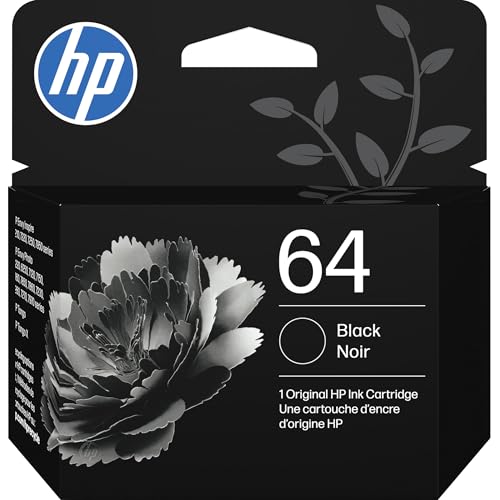
This is the everyday black cartridge for the Inspire 7200, and it suits households that print schoolwork, forms and letters a few times a week. It produces clean black text for documents that need to look sharp, and it installs in seconds because the printhead is built into the cartridge itself. With a yield of about 200 pages, it fits light to moderate use, and its Instant Ink eligibility makes it a simple choice for families who want a replacement to arrive before the cartridge runs dry. HP’s datasheet for the Inspire 7220e lists this part number, N9J90AN, as the replacement black cartridge.
Specs
- Brand: HP
- Model number: N9J90AN
- Ink color: Black
- Stated page yield: about 200 pages
- Ink type: Pigment-based
- Ink base: Water
- Item weight: 1.12 ounces
- Package dimensions: 4.49 x 1.43 x 4.05 in
- Eligible for Instant Ink
- Works with: ENVY Inspire 7955e, 7958e; ENVY Photo 6200, 7100, 7800 series; Tango, Tango X
Best for: Everyday black printing on an Inspire 7200 in a home or student household.
Watch out for: The 200-page yield runs out quickly with daily printing, so heavy users should look at the HP 64XL black instead.
HP 64XL Black High-Yield Ink Cartridge

This high-yield version of the HP 64 black fits the same Inspire 7200 printers but holds about three times the ink, so it suits anyone who prints black documents daily and is tired of swapping cartridges. Homework packets, work reports and long forms all benefit from the 600-page yield, which stretches the time between replacements and keeps the printer ready for the next deadline. It is the natural upgrade for an Inspire 7200 owner who already uses the standard HP 64 black and finds it runs out too soon, with no change in installation or fit.
Specs
- Brand: HP
- Model number: N9J92AN
- Ink color: Black
- Stated page yield: about 600 pages
- Ink type: Pigment-based
- Eligible for Instant Ink
Best for: Heavy black-document printing on an Inspire 7200 with fewer cartridge changes.
Watch out for: It covers black printing only, so color work still needs a separate tri-color cartridge in the second slot.
HP 64XL Tri-Color High-Yield Ink Cartridge

Color printing is where the XL tri-color earns its place, because photos, charts and school projects drain a standard color cartridge quickly. At about 415 pages, this cartridge holds roughly two and a half times the color ink of the standard HP 64 tri-color, so a family printing photos and colorful homework replaces it far less often. It is a genuine HP cartridge, so it is accepted by HP+ enrolled printers and works with Instant Ink. The dye-based tri-color ink covers cyan, magenta and yellow in a single cartridge, which keeps color printing simple on a two-cartridge printer.
Specs
- Brand: HP
- Model number: N9J91AN
- Ink color: Tri-color (cyan, magenta, yellow)
- Stated page yield: about 415 pages
- Ink type: Dye-based
- Eligible for Instant Ink
Best for: Families printing photos, charts and colorful school projects on an Inspire 7200.
Watch out for: It holds only color ink, so black text still needs a separate black cartridge.
HP 64 Black and Tri-Color Ink Cartridges (2-Pack)
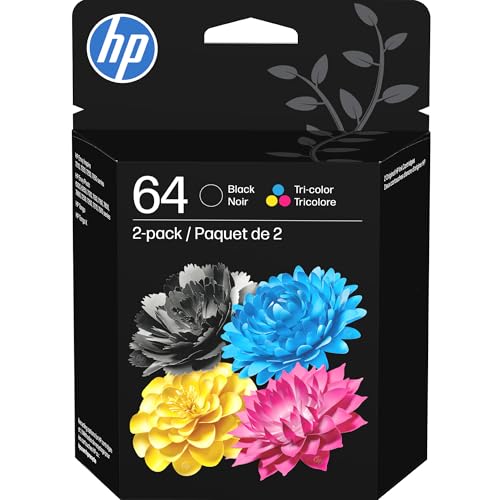
For a printer that sees light, everyday use, this standard two-pack is the simplest restock there is: one box replaces both cartridges at once, with about 200 black pages and 165 tri-color pages. That is enough for a household printing a few documents a week plus the odd photo, and the standard yield means less ink sits unused in the printer for months. Both cartridges are genuine HP, so they work with Instant Ink and HP+ enrollment. It is the right default when printing volume is low and the main goal is keeping the printer ready rather than stretching every cartridge.
Specs
- Brand: HP
- Model number: X4D92AN
- Contents: 1 black cartridge, 1 tri-color cartridge
- Stated page yield: about 200 black pages, about 165 tri-color pages
- Eligible for Instant Ink
Best for: Light, everyday home printing where both cartridges run low together.
Watch out for: Standard yields run out faster than XL, so heavy printers will replace these more often.
Chromojet 64XL Ink Cartridge Combo Pack

This compatible two-pack is the budget route to restocking both stations at once, pairing an XL black cartridge with an XL tri-color cartridge. The listing states a page yield of 1,150 pages for the set and names the Inspire 7200e, 7220e and 7255e among its compatible printers, so it is built for owners who print a lot and watch spending. It is a non-HP cartridge, which means it belongs on printers outside HP+ enrollment, where original HP ink is not required. For a household that prints heavily and wants both slots filled in one order, it keeps the printer running without buying genuine HP cartridges.
Specs
- Brand: Chromojet
- Contents: 1 XL black cartridge, 1 XL tri-color cartridge
- Listing states: page yield of 1,150 pages
- Cartridge type: Compatible replacement for HP 64XL (non-OEM)
- Compatible with: Envy Inspire 7200e, 7220e, 7255e, 7900e; Envy Photo series; Tango X
Best for: Budget restock of both stations on a printer outside HP+ enrollment.
Watch out for: HP dynamic security can block cartridges with non-HP chips after firmware updates, and HP+ enrolled printers require original HP ink.
Which One Fits Your Situation
Your printing is mostly black text
Buy the HP 64XL Black cartridge first. At about 600 pages it covers homework, forms and office documents for far longer than the standard black cartridge, and the pigment-based ink keeps text sharp. Add a standard tri-color cartridge only when color runs low, since a household that rarely prints in color does not need high-yield color sitting in the printer.
You print photos and school projects in color
Pair the HP 64XL Tri-Color cartridge with the XL black cartridge, or restock with the standard two-pack when black runs faster than color. The XL tri-color holds about 415 pages of color ink, so photo printing and colorful projects do not drain it in a single weekend. Keep a spare tri-color cartridge on hand if photo printing is a weekly habit.
You print rarely and want the simplest restock
Choose the standard HP 64 two-pack. One box replaces both cartridges, and the standard yields of about 200 black pages and 165 tri-color pages are enough for a few documents a week. Light use also means less ink sits in the printer for months, and genuine HP cartridges keep Instant Ink and HP+ enrollment working without any compatibility checks.
You want both slots filled on a tight budget
Take the Chromojet 64XL combo pack, but only if the printer is outside HP+ enrollment. It fills both slots in one order with high-yield cartridges, and the listing names the Inspire 7200e among its compatible models. Check the seller’s return terms first, since a compatible cartridge that the printer rejects is only useful if it can go back.
Common Mistakes
- Buying HP 67 cartridges for an Inspire 7200 — they fit the Envy 6000 and 6400 series, not the Inspire 7200, and will not work in it.
- Ordering HP 65, 61 or 63 cartridges because the printer says Envy or the cartridge looks the same — each family is keyed to its own printer lines.
- Buying a compatible pack for a printer enrolled in HP+, which requires original HP ink for the life of the printer.
- Choosing a high-yield tri-color cartridge when the household prints almost no color, leaving ink sitting unused in the printer for months.
- Ignoring firmware updates: HP dynamic security can block cartridges with non-HP chips after an update, so a compatible pack that worked last year can stop being accepted.
Frequently Asked Questions
What ink cartridges does the HP Envy Inspire 7200 use?
The Inspire 7200 series uses HP 64 cartridges: one black and one tri-color. The standard versions are HP 64 Black (N9J90AN, about 200 pages) and HP 64 Tri-Color (N9J89A, about 165 pages), and the high-yield versions are HP 64XL Black (N9J92A, about 600 pages) and HP 64XL Tri-Color (N9J91A, about 415 pages). This covers the 7220e, 7221e, 7252e, 7255e and 7258e models.
Can I use HP 67 cartridges in an Envy Inspire 7200?
No. HP 67 cartridges fit the Envy 6000 and 6400 series, DeskJet 2700 and 4100 series, while the Inspire 7200 takes HP 64 cartridges. The two families look similar and share the same two-slot layout, but the cartridges are keyed differently, and several online guides list HP 67 for the Inspire 7200 by mistake. Always check the number on the cartridge already in the printer.
Can I mix standard 64 and high-yield 64XL cartridges?
Yes. The Inspire 7200 accepts any combination of standard HP 64 and high-yield HP 64XL cartridges, one black and one tri-color at a time. A common setup is an XL black cartridge with a standard tri-color cartridge, which suits households that print far more black text than color. Each station works independently, so only the cartridge that runs out needs replacing.
Do compatible 64XL cartridges work with HP+ printers?
HP requires original HP ink on printers enrolled in HP+, so a compatible cartridge is not accepted on those printers. On printers outside HP+, compatible cartridges with a replacement chip often work, but HP dynamic security and firmware updates can block cartridges with non-HP chips. Check the printer’s HP+ status in the HP Smart app before buying a compatible pack.
FAQ
What ink cartridges does the HP Envy Inspire 7200 use?
Can I use HP 67 cartridges in an Envy Inspire 7200?
Can I mix standard 64 and high-yield 64XL cartridges?
Do compatible 64XL cartridges work with HP+ printers?
More from Amazon
Programs that pair well with the guide above. Offers and eligibility are set by Amazon and may change.
A free business account with business pricing and bulk-buying tools for work, shop or home office.
Create a business accountFree shipping on eligible items, Prime Video and more. Eligible new members can start with a free trial.
Start a Prime free trialAudiobooks and podcasts to listen to on the go. Eligible new members can start with a free trial.
Try Audible freeAd-free music streaming. Eligible new subscribers can start with a free trial.
Try Music Unlimited freeAs an Amazon Associate we earn from qualifying purchases.
Write Your Review
No reviews yet. Be the first to share your experience!