
Key takeaways
- Five genuine Canon PG-260 and CL-261 cartridges for the PIXMA TS6420 compared: standard and XL black and color singles plus the XL value pack.
The Canon PIXMA TS6420 takes exactly one ink family, PG-260 black and CL-261 tri-color, so the real decision is not which brand to trust but which size to buy and how often you want to change cartridges. Standard cartridges cost less up front and suit light printing, while XL cartridges hold more ink and make sense when the printer runs most days. Buying a cartridge from a look-alike family, such as PG-245 or PG-275, wastes money because it will not fit the TS6420 at all.
This guide is for TS6420 owners who print homework, photos, and everyday documents at home and want genuine Canon ink without guessing at compatibility. Every cartridge below was picked from the name and specifications on its Amazon listing, with the yield and printer list checked against Canon’s own part numbers, so you can match the cartridge to how much you print.
Quick Picks
As an Amazon Associate we earn from qualifying purchases
| Product | Best for | Key spec from title |
|---|---|---|
| Canon PG-260XL / CL-261XL Value Pack | Replacing black and color together | XL black and color pair |
| Canon PG-260 Black | Light black-only printing | Standard black, up to 180 pages |
| Canon PG-260XL Black | Heavy black printing | XL black, up to 400 pages |
| Canon CL-261 Tri-Color | Light color printing | Standard color, up to 180 pages |
| Canon CL-261XL Tri-Color | Heavy color printing | XL color, up to 300 pages |
How to Choose
Standard or XL: Match the Cartridge to Your Print Volume
Standard PG-260 and CL-261 cartridges hold less ink and cost less per cartridge, which suits a printer that runs a few pages a week. XL cartridges hold roughly twice as much ink, so they last longer between changes and reduce the number of times you open the printer. If you print homework every evening or run photo batches on weekends, the XL black cartridge earns its place first, because black runs out fastest on text-heavy pages. If the printer sits idle for weeks, standard cartridges make more sense, since ink can dry in the nozzles during long gaps. Count your weekly pages before choosing, and let that number decide the size rather than the size on the shelf.
Black or Color: Replace Only What Runs Out
The TS6420 uses one black cartridge and one tri-color cartridge, and they run out on different schedules. Text documents drain the pigment black cartridge, while photos and color charts drain the tri-color cartridge, so replacing both at once often wastes ink that is still usable. Check the printer’s ink levels before ordering, and buy only the cartridge that is low. A value pack that pairs both XL cartridges fits owners who print a mix of text and photos and expect both to run low together. Single cartridges fit everyone else, because they let you replace exactly what the printer needs and nothing more.
Genuine Canon or Compatible: What the Listing Actually Says
Every cartridge in this guide is a genuine Canon product, which means Canon built it for the TS6420 and its chip reports ink levels to the printer. Third-party compatible cartridges exist for this family, and some cost less, but their chips do not always report levels correctly, and Canon’s firmware updates can reject cartridges it does not recognize. If you print photos for keepsakes or documents for school and work, the genuine cartridge removes that uncertainty. If you decide to try a compatible set later, read the listing’s compatibility list word for word and confirm it names the TS6420, because a listing for PG-245 or PG-275 looks nearly identical at a glance.
Check the Family Code Before You Order
Canon sells several two-number ink families that look alike, and only PG-260 and CL-261 fit the TS6420. PG-245 and CL-246 fit the TS3320 and older TS202, TS3122, and TS3420 models, while PG-275 and CL-276 fit the TS3322, TS3520, TS3720, and TR4720. PGI-280 and CLI-281 belong to larger five-tank printers and do not fit either. The part number is printed on the cartridge box and on the cartridge itself, so compare it against PG-260 or CL-261 before you open the package. If the number on the box reads 245, 275, or 280, send it back unopened, because no adapter makes a wrong-family cartridge work in this printer.
The 5 Best Options
Canon PG-260XL / CL-261XL Genuine Ink Value Pack

This pair bundles the XL black and XL tri-color cartridges in one box, so it suits owners who print text and photos together and want both cartridges replaced at the same time. The XL sizes hold more ink than the standard cartridges, which means fewer changes and fewer interruptions during a busy print week. It is the simplest choice for a household printer that handles homework, photos, and everyday documents in the same week. Because both cartridges arrive together, the printer stays ready for mixed jobs without a second order. Check the yield figures on the listing before ordering, since Canon states pack yields differently from single-cartridge yields.
Specs
- 1 PG-260XL black cartridge and 1 CL-261XL tri-color cartridge
- XL high yield, genuine Canon ink
- Pigment black and dye color ink
- Compatible with PIXMA TS6420, TS5320, TS6400, TR7020
Best for: Households that print text and photos every week and want both cartridges in one order.
Watch out for: Confirm the pack yield on the listing before ordering, since Canon states pack yields differently from single-cartridge yields.
Canon PG-260 Genuine Black Ink Cartridge
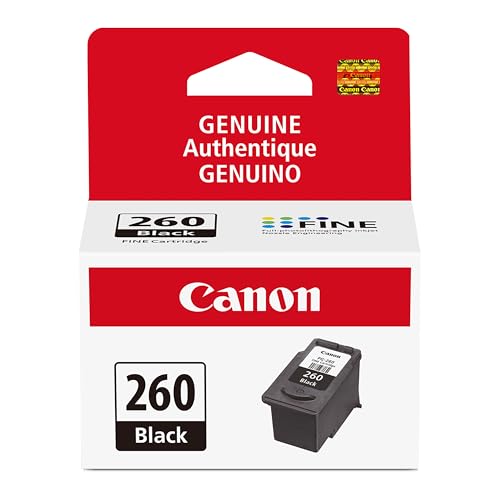
The standard black cartridge is the right pick for light printing, when the TS6420 mostly handles a few pages of homework or forms each week. Its pigment black ink keeps text sharp on plain paper, which is what most everyday documents need. Because it holds less ink than the XL version, it costs less per cartridge and suits printers that sit idle between jobs. It installs the same way as every other cartridge in this family, so there is nothing new to learn. Choose it when black is the only cartridge running low and the color cartridge still has ink left.
Specs
- Genuine Canon PG-260 black ink cartridge, standard yield
- Pigment black ink for sharp text on plain paper
- Page yield: up to 180 pages
- Compatible with PIXMA TS5320, TS6420, TS6420a, TR7020, TR7020a
Best for: Light printing where only the black cartridge needs replacing.
Watch out for: Confirm the box reads PG-260, since PG-245 and PG-275 cartridges look alike but do not fit this printer.
Canon PG-260XL Genuine Black Ink Cartridge

The XL black cartridge is the workhorse of this family, built for owners whose TS6420 prints text-heavy pages most days. It holds more ink than the standard PG-260, with a yield of up to 400 pages, so it lasts roughly twice as long between changes. That makes it the sensible pick for homework, reports, and forms that drain black ink fast. It uses the same pigment black ink as the standard cartridge, so text stays sharp while the cartridge lasts longer. If black is the cartridge you replace most often, this is the one to keep on the shelf.
Specs
- Genuine Canon PG-260XL black ink cartridge, high yield
- Pigment black ink for sharp text on plain paper
- Page yield: up to 400 pages
- Compatible with PIXMA TS5320, TS6420, TS6420a, TR7020, TR7020a
Best for: Heavy black printing, such as daily homework and text documents.
Watch out for: Check the box reads PG-260XL, not PG-260, since the two cartridges look alike and the XL costs more.
Canon CL-261 Genuine Color Ink Cartridge

The standard tri-color cartridge handles light color printing, from school charts to the occasional photo, without committing you to a high-yield cartridge you may not finish. Its dye-based color ink produces bright color on plain and photo paper, which covers most home color jobs. Because it holds less ink than the XL version, it suits printers that print color only now and then and sit idle between color jobs. It pairs with either black cartridge in this family, so you can mix a standard color cartridge with an XL black one. Choose it when color runs low but black still has plenty left.
Specs
- Genuine Canon CL-261 tri-color ink cartridge, standard yield
- Dye-based color ink for bright color on plain and photo paper
- Page yield: up to 180 pages
- Compatible with PIXMA TS5320, TS6420, TS6420a, TR7020, TR7020a
Best for: Light color printing where only the color cartridge needs replacing.
Watch out for: Confirm the box reads CL-261, since CL-246 and CL-276 cartridges look alike but do not fit this printer.
Canon CL-261XL Genuine Color Ink Cartridge

The XL tri-color cartridge is the pick for owners who print color often, whether that means photos, school projects, or color charts every week. It holds more ink than the standard CL-261, with a yield of up to 300 pages, so it survives longer between changes. That matters when color runs out mid-project, because a half-finished photo batch cannot wait for a delivery. It uses the same dye-based color ink as the standard cartridge, so color quality stays the same while the cartridge lasts longer. Pair it with the XL black cartridge when the whole printer works hard.
Specs
- Genuine Canon CL-261XL tri-color ink cartridge, high yield
- Dye-based color ink for bright color on plain and photo paper
- Page yield: up to 300 pages
- Compatible with PIXMA TS5320, TS6420, TS6420a, TR7020, TR7020a
Best for: Heavy color printing, such as weekly photos and school projects.
Watch out for: Check the box reads CL-261XL, not CL-261, since the two cartridges look alike and the XL costs more.
Which One Fits Your Situation
You Print a Little of Everything Each Week
The value pack fits best here. It pairs the XL black and XL color cartridges, so a household printing homework, photos, and forms in the same week can replace both at once and stay ready for mixed jobs. The XL sizes last longer than standard cartridges, which means fewer trips to change ink during a busy week. Order it when both cartridges are running low together.
Black Ink Runs Out First
Pick the PG-260XL black cartridge. Text-heavy printing drains black fastest, and the XL size yields up to 400 pages, roughly twice the standard cartridge. Keep the color cartridge you already have, since it still has ink left. If printing is light, the standard PG-260 works instead and costs less per cartridge.
Color Ink Runs Out First
Pick the CL-261XL tri-color cartridge when photos and charts drain color faster than black. Its yield of up to 300 pages outlasts the standard color cartridge, so it suits weekly photo printing and school projects. If color printing is rare, the standard CL-261 is enough and avoids leaving a large cartridge half-used.
You Print Rarely and Want the Cheapest Fix
Buy only the single standard cartridge that is low, either the PG-260 black or the CL-261 color. Standard cartridges cost less per cartridge and suit a printer that runs a few pages a week, so you are not paying for ink that dries in the nozzles during long idle gaps. Replace the other cartridge only when the printer says it is low.
Common Mistakes
- Buying PG-245/CL-246 cartridges, which fit the TS3320 and older TS models, not the TS6420.
- Buying PG-275/CL-276 cartridges, which fit the TS3322, TS3520, TS3720, and TR4720, not the TS6420.
- Replacing both cartridges at once when only one is low, which wastes ink that is still usable.
- Choosing standard cartridges for a printer that runs every day, then changing ink far more often than needed.
- Opening a cartridge before checking the part number on the box, which makes a wrong purchase harder to return.
Frequently Asked Questions
Does the Canon PIXMA TS6420 use PG-260 and CL-261 ink?
Yes. The TS6420 takes one PG-260 black cartridge and one CL-261 tri-color cartridge, in standard or XL sizes. Genuine Canon cartridges with those part numbers are the ones built for this printer. PG-245, PG-275, and PGI-280 cartridges do not fit, so check the part number on the box before ordering.
What is the difference between standard and XL cartridges?
XL cartridges hold more ink than standard cartridges of the same part number. The PG-260XL black cartridge yields up to 400 pages against up to 180 for the standard PG-260, and the CL-261XL color cartridge yields up to 300 pages against up to 180 for the standard CL-261. XL suits frequent printing; standard suits light printing.
Can I mix a standard cartridge with an XL cartridge?
Yes. The black and color slots work independently, so a standard cartridge in one slot and an XL cartridge in the other is fine. Many owners pair an XL black cartridge with a standard color cartridge when text printing is heavy and color printing is light. Replace each cartridge when the printer reports it as low.
Do PG-260 and CL-261 cartridges fit other Canon printers?
Yes, the same family fits the PIXMA TS5320, TS6400, and TR7020, along with the TS6420a and TR7020a variants. Canon lists these models on the cartridge packaging and in its compatibility tables. They do not fit the TS3320, TS3520, or TR4720, which use PG-245, PG-275, and related part numbers instead.
FAQ
Does the Canon PIXMA TS6420 use PG-260 and CL-261 ink?
What is the difference between standard and XL cartridges?
Can I mix a standard cartridge with an XL cartridge?
Do PG-260 and CL-261 cartridges fit other Canon printers?
More from Amazon
Programs that pair well with the guide above. Offers and eligibility are set by Amazon and may change.
A free business account with business pricing and bulk-buying tools for work, shop or home office.
Create a business accountFree shipping on eligible items, Prime Video and more. Eligible new members can start with a free trial.
Start a Prime free trialAudiobooks and podcasts to listen to on the go. Eligible new members can start with a free trial.
Try Audible freeAd-free music streaming. Eligible new subscribers can start with a free trial.
Try Music Unlimited freeAs an Amazon Associate we earn from qualifying purchases.
Write Your Review
No reviews yet. Be the first to share your experience!