
Key takeaways
- Find the best GI-21 ink refill bottles for the Canon PIXMA G1220, with 4-pack and 5-pack third-party sets for homework, forms, and family photos.
The Canon PIXMA G1220 is a print-only MegaTank, so there is no cartridge to swap: you pour ink from bottles straight into the built-in tanks. That makes the buying decision simple in one way and easy to get wrong in another, because the shelves hold look-alike bottles for other Canon printers, and a bottle opened into the wrong tank cannot be poured back. The only family that fits the G1220 is GI-21, one pigment black bottle for text and three dye color bottles for photos and graphics.
This guide is for G1220 owners printing homework, permission slips, and family photos at home, for students sharing one printer in a flat, and for home offices running a single MegaTank through long weeks of forms. Every set below was chosen from its Amazon listing name and stated specifications, with bottle counts, volumes, and model lists checked against the listing. All five sets are third-party compatible refills, not genuine Canon bottles.
Quick Picks
As an Amazon Associate we earn from qualifying purchases
| Product | Best for | Key spec from title |
|---|---|---|
| ENCAMENT GI-21 Ink Refill Bottles 5-Pack | Homes that drain black ink first | 2 black bottles plus cyan, magenta, yellow |
| TOAIEPO GI-21 Ink Refill Bottles 4-Pack | One full refill for a G1220 | Pigment black and dye color bottles |
| Topcolor GI-21 Ink Refill Bottles 5-Pack | A spare set for a busy G1220 | 2 black bottles plus 3 color bottles |
| EXCERCUS GI-21 Ink Refill Bottles 4-Pack | A first refill with gloves included | 1 black plus cyan, magenta, yellow bottles |
| SHUOLEI GI-21 Ink Refill Bottles 4-Pack | A full refill with gloves for clean pouring | 4 bottles plus a pair of gloves |
How to Choose
Start With GI-21 and Nothing Else
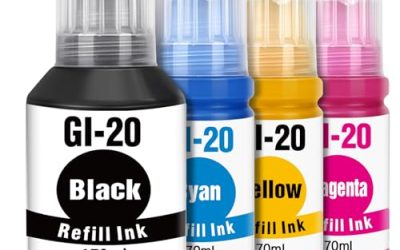
The G1220 takes GI-21 bottles, and that one code settles the purchase before anything else. Canon built the G1220 through G4270 range around GI-21, while the G5020 through G7020 range takes GI-20, the older G1200 through G4210 range takes GI-290, and the MAXIFY GX office range takes GI-26. The bottles look almost identical on a shelf, and none of those three families fits the G1220 tank, so a careful glance at the label is not enough. Check the code printed on your empty bottle or inside the printer lid, and match it letter for letter with the model list on the listing before you order.
Match the Ink Type to the Job
Every GI-21 set pairs a pigment black bottle with three dye color bottles, and the two inks behave differently once they reach paper. Pigment black sits on the surface of plain paper, which keeps letters dark and edges sharp through long documents and forms. Dye cyan, magenta, and yellow soak into coated paper and blend smoothly, which suits photos and color charts. A set that mixes those roles up, or a single bottle poured into the wrong tank, changes how both text and pictures come out. Read the ink type printed on each bottle before you open it, and pour each color only into the tank marked with the same color.
Count Bottles Against Your Printing Mix
A four-bottle set fills every tank once, while a five-bottle set adds a second black bottle, and that extra bottle matters more than it first appears. Homes that print homework, tickets, and forms drain the black tank far faster than any single color, so the black tank often runs dry while the color tanks are still half full. A household that prints mostly photos drains the three colors more evenly and gains little from the spare black. Look at your last few weeks of printing before you choose: document-heavy homes should lean toward the 5-pack, while photo-heavy homes can take the 4-pack and keep the shelf clear.
Check the Neck, the Seal, and the Yield Claim
MegaTank bottles use a keyed neck shaped to fit only the matching tank, so the bottle should seat firmly and pour without dripping when the neck lines up. A bottle that wobbles, leaks at the neck, or needs force to seat is the wrong family or a poor copy, and forcing it risks a spill inside the printer. Check that the seal is intact when the pack arrives and keep spare bottles upright in a cool cupboard. Treat the page yield on the listing as a guide rather than a promise, since dense photos drain color faster than plain text, and watch the tank windows instead of counting pages.
The 5 Best Options
ENCAMENT GI-21 Ink Refill Bottles 5-Pack

This five-bottle set is the pick for households that empty the black tank first, because it carries two black bottles beside one bottle each of cyan, magenta, and yellow. The black bottles hold 170mL each and the color bottles hold 70mL each, and the listing states a page yield up to 25,700 pages. It covers the whole GI-21 range from the G1220 up to the G4280, so it suits a family printing homework, tickets, and forms every day that wants a spare black bottle ready before the tank runs dry.
Specs
- 5 bottles: 2 black, 1 cyan, 1 magenta, 1 yellow
- Black bottles 170mL each, color bottles 70mL each
- Page yield up to 25,700 pages as stated on the listing
- Compatible with Canon PIXMA G1220, G1230, G2260, G2270, G3260, G3262, G3270, G3272, G3290, G4270, and G4280
- Clog-free refillable bottles, water-based ink
Best for: Families with a G1220 who print black documents daily.
Watch out for: The second black bottle only helps on a GI-21 printer; confirm the G1220 is on the model list first.
ASIN: B0FHPJLSDS
TOAIEPO GI-21 Ink Refill Bottles 4-Pack

This four-bottle set is the straightforward GI-21 refill: one pigment black bottle for sharp text and three dye color bottles for photos and graphics. The black bottle holds 170mL and each color bottle holds 70mL, and the listing states black coverage up to 9,000 pages. It suits a household with a G1220 that prints a normal mix of schoolwork and color pages and wants a single set that fills every tank once without a spare bottle to store.
Specs
- 4 bottles: 1 black, 1 cyan, 1 magenta, 1 yellow
- Black bottle 170mL, color bottles 70mL each
- Black page yield up to 9,000 pages as stated on the listing
- Pigment black ink, dye-based color ink
- Compatible with Canon MegaTank G1220, G1230, G2260, G2270, G3260, G3270, and G4270
Best for: Everyday refills on a G1220 with a normal mix of text and color.
Watch out for: One black bottle means document-heavy homes will need a spare sooner than with a 5-pack.
ASIN: B0CYTJHW1X
Topcolor GI-21 Ink Refill Bottles 5-Pack
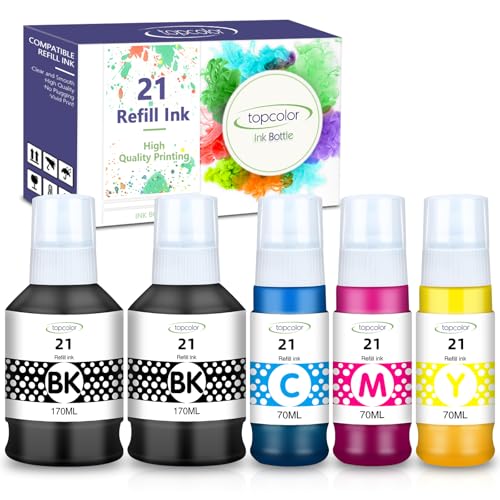
This five-bottle set mirrors the ENCAMENT set with two black bottles and one bottle each of cyan, magenta, and yellow, giving a G1220 household a spare black bottle for the tank that empties first. The black bottles hold 170mL each and the color bottles hold 70mL each, and the listing states a page yield up to 9,000 pages. It suits a household that prints a lot of black documents beside color schoolwork and wants a full spare set sitting on the shelf.
Specs
- 5 bottles: 2 black, 1 cyan, 1 magenta, 1 yellow
- Black bottles 170mL each, color bottles 70mL each
- Page yield up to 9,000 pages as stated on the listing
- Compatible with Canon MegaTank G1220, G1230, G2260, G2270, G3260, G3270, G3290, G4270, and G4280
- Dye-based ink refill bottles
Best for: A spare full GI-21 set for a busy G1220 household.
Watch out for: Check the bottle count on arrival; a 5-pack should hold two black bottles, not one.
ASIN: B0G5PG1DY3
EXCERCUS GI-21 Ink Refill Bottles 4-Pack

This four-bottle set covers a full GI-21 refill with one black bottle and one bottle each of cyan, magenta, and yellow, plus a pair of disposable gloves for clean pouring. The black bottle holds 170mL and each color bottle holds 70mL, and the listing states black coverage up to 6,000 pages with color coverage up to 7,700 pages. It suits a G1220 owner refilling for the first time who wants the gloves in the box and a straightforward set that fills every tank once.
Specs
- 4 bottles: 1 black, 1 cyan, 1 magenta, 1 yellow
- Black bottle 170mL, color bottles 70mL each
- Black page yield up to 6,000 pages, color up to 7,700 pages as stated on the listing
- Compatible with Canon PIXMA G1220, G1230, G2260, G2270, G3260, G3262, G3270, G3272, G3290, G4270, and G4280
- Includes 1 pair of disposable gloves
- ISO9001, ISO14001, and RoHS certified as stated on the listing
Best for: First-time G1220 refills where gloves in the box keep hands clean.
Watch out for: The stated black yield is lower than other GI-21 sets here, so heavy document homes should weigh the 5-packs.
ASIN: B0D25985MV
SHUOLEI GI-21 Ink Refill Bottles 4-Pack

This four-bottle set fills every G1220 tank once with one black bottle and one bottle each of cyan, magenta, and yellow, and it includes a pair of disposable gloves for the pour. The black bottle holds 170mL and each color bottle holds 70mL, and the listing states black coverage up to 8,300 pages with color coverage up to 7,700 pages. It suits a G1220 household that wants a full refill with gloves included and a black yield close to the higher sets in this guide.
Specs
- 4 bottles: 1 black, 1 cyan, 1 magenta, 1 yellow
- Black bottle 170mL, color bottles 70mL each
- Black page yield up to 8,300 pages, color up to 7,700 pages as stated on the listing
- Compatible with Canon PIXMA G3270, G3290, G4270, G4280, G3260, G3272, G2270, G2260, G1220, and G1230
- Includes 1 pair of disposable gloves
Best for: A full G1220 refill with gloves and a strong stated black yield.
Watch out for: Confirm the G1220 is on the model list before ordering, since the listing title leads with other models.
ASIN: B0BK9R665T
Which One Fits Your Situation
You Print Homework and Forms Every Day
Choose the ENCAMENT GI-21 5-pack, because the second black bottle covers the tank that empties first when every job is mostly text. The Topcolor 5-pack works the same way if you prefer a spare full set on the shelf. Either way, keep the spare black bottle beside the printer rather than a spare color set.
You Refill Every Tank at Once
Choose the TOAIEPO GI-21 4-pack for a single full refill, since it fills all four tanks in one order with no spare to store. The SHUOLEI 4-pack does the same job and adds gloves for the pour. Both sets match a household that refills after a big project and wants every tank back to full at the same time.
You Are Refilling a MegaTank for the First Time
Choose the EXCERCUS GI-21 4-pack, because the gloves in the box keep the first pour clean and the four bottles map one-to-one onto the four tanks. Read the color on each bottle before you open it, seat the keyed neck firmly, and pour slowly so the tank fills without overflowing. The SHUOLEI 4-pack is the backup pick with gloves included.
You Print Photos as Well as Documents
Choose the Topcolor GI-21 5-pack, because it pairs a spare black bottle for text with full cyan, magenta, and yellow bottles for photos. The dye color inks blend smoothly on coated paper, while the pigment black keeps letter text sharp, so one set covers both jobs without a second order. Keep the color tanks topped up together so no single color runs dry mid-photo.
Common Mistakes
- Pouring GI-20, GI-290, or GI-26 bottles into a G1220 without checking the model list on the listing.
- Buying a 4-pack when black ink runs out twice as fast as any single color in a document household.
- Pouring dye ink into the pigment black tank, or mixing colors between tanks.
- Forcing a bottle whose keyed neck does not seat, instead of checking the bottle family first.
- Leaving tank caps loose after a refill, which lets dust and air into the ink.
Frequently Asked Questions
Which ink does a Canon PIXMA G1220 use?
The G1220 takes GI-21 bottles: one pigment black bottle and three dye color bottles in cyan, magenta, and yellow. The black bottle holds 170mL and each color bottle holds 70mL. Any of the GI-21 sets in this guide fits it, so pick a 4-pack for a single refill or a 5-pack if black ink runs out first in your house.
Can I use GI-20 ink in a G1220?
No. GI-20 bottles belong to the G5020, G6020, and G7020 range, and they do not match the G1220 tank, even though the printers look similar. The same applies to GI-290 bottles for the older G1200 through G4210 range and GI-26 bottles for the MAXIFY GX range. Buy a GI-21 set and check that the G1220 appears on the listing model list before ordering.
How many pages does a GI-21 bottle cover?
The listings in this guide state black coverage from up to 6,000 pages to up to 9,000 pages from a single 170mL black bottle, with color coverage up to 7,700 pages per bottle at standard coverage. Real coverage moves with the job: dense photos drain color faster, while plain text uses mostly black. Watch the tank windows rather than counting pages.
Does the G1220 use cartridges at all?
No. The G1220 is a MegaTank printer with built-in ink tanks that you refill from bottles, so there is no cartridge to swap. You pour ink straight into the tank through the keyed bottle neck, and the printhead is a separate part inside the printer. When a tank runs low, you refill that tank only and leave the rest alone.
FAQ
Which ink does a Canon PIXMA G1220 use?
Can I use GI-20 ink in a G1220?
How many pages does a GI-21 bottle cover?
Does the G1220 use cartridges at all?
More from Amazon
Programs that pair well with the guide above. Offers and eligibility are set by Amazon and may change.
A free business account with business pricing and bulk-buying tools for work, shop or home office.
Create a business accountFree shipping on eligible items, Prime Video and more. Eligible new members can start with a free trial.
Start a Prime free trialAudiobooks and podcasts to listen to on the go. Eligible new members can start with a free trial.
Try Audible freeAd-free music streaming. Eligible new subscribers can start with a free trial.
Try Music Unlimited freeAs an Amazon Associate we earn from qualifying purchases.
Write Your Review
No reviews yet. Be the first to share your experience!