
Key takeaways
- Compare the best toner cartridges for the HP LaserJet Enterprise MFP M430f, with genuine 58A and 58X options and compatible two-packs for busy offices.
An Enterprise MFP M430f that runs out of toner stops printing, copying, and scanning at once, so the cartridge inside it matters more than it looks. The machine takes one black cartridge in two yields, the HP 58A at about 3,000 pages and the HP 58X at about 10,000, and both slide into the same slot, which means the real choice is how long you want each cartridge to last. Genuine HP cartridges and compatible two-packs both cover this family, and the right one depends on how much the machine prints, whether firmware updates worry you, and how often someone can stop to swap toner.
This guide is for M430f owners in small offices, departments, and branch offices who want a toner pick matched to their workload. Every cartridge below was chosen from its Amazon listing name and stated specifications, with yields, part numbers, and model lists checked against the listing before it earned a place here.
Quick Picks
As an Amazon Associate we earn from qualifying purchases
| Product | Best for | Key spec from title |
|---|---|---|
| HP 58A Black Original LaserJet Toner Cartridge (CF258A) | Everyday printing on a quiet M430f | About 3,000 pages, genuine HP standard yield |
| HP 58X High Yield Black Original LaserJet Toner Cartridge (CF258X) | A department M430f that prints all day | About 10,000 pages, genuine HP high yield |
| Yojoylite 58X Toner Cartridges 2-Pack (CF258X) | A busy office that wants a spare ready | Up to 10,000 pages per cartridge, 2-pack |
| AURASKY 58X Toner Cartridges 2-Pack (CF258X) | A small team that wants high yield with a chip | Compatible 2-pack with chip included |
| E-Z Ink 58A Toner Cartridges 2-Pack (CF258A) | A standard-yield spare pair for an M430f | 3,000 pages per cartridge, 2-pack with chip |
How to Choose
58A or 58X: Pick the Yield That Fits the M430f Workload
Start by counting pages, because the 58A and the 58X occupy the same slot and differ only in capacity. HP rates the 58A at about 3,000 pages and the 58X at about 10,000, so a branch machine that prints a few dozen pages a week can run for months on a 58A, while a shared M430f that turns out hundreds of pages a week drains it within weeks. Copying and scanning add pages beyond straight printing, so a multifunction machine empties cartridges faster than a print-only one. The 58X asks for more at the till, yet it stretches the interval between changes and refreshes the imaging drum each time, since the drum lives inside the cartridge.
Genuine HP or Compatible: Weigh the Chip, the Firmware, and the Support
Next, decide between the cartridge HP made and a compatible one, because the two routes behave differently over time. A genuine HP 58A or 58X carries JetIntelligence, so the M430f reads toner levels accurately and firmware updates never lock the cartridge out. A compatible cartridge usually arrives in a two-pack, so the next change waits on the shelf, and the outlay per cartridge runs lower, yet the chip, the toner blend, and the build vary from one brand to the next. The M430f uses dynamic security, so a compatible cartridge needs a working HP chip, and one with a non-HP chip may stop working after a firmware update. Read the listing for chip support and the exact models named.
Read the Model List: M430f, M406dn, and the Cartridges That Look Alike
Always check the model list before ordering, because a cartridge that fits one LaserJet does not fit every LaserJet. The 58A and 58X fit the Enterprise MFP M430f and the Enterprise M406dn, plus the LaserJet Pro M404 series and the MFP M428 series. They do not fit the LaserJet Pro 4001 or the MFP 4101, which take the 148A and 148X. The 147A, 147X, 89A, and 89X have never been verified as compatible with any printer in this range, so treat none of them as a fit for the M430f. The 206A and 206X are color cartridges for the Color LaserJet Pro M255, M282, and M283, and they do not fit a monochrome M430f at all.
Plan Around the Drum and the Multifunction Load
The last check is the drum and the extra work a multifunction machine does. The imaging drum sits inside the cartridge on this printer family, so every new cartridge also hands the M430f a fresh drum, and that is one reason a high-yield 58X keeps a busy floor going for so long between changes. Copying and scanning add pages that a print-only machine never sees, so a shared M430f burns through a standard cartridge sooner than the same office would expect from printing alone. After installation, run a test page and confirm the toner level reads correctly before a long print run, and keep a spare cartridge nearby when the machine serves a whole department.
The 5 Best Options
HP 58A Black Original LaserJet Toner Cartridge (CF258A)
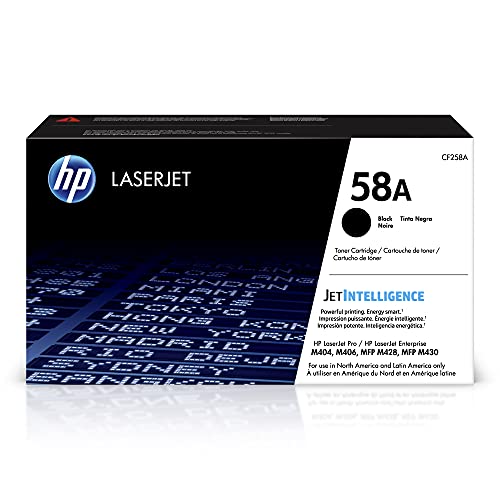
For an M430f that sees steady use without running flat out, the genuine 58A is the plain choice. HP built it as the standard cartridge for this engine, with a rating of about 3,000 pages that covers letters, reports, invoices, and copies for months on a desk printing a few dozen pages a week. JetIntelligence lets the printer track toner levels accurately, and because the cartridge comes from HP, firmware updates never lock it out. The drum sits inside the cartridge, so every change refreshes the imaging drum. Pick it when the office prints regularly and a high-yield cartridge would sit half full for months.
Specs
- Black Original LaserJet Toner Cartridge, part number CF258A
- Page yield: about 3,000 pages
- Cartridge type: Genuine HP, standard yield
- Color: Black
- Works with: HP LaserJet Enterprise MFP M430f, HP LaserJet Enterprise M406dn, HP LaserJet Pro M404 series, HP LaserJet Pro MFP M428 series
- Technology: JetIntelligence
Best for: A small office M430f that prints a few dozen pages a week.
Watch out for: An M430f that empties the 58A every few weeks is better served by the 58X.
HP 58X High Yield Black Original LaserJet Toner Cartridge (CF258X)

When the M430f serves a whole floor, the genuine 58X earns its place. One cartridge covers about 10,000 pages, so a department that prints, copies, and scans hundreds of pages a week can go months between changes instead of swapping toner every few weeks. Each change also brings a fresh imaging drum, since the drum is built into the cartridge, and JetIntelligence keeps the toner level reading accurate from the first page to the last. Because it is a genuine HP cartridge, firmware updates never lock it out. It asks for more upfront than the 58A, yet the longer interval and fewer interruptions repay that on a busy machine.
Specs
- Black Original LaserJet Toner Cartridge, part number CF258X
- Page yield: about 10,000 pages
- Cartridge type: Genuine HP, high yield
- Color: Black
- Works with: HP LaserJet Enterprise MFP M430f, HP LaserJet Enterprise M406dn, HP LaserJet Pro M404 series, HP LaserJet Pro MFP M428 series
- Technology: JetIntelligence
Best for: A department M430f that prints hundreds of pages a week.
Watch out for: Confirm your machine is an Enterprise MFP M430f, since the 58X does not fit the newer Pro 4001 or MFP 4101.
Yojoylite 58X Toner Cartridges 2-Pack (CF258X)

A Yojoylite pair gives a busy office two high-yield cartridges for the M430f, so the next change is already on the shelf when the printer flags low toner. Each cartridge covers up to 10,000 pages, matching the genuine 58X, and the listing names the Enterprise MFP M430f and M406dn alongside the Pro M404 and MFP M428 families. That makes the pair a fit for a workgroup that prints in volume and wants to cut the number of orders through the year. The drum is built into each cartridge, so a swap refreshes the imaging drum as well as the toner supply.
Specs
- Black toner cartridge, 2-pack, compatible replacement for HP 58X (CF258X) and 58A (CF258A)
- Page yield: up to 10,000 pages per cartridge
- Works with: HP LaserJet Pro M404 series, HP LaserJet Pro MFP M428 series, HP LaserJet Enterprise M406dn, HP LaserJet Enterprise MFP M430f
- Cartridge type: Compatible, 2-pack
- Color: Black
Best for: A busy office that prints in volume and wants a spare high-yield cartridge ready on the shelf.
Watch out for: The listing snapshot showed no featured offers, so confirm the listing is live and your exact model is named before ordering, and check chip compatibility with your printer firmware.
AURASKY 58X Toner Cartridges 2-Pack (CF258X)

The AURASKY pair is a second compatible route to the 58X, with a chip in each cartridge so the M430f recognises it on installation. It fits the Enterprise MFP M430f and M406dn as well as the Pro M404 and MFP M428 families, and the two cartridges cover a long stretch of heavy black-and-white printing between orders. A small team that wants high-yield printing without buying genuine cartridges twice over will find the pair practical, and the second cartridge in the box means the next change is already in the cupboard when the first one runs low.
Specs
- Black toner cartridge, 2-pack, compatible replacement for HP 58X (CF258X) and 58A (CF258A)
- Works with: HP LaserJet Pro M404 series, HP LaserJet Pro MFP M428 series, HP LaserJet Enterprise M406dn, HP LaserJet Enterprise MFP M430f
- Cartridge type: Compatible, with chip, 2-pack
- Color: Black
Best for: A small team that wants high-yield printing with a chip included.
Watch out for: This is a compatible cartridge, not a genuine HP one, so confirm your exact model is named in the listing and keep your firmware in mind before ordering.
E-Z Ink 58A Toner Cartridges 2-Pack (CF258A)

The E-Z Ink pair covers the standard-yield side of the family, giving an M430f owner two compatible 58A cartridges with a chip in each one. Each cartridge covers 3,000 pages at 5% coverage on A4 paper, which suits a branch office or a quiet department machine that prints a moderate amount and wants a spare ready. The listing names the LaserJet Pro M404 and MFP M428 families, so confirm the Enterprise MFP M430f appears in the model list before ordering, since a compatible cartridge only works when the seller names your exact machine.
Specs
- Black toner cartridge, 2-pack, compatible replacement for HP 58A (CF258A) and 58X (CF258X)
- Page yield: 3,000 pages per cartridge at 5% coverage on A4 paper
- Works with: HP LaserJet Pro M404, M404n, M404dn, M404dw, HP LaserJet Pro MFP M428, M428dw, M428fdw, M428fdn
- Cartridge type: Compatible, with chip, 2-pack
- Color: Black
Best for: A branch-office M430f that prints a moderate amount and wants a spare standard-yield cartridge ready.
Watch out for: Confirm the listing names the Enterprise MFP M430f before ordering, since the model list on file names the Pro M404 and MFP M428 families.
Which One Fits Your Situation
A Small Office M430f That Prints Every Day
Choose the HP 58A when your M430f prints a few dozen pages a day and the cartridge lasts for months. The standard yield matches a small office, the genuine cartridge keeps toner levels accurate, and the lower upfront outlay suits a machine that never empties a cartridge in a hurry. Keep the E-Z Ink 58A two-pack in mind if you want a spare standard cartridge on the shelf without paying for genuine twice over.
A Department Machine Shared by a Whole Floor
Choose the HP 58X when a shared M430f prints, copies, and scans through the day and a standard cartridge would run out in weeks. The high yield of about 10,000 pages means months between changes, and each swap also gives the machine a fresh drum. The Yojoylite or AURASKY two-pack works the same way for a team that wants a spare high-yield cartridge ready without ordering genuine cartridges twice over.
A Team That Wants a Spare on the Shelf
Choose the Yojoylite or AURASKY 58X two-pack when a small team prints in volume and wants the next cartridge already in the cupboard. Both pairs replace the high-yield 58X, both fit the M430f and M406dn, and the AURASKY pair includes a chip so the printer recognises each cartridge on installation. Confirm the listing is live and your exact model is named before you order, since a compatible cartridge depends on the listing stating both clearly.
A Branch Office M430f That Prints Lightly
Choose the E-Z Ink 58A two-pack when a branch-office M430f prints a moderate amount and the budget is tight. Each cartridge covers 3,000 pages, so the pair lasts a lightly used machine a long while, and the chip in each cartridge lets the printer read toner levels on installation. Confirm the Enterprise MFP M430f is named in the listing before ordering, and keep the genuine 58A in mind if you would rather have HP support behind the cartridge.
Common Mistakes
- Buying a 58A for a department M430f that empties it every few weeks, then changing toner far more often than a 58X would need.
- Ordering the 147A, 147X, 89A, or 89X for an M430f — none of these families has ever been verified as compatible with any printer, so none of them fits this machine.
- Ordering the 206A or 206X by mistake — those are color cartridges for the Color LaserJet Pro M255, M282, and M283, and they do not fit a monochrome M430f.
- Buying a compatible cartridge without checking chip support and firmware, then finding the printer refuses it after an update.
- Ordering the 59A or 59X, the European equivalents, or the 76A or 77A regional cartridges, instead of the 58A or 58X a printer bought in the United States needs — check the part number CF258A or CF258X.
Frequently Asked Questions
Which toner cartridge does the HP LaserJet Enterprise MFP M430f use?
HP lists two cartridges for the M430f: the 58A (CF258A) at about 3,000 pages and the 58X (CF258X) at about 10,000 pages. Both fit the same slot, so the choice is yield, not fit. The same family also serves the Enterprise M406dn and the LaserJet Pro M404 and MFP M428 ranges.
Can I use a 58X cartridge instead of a 58A in the M430f?
Yes. The 58X fits the same slot as the 58A, so it works in any M430f without a change to the printer. The only difference is capacity: the 58X covers about 10,000 pages against about 3,000 for the 58A, so it suits a machine that prints hundreds of pages a week and empties a standard cartridge quickly.
Do the 147A, 147X, 89A, or 89X fit the M430f?
No. None of these families has ever been verified as compatible with any printer, and none of them fits the M430f. The 206A and 206X do not fit either — those are color cartridges for the Color LaserJet Pro M255, M282, and M283. Buy only the 58A (CF258A) or the 58X (CF258X), and check the part number on the listing before you order.
Will a compatible 58X cartridge keep working after a firmware update?
It should, as long as the listing states chip support and names your exact model. The M430f uses dynamic security, so it only works with cartridges that carry a new or reused HP chip, and a cartridge with a non-HP chip may stop working after a firmware update. Genuine HP cartridges never face this lockout, so choose one if uninterrupted printing matters most.
FAQ
Which toner cartridge does the HP LaserJet Enterprise MFP M430f use?
Can I use a 58X cartridge instead of a 58A in the M430f?
Do the 147A, 147X, 89A, or 89X fit the M430f?
Will a compatible 58X cartridge keep working after a firmware update?
More from Amazon
Programs that pair well with the guide above. Offers and eligibility are set by Amazon and may change.
A free business account with business pricing and bulk-buying tools for work, shop or home office.
Create a business accountFree shipping on eligible items, Prime Video and more. Eligible new members can start with a free trial.
Start a Prime free trialAudiobooks and podcasts to listen to on the go. Eligible new members can start with a free trial.
Try Audible freeAd-free music streaming. Eligible new subscribers can start with a free trial.
Try Music Unlimited freeAs an Amazon Associate we earn from qualifying purchases.
Write Your Review
No reviews yet. Be the first to share your experience!