
Our Short List of 3

- Best for: Everyday Air desk work and video calls on a single cable.
- 27-inch 4K UHD (3840 x 2160) IPS display
- USB-C with 65W Power Delivery
- 99% sRGB color coverage
- 60Hz refresh rate, 8ms grey-to-grey response time

- Best for: Color work and Air owners who want the strongest USB-C charging in this lineup.
- 27-inch 4K UHD (3840 x 2160) IPS display
- USB-C with 96W Power Delivery
- 95% DCI-P3 color gamut
- VESA DisplayHDR 400
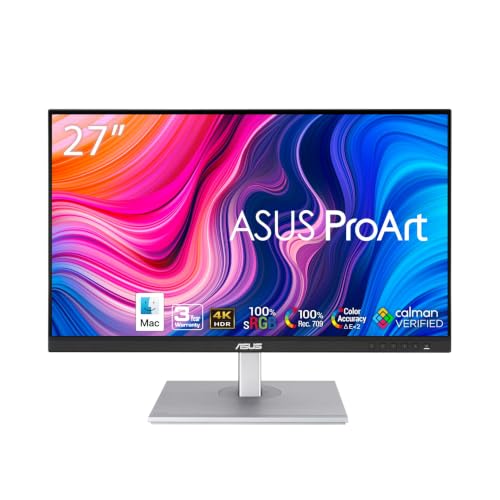
- Best for: Photo and video editing where accurate color matters.
- 27-inch 4K HDR UHD (3840 x 2160) IPS display
- 100% sRGB and 100% Rec. 709 color coverage
- Calman Verified, Delta E under 2
- USB-C with 65W Power Delivery
All 4 Picks at a Glance
| Product | Specs | Action |
|---|---|---|
| Dell S2722QC |
| Check price on Amazon |
| LG 27UP850-W |
| Check price on Amazon |
| ASUS ProArt Display PA279CV |
| Check price on Amazon |
 Dell UltraSharp U2723QE |
| Check price on Amazon |
Key takeaways
- Compare the best external monitors for MacBook Air: sharp 4K USB-C displays from Dell, LG and ASUS, plus a portable screen that travels well.
A MacBook Air screen is sharp and bright, yet thirteen inches of workspace turns cramped once documents and browser windows compete for room. The real decision is not simply buying a bigger display. Buyers must weigh how the monitor connects through the Air’s USB-C ports, whether one cable can also charge the laptop, and how sharp text will look once macOS scales the picture, because a screen that looks fine on a Windows desk can render soft text on a Mac.
This guide is for MacBook Air owners who want a larger desk setup without giving up the crisp text they chose the Air for. It covers remote workers building a home office, students and writers who live in documents, photo editors who need faithful color, and travelers who want a second screen in a bag. Every monitor below was picked from its name and listed specifications on its Amazon product page, with attention to USB-C charging, resolution, color coverage, and each model’s fit for the Air’s port-limited design.
Quick Picks
As an Amazon Associate we earn from qualifying purchases
| Product | Best for | Key spec from title |
|---|---|---|
| Dell S2722QC | Everyday desk work on a single cable | 27-inch 4K UHD IPS with 65W USB-C charging |
| LG 27UP850-W | Color work with strong charging headroom | 27-inch 4K UHD IPS with 96W USB-C charging |
| ASUS ProArt Display PA279CV | Photo and video editing with accurate color | 27-inch 4K HDR IPS, Calman Verified, Delta E under 2 |
| Dell UltraSharp U2723QE | A one-cable desk that replaces a separate dock | 27-inch 4K IPS Black with 90W USB-C charging |
| ARZOPA A1 | A second screen that travels in a laptop bag | 15.6-inch FHD 1080p IPS portable display, 1.6 pounds |
How to Choose
Match the Cable: USB-C Power Delivery and Ports
Every MacBook Air ships with USB-C and Thunderbolt ports only, so the monitor’s connection decides whether the desk stays tidy or grows a pile of adapters. A monitor with USB-C video input carries the picture and charging over one cable, which leaves the Air’s second port free for a drive or a phone. Check the charging wattage too: the Air’s own adapter runs from 30W to 70W depending on the model, so a monitor delivering 65W or more keeps every Air charged during normal work. Also confirm the port supports DisplayPort Alt Mode, because a USB-C port that only carries data will not show a picture at all.
Resolution and Text Sharpness on macOS
Pixel density matters more on a Mac than on a Windows machine, because macOS scales the picture to keep text readable and low-density panels turn soft once scaled. A 27-inch 4K panel lands around 163 pixels per inch, which stays crisp for documents, code, and browsing at the usual scaled settings. A 27-inch 1080p panel drops to roughly half that density, and the softness shows immediately in small text. Higher resolution also buys usable space: a 4K panel scaled to look like a 1440p screen still fits more windows side by side than a native 1440p panel, which suits the multitasking most Air owners buy a second screen for.
How Many Displays Your Air Can Drive
The Air’s chip sets a hard limit on external screens, and it changes by generation, so check the model before planning a dual-monitor desk. M1 and M2 MacBook Air models drive a single external display, up to 6K resolution, which makes one large screen or one ultrawide the practical choice. M3 models can drive two external displays when the lid stays closed, and M4 models can drive two external displays while the built-in screen stays on. A monitor with a DisplayPort output for daisy-chaining helps only if the laptop supports the second screen in the first place, so match the desk plan to the chip, not to the monitor’s port list.
Color Coverage and Panel Type
An IPS panel is the safe default for a MacBook Air desk, because it holds color and contrast steady from the angles a laptop user actually sits at. For office work, writing, and browsing, full sRGB coverage keeps web pages and documents looking natural. Photo and video editors should look further: 95 percent DCI-P3 coverage or better reproduces the wider colors their cameras capture, and a factory-calibrated panel with a stated Delta E under 2 means the screen is trustworthy from the first day. Matte finishes cut reflections in bright rooms, while glossy panels look punchier but mirror every window behind the desk.
The 5 Best Options
Dell S2722QC
- Best for: Everyday Air desk work and video calls on a single cable.
- 27-inch 4K UHD (3840 x 2160) IPS display
- USB-C with 65W Power Delivery
- 99% sRGB color coverage
- 60Hz refresh rate, 8ms grey-to-grey response time
Everyday Air desk work and video calls on a single cable.
65W charging is ample for any MacBook Air, but it will not keep up with a larger performance laptop under heavy load if the monitor later moves to a different desk.
The Dell S2722QC is the straightforward way to give a MacBook Air a sharp 4K desk screen without a tangle of cables. Its USB-C port carries video and up to 65W of charging, which covers every Air model, while two HDMI ports leave room for a second device such as a streaming box. The 27-inch IPS panel with 99 percent sRGB coverage keeps text crisp and colors natural for documents, spreadsheets, and video calls. Built-in dual speakers mean no extra audio gear on the desk, and the height, tilt, swivel, and pivot stand adjusts to eye level.
Watch out for: 65W charging is ample for any MacBook Air, but it will not keep up with a larger performance laptop under heavy load if the monitor later moves to a different desk.
LG 27UP850-W
- Best for: Color work and Air owners who want the strongest USB-C charging in this lineup.
- 27-inch 4K UHD (3840 x 2160) IPS display
- USB-C with 96W Power Delivery
- 95% DCI-P3 color gamut
- VESA DisplayHDR 400
Color work and Air owners who want the strongest USB-C charging in this lineup.
Confirm the Air’s USB-C port supports DisplayPort Alt Mode, or video will not pass through the single cable.
The LG 27UP850-W suits Air owners who want strong color and generous charging headroom in one screen. Its USB-C port delivers up to 96W, which covers every Air with room to spare, and the 27-inch 4K IPS panel covers 95 percent of DCI-P3 with VESA DisplayHDR 400 support. That combination makes it a solid fit for photo editing, design, and video alongside ordinary office work. HDMI and DisplayPort inputs cover a desktop or console, and the height, pivot, and tilt stand keeps long sessions comfortable.
Watch out for: Confirm the Air’s USB-C port supports DisplayPort Alt Mode, or video will not pass through the single cable.
ASUS ProArt Display PA279CV
- Best for: Photo and video editing where accurate color matters.
- 27-inch 4K HDR UHD (3840 x 2160) IPS display
- 100% sRGB and 100% Rec. 709 color coverage
- Calman Verified, Delta E under 2
- USB-C with 65W Power Delivery
Photo and video editing where accurate color matters.
65W charging is ample for a MacBook Air, but confirm current availability on the listing before ordering, since older listing snapshots showed gaps in stock.
The ASUS ProArt Display PA279CV is built for color-critical work at a sensible level of outlay. It ships factory calibrated with Calman Verified status and Delta E under 2, covering 100 percent of sRGB and 100 percent of Rec. 709, so photos and video look consistent from the first day. The 27-inch 4K IPS panel pairs with USB-C carrying video and 65W of charging, which covers any MacBook Air, plus a USB hub for peripherals. Its stand tilts, pivots, swivels, and adjusts in height, which helps when editing tall pages or grading long timelines.
Watch out for: 65W charging is ample for a MacBook Air, but confirm current availability on the listing before ordering, since older listing snapshots showed gaps in stock.
Dell UltraSharp U2723QE
- Best for: A one-cable desk that replaces a separate dock.
- 27-inch 4K UHD (3840 x 2160) IPS Black display
- 2000:1 contrast ratio
- 98% DCI-P3 and 100% sRGB color coverage
- USB-C with 90W Power Delivery
A one-cable desk that replaces a separate dock.
It is a USB-C hub monitor rather than a Thunderbolt display, so Thunderbolt-only docks and accessories will not connect through it.
The Dell UltraSharp U2723QE is the pick for Air owners who want the monitor to replace a docking station entirely. One USB-C cable delivers 4K video, up to 90W of charging, and access to a full hub with USB-A ports, a downstream USB-C port, and wired Ethernet. The 27-inch 4K IPS Black panel doubles the contrast of standard IPS, and its 98 percent DCI-P3 coverage suits color work as well as documents. A built-in KVM switch and DisplayPort output for daisy-chaining a second screen make it easy to run two computers or two displays from one desk.
Watch out for: It is a USB-C hub monitor rather than a Thunderbolt display, so Thunderbolt-only docks and accessories will not connect through it.
ARZOPA A1
The ARZOPA A1 is the travel pick for Air owners who want a second screen away from the desk. It pairs a 15.6-inch 1080p IPS panel with both USB-C and mini HDMI inputs, so it works with the Air over a single cable and with older machines through HDMI. The built-in kickstand adjusts to a comfortable viewing angle, and the metal build feels sturdy in a bag without adding much weight. It covers the essentials well, which is why it works as a general-purpose second screen for home offices, dorm rooms, and coffee-shop work sessions alike.
Specs
- 15.6-inch FHD 1080p IPS display
- 1920 x 1080 resolution
- USB-C and HDMI connectivity
- Built-in kickstand
- Metal construction
- 1.6 pounds
- 0.35-inch thick
Best for: First-time buyers who want a light, simple second screen that travels with a MacBook Air.
Watch out for: The listing does not state a brightness figure, so check your lighting conditions and expect a standard office panel rather than a bright outdoor display.
Which One Fits Your Situation
You Want One Cable to Run the Whole Desk
Pick the Dell UltraSharp U2723QE. Its 90W USB-C charging, Ethernet port, USB hub, and KVM switch turn a single cable into a full docking station, so the Air connects with one plug and everything else stays wired to the monitor. It suits remote workers who dock and undock every day and want the desk ready the moment the laptop lands on it.
You Edit Photos and Need Trustworthy Color
Pick the ASUS ProArt Display PA279CV. Its factory calibration, Calman Verified status, and Delta E under 2 mean colors are accurate from the first day, with 100 percent sRGB and Rec. 709 coverage for consistent edits. The 65W USB-C charging still covers any MacBook Air, so the color accuracy costs nothing in cable clutter.
You Want the Sharpest Affordable 4K Upgrade
Pick the Dell S2722QC. Its 27-inch 4K panel, 99 percent sRGB coverage, and 65W single-cable charging cover the everyday Air desk for documents, calls, and browsing at the most approachable level in this lineup. Built-in speakers and a fully adjustable stand round out a setup that needs nothing else added to work well.
You Work From Cafes, Hotels, and Airports
Pick the ARZOPA A1. At 1.6 pounds and 0.35 inches thick, it slips into a laptop bag beside the Air and runs over a single USB-C cable, giving travelers a second screen wherever they sit down. It is the only pick here that follows the Air out of the house instead of anchoring it to one desk.
Common Mistakes
- Buying a monitor without USB-C video input, then discovering the Air needs an adapter or a dock just to show a picture.
- Assuming an M1 or M2 MacBook Air can drive two external displays, when those models support only one.
- Picking a 27-inch 1080p panel and getting soft, fuzzy text once macOS scales the picture.
- Choosing a monitor whose USB-C charging delivers only 15W, which drains the Air slowly during heavy use instead of charging it.
- Forgetting the Air has no HDMI port and ordering an HDMI-only monitor without a USB-C to HDMI adapter in the same order.
Frequently Asked Questions
Can a MacBook Air drive a 4K external monitor?
Yes. Every Apple silicon MacBook Air supports an external display up to 6K resolution, so a 4K monitor works over USB-C or Thunderbolt. M1 and M2 models drive one external display, while M3 models can drive two with the lid closed and M4 models can drive two with the built-in screen still on.
Can one USB-C cable charge a MacBook Air and drive a monitor?
Yes, when the monitor’s USB-C port supports video and enough charging wattage. The Air’s own adapter runs from 30W to 70W depending on the model, so a monitor delivering 65W or more keeps every Air charged. Confirm the port supports DisplayPort Alt Mode before relying on the single cable.
Is a 27-inch 4K or 5K monitor better for a MacBook Air?
A 5K panel gives the sharpest text at native scaling, because its pixel density matches the Air’s own screen more closely. A 27-inch 4K panel still looks crisp at the usual scaled settings and fits more windows than a 1440p screen, so it is the practical choice for most Air owners who want sharp text without paying for 5K.
Do I need a dock or adapter for an external monitor with a MacBook Air?
No, not when the monitor has a USB-C port that carries video. One cable then handles the picture and charging, and the Air’s second port stays free. An HDMI-only monitor needs a USB-C to HDMI adapter, and a Thunderbolt monitor connects directly to the Air’s Thunderbolt port.
FAQ
Can a MacBook Air drive a 4K external monitor?
Can one USB-C cable charge a MacBook Air and drive a monitor?
Is a 27-inch 4K or 5K monitor better for a MacBook Air?
Do I need a dock or adapter for an external monitor with a MacBook Air?
More from Amazon
Programs that pair well with the guide above. Offers and eligibility are set by Amazon and may change.
A free business account with business pricing and bulk-buying tools for work, shop or home office.
Create a business accountFree shipping on eligible items, Prime Video and more. Eligible new members can start with a free trial.
Start a Prime free trialAudiobooks and podcasts to listen to on the go. Eligible new members can start with a free trial.
Try Audible freeAd-free music streaming. Eligible new subscribers can start with a free trial.
Try Music Unlimited freeAs an Amazon Associate we earn from qualifying purchases.





Write Your Review
No reviews yet. Be the first to share your experience!