
Key takeaways
- Compare the best ergonomic keyboards for home office work, from split wireless boards to contoured mechanical designs that keep wrists straighter all day.
A keyboard decides how your hands feel at the end of a workday. A flat, straight board forces your wrists to bend outward and your forearms to twist, and after hours of emails, documents and spreadsheets that posture turns into stiffness, tingling and sore shoulders. An ergonomic keyboard changes the geometry instead of asking your body to adapt: split halves, a curved keyframe or a contoured well let your hands rest in a straighter, more natural line while you type.
This guide is for people who type for hours at a home desk: remote workers, writers, coders, students and anyone whose wrists complain by mid-afternoon. The five keyboards below were picked from their names and listed specifications on Amazon, covering split wireless boards, a domed classic, a contoured mechanical board and a wired split board, so you can match the shape to your hands, your desk and the way you work.
Quick Picks
As an Amazon Associate we earn from qualifying purchases.
| Product | Best for | Key spec from title |
|---|---|---|
| Logitech Ergo K860 | All-day typing with a split layout and built-in wrist rest | Split keyboard with Bluetooth and USB connectivity |
| Microsoft Sculpt Ergonomic Keyboard | A domed split board with a separate number pad | Split layout with cushioned palm rest and domed shape |
| Logitech Wave Keys | A gentle curved board for a shared family desk | Cushioned palm rest with Bluetooth and Logi Bolt receiver |
| Kinesis Advantage2 KB600 | Heavy daily typing on a contoured mechanical board | Cherry MX Brown switches with SmartSet programming |
| Perixx Periboard-512 | A wired split board for a fixed desk setup | Full-size split design with palm rest and 7 hotkeys |
How to Choose
Split and curved layouts
Ergonomic boards come in three shapes, and the shape matters more than the brand. A split board separates the left and right halves so your hands sit shoulder-width apart instead of angled inward. A curved or wave board keeps one piece but arches the key rows to follow the natural fall of your fingers. A contoured board goes further, sinking the keys into two wells with raised sides that hold each hand in place. If your wrists ache on a flat board, start with a curved board, which feels familiar within a day. If the ache persists, a split or contoured board changes your hand angle more decisively, though it needs a week of practice before typing feels automatic again.
Key feel and switch type
The keys under your fingers decide whether a board feels soft, crisp or mushy, and this is where ergonomic boards differ most. Most split and curved boards use quiet membrane keys with a short, cushioned travel that suits long documents and shared rooms. Mechanical boards use individual switches, such as Cherry MX Brown, which give a light tactile bump at the actuation point and a firmer landing for each keystroke. If you type fast and like feedback you can feel, a mechanical board rewards you. If you type in a room where someone else sleeps or works, quiet membrane keys are the kinder choice, and you should confirm the switch type on the listing before ordering.
Connectivity and multi-device switching
A home desk often holds more than one machine, so check how the keyboard connects before you buy. Some boards pair over Bluetooth, some use a small USB receiver, and some offer both, which covers a laptop with limited ports and a desktop without Bluetooth. Boards with an Easy-Switch style button let you hop between two or three paired devices without re-pairing each time, which suits people who alternate between a work laptop and a personal computer. Wired boards skip batteries entirely and connect with a USB cable, a simpler setup for a desk that never moves. Confirm the connection type and the operating systems listed on the Amazon page.
Size, tilt and desk fit
Ergonomic keyboards are wider and deeper than flat boards, so measure your desk before ordering. A split board with a built-in wrist rest can stretch past 45 cm across, and a contoured board adds depth for its raised wells, which leaves less room for a mouse, a notebook or a coffee mug. Tilt matters too: some boards slope downward toward you, some offer adjustable feet, and some keep a fixed negative tilt that drops the front edge lower than the back. A negative tilt keeps your wrists straighter than a board propped up at the back. Check the listed dimensions and the tilt options on the listing, then compare them with the free space on your desk.
The 5 Best Options
Logitech Ergo K860

The Ergo K860 is the easiest split keyboard to live with, and it suits anyone moving from a standard board for the first time. Its curved, split keyframe angles each half toward the matching hand, while the pillowed wrist rest supports your palms without a separate accessory to slide around. The layout stays familiar, with a full set of keys in their usual places, so your fingers adapt in days rather than weeks. Bluetooth and USB connectivity cover both laptops and desktops, and the board works with Windows and Mac, which makes it a safe pick for a mixed-device home desk.
Specs
- Split curved keyframe with pillowed wrist rest
- Bluetooth and USB connectivity with included USB receiver
- Stain-resistant fabric on the wrist rest
- Compatible with Windows and Mac
- Black finish
Best for: first-time split keyboard buyers who want a familiar layout with real wrist support.
Watch out for: the board is wide and deep, so measure your desk first, and the split angle needs a few days of practice before your typing speed returns to normal.
Microsoft Sculpt Ergonomic Keyboard

The Sculpt is the classic domed ergonomic board, and it suits typists who want a proven shape without a steep learning curve. Its split layout and domed centre lift the middle of the board so your forearms rest in a more natural position, while the cushioned palm rest takes the load off your wrists during long sessions. The number pad comes as a separate unit, so you can place it on either side or push it aside when you want more mouse room. With 107 keys and a quiet membrane feel, it handles documents, email and data entry without demanding that you relearn where everything sits.
Specs
- Split keyboard layout with domed shape
- Cushioned palm rest
- Separate number pad included
- 107 keys with QWERTY layout
- Radio frequency wireless connection
- Battery powered, 2 pounds
- Compatible with Windows 10
Best for: office workers and data entry typists who want a domed split board with a movable number pad.
Watch out for: this board is Windows-focused and connects through its own radio frequency receiver rather than Bluetooth, so confirm your computer has a free USB port for the receiver.
Logitech Wave Keys

Wave Keys is the gentlest step into ergonomic typing, and it suits people who find split boards too strange. Its wave-shaped keyframe curves the rows slightly and pairs them with a cushioned palm rest, so your hands sit straighter without relearning the layout. The board connects over Bluetooth or the included Logi Bolt receiver, and the Easy-Switch button moves it between paired devices, which is handy on a desk shared by a work laptop and a home computer. It works across Windows and Mac, and the quiet keys keep typing unobtrusive in a shared room.
Specs
- Wave-shaped keyframe with cushioned palm rest
- Bluetooth and Logi Bolt receiver connectivity
- Easy-Switch for moving between paired devices
- Compatible with Windows and Mac, multi-OS
- Graphite finish
Best for: shared home desks and first-time ergonomic buyers who want a familiar feel with a gentle curve.
Watch out for: the keys are quiet membrane keys with a soft feel, so mechanical keyboard fans may find them too light, and the board is wireless only with no wired mode.
Kinesis Advantage2 KB600
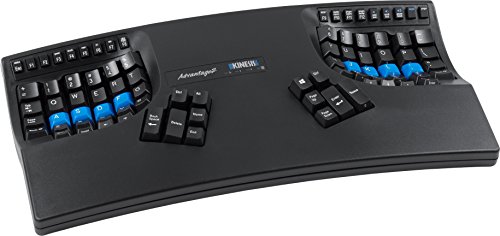
The Advantage2 is built for people who type for a living and want the strongest ergonomic intervention in a single board. Its contoured shell splits the keys into two deep wells with Cherry MX Brown switches, and the 20-degree tenting angles each half so your hands stay close to a handshake position. The SmartSet programming lets you remap keys and store macros on the board itself, which suits coders and writers with heavy shortcut habits. It connects over USB and works with PC and Mac, and the unusual shape means your fingers travel less once muscle memory settles in.
Specs
- Contoured split design with two key wells and 20-degree tenting
- Cherry MX Brown tactile low-force switches
- QWERTY keycaps with Dvorak layout support
- SmartSet programming technology, supports 100 macros
- USB connection, works with PC and Mac
- 2.2 pounds
Best for: coders, writers and heavy typists who want a contoured mechanical board and are willing to relearn their layout.
Watch out for: the contoured layout takes two to four weeks to learn, and Kinesis announced in January 2026 that production is winding down, so confirm the listing variant and remaining stock before ordering.
Perixx Periboard-512

The Periboard-512 is the straightforward wired choice, and it suits a fixed desk where the keyboard never moves. Its split, curved design angles the keys toward each hand, and the built-in palm rest gives your wrists a place to land without buying a separate pad. Seven multimedia hotkeys sit along the top for volume, email and web shortcuts, and the full-size layout keeps a number pad on the right for spreadsheets and data entry. Because it connects with a USB cable, there are no batteries to change and no pairing to manage, so it works the moment you plug it in.
Specs
- Full-size split ergonomic design with palm rest
- Wired USB connection, plug and play
- 7 multimedia hotkeys
- 1.8 m cable
- Dimensions 485 x 236 x 44 mm, weight 1154 g
- System requirement Windows 7, 8, 10
Best for: fixed home desks and budget-conscious buyers who want a split board without batteries or wireless setup.
Watch out for: the board is wired only, so it needs a free USB port within cable reach, and the layout is Windows-focused, so Mac users should check the key legends first.
Which One Fits Your Situation
Your wrists ache by mid-afternoon
Pick the Logitech Ergo K860 if you want the most forgiving change, since its split curve and pillowed rest support your wrists while the layout stays familiar. Choose the Microsoft Sculpt instead if you prefer a domed centre and a separate number pad you can move out of the way, which suits long sessions of documents and data entry.
You move between a laptop and a desktop
Pick the Logitech Wave Keys, because its Bluetooth and Logi Bolt connections plus the Easy-Switch button let you jump between paired machines without touching a cable. The K860 is the second choice here, since it also offers Bluetooth and USB, though its wider split frame takes up more desk space.
You type for a living and want a mechanical feel
Pick the Kinesis Advantage2 KB600, because its Cherry MX Brown switches and contoured wells are built for all-day typing with the least finger travel. Accept the learning curve: the first two weeks feel slow, but the fixed hand position and programmable macros pay off once your fingers settle into the wells.
You want the simplest switch to a split layout
Pick the Perixx Periboard-512, because it plugs in over USB and works at once, with no batteries, no pairing and no software to install. The split curve and palm rest give you the ergonomic shape at a straightforward setup, which suits a fixed desk where the keyboard stays in one place.
Common Mistakes
- Giving up on a split or contoured board after one day, when most people need one to two weeks before typing feels natural again.
- Buying a Windows-focused board for a Mac desk without checking the key legends and listed operating systems on the Amazon page.
- Ignoring the board’s footprint: split and contoured keyboards are wider and deeper than flat boards and can crowd out the mouse.
- Choosing a wireless board without checking whether it uses Bluetooth, a USB receiver or both, and whether your computer supports that connection.
- Expecting the keyboard alone to fix wrist pain while the chair height, desk height and monitor position stay unchanged.
Frequently Asked Questions
Do ergonomic keyboards really help wrist pain?
An ergonomic keyboard can reduce wrist bending by keeping your hands in a straighter, more neutral position, which many typists find eases stiffness during long sessions. It is not a medical treatment, though, and it cannot fix pain caused by poor posture, overuse or an underlying condition. If pain persists or worsens, see a clinician and rethink your whole desk setup.
How long does it take to get used to a split keyboard?
Most people need three to seven days for a gently curved board and one to two weeks for a split or contoured board before typing speed returns to normal. The adjustment is fastest when you use the new board for all typing instead of switching back to the old one. Short, regular sessions in the first days help your fingers learn the new key positions.
Are ergonomic keyboards good for Mac?
Some are, and some are Windows-focused, so check the listing before ordering. The Logitech Ergo K860 and Wave Keys both list Mac compatibility alongside Windows, while the Microsoft Sculpt is built around Windows. Mac users should also check the key legends, since Windows-specific keys may be labelled differently from what macOS expects.
Wired or wireless: which is better for a home office?
Wireless suits a tidy desk and a laptop that moves around, since Bluetooth or a small receiver keeps cables out of the way. Wired suits a fixed desk, since the board never needs charging or pairing and works the moment it is plugged in. Choose wireless when you value a clean desk and device switching, and wired when you value a setup that never needs attention.
FAQ
Do ergonomic keyboards really help wrist pain?
How long does it take to get used to a split keyboard?
Are ergonomic keyboards good for Mac?
Wired or wireless: which is better for a home office?
More from Amazon
Programs that pair well with the guide above. Offers and eligibility are set by Amazon and may change.
A free business account with business pricing and bulk-buying tools for work, shop or home office.
Create a business accountFree shipping on eligible items, Prime Video and more. Eligible new members can start with a free trial.
Start a Prime free trialAudiobooks and podcasts to listen to on the go. Eligible new members can start with a free trial.
Try Audible freeAd-free music streaming. Eligible new subscribers can start with a free trial.
Try Music Unlimited freeAs an Amazon Associate we earn from qualifying purchases.

Write Your Review
No reviews yet. Be the first to share your experience!