
Key takeaways
- Compare keyboard covers, checking fit, material thickness, key clarity and washability for laptops, desks and office keyboards at home and work.
A keyboard collects more debris than almost anything else on a desk. Crumbs slip between the keys, coffee splashes land without warning, dust settles into every gap, and the printed letters on busy keys slowly wear away. A keyboard cover stops most of that before it reaches the switches. The thin skins in this guide stretch over each key and stay in place while you type, while the one rigid lid sits over a desktop board whenever it is not in use. Every option here can be lifted off and washed, so the cover takes the mess instead of the keyboard.
Disclosure: As an Amazon Associate, I earn from qualifying purchases. Product details were verified at the time of writing.
How to Choose a Keyboard Cover
Match the exact model and layout. Molded skins are cut for one keyboard only, down to the shape of the Enter key and the function row. Check the model number printed on the underside of a laptop or on the back of a desktop board, and confirm whether your layout is the US version or another regional layout before ordering. A cover made for a board with a numeric keypad will never sit right on a compact board, and the reverse is also true.
Pick a material for how you work. Silicone is the most common choice: soft, grippy, quiet under the fingers, and usually molded key by key. TPU skins are thinner and clearer, so they change the typing feel less and let more backlight through. A rigid acrylic lid is a different idea entirely — it protects a desktop keyboard from dust, spills, and curious pets while the machine is idle, then lifts away when you sit down to type.
Think about thickness and key clarity. Thicker silicone softens keystrokes and muffles sound, which some typists love and others find spongy. Printed legends on a skin keep letters readable, but opaque printing can block keyboard backlighting; fully clear covers let light and the original legends show through. Shortcut-printed skins trade that backlight for labeled commands, which suits editors and anyone learning new software.
Check the care routine. Most silicone and TPU covers rinse clean with soapy water and air-dry flat. If you eat at your desk or work in a dusty shop office, easy washing matters more than almost any other detail.
1. XSKN Silicone Keyboard Cover Skin for MacBook Pro and Air with Touch ID

XSKN molds this skin for the current generation of Apple laptops, and this version prints Final Cut Pro shortcuts directly onto the keys, turning the cover into a quiet cheat sheet for video work. Each key is individually molded, so the skin follows the low-profile Apple layout precisely across the 14.2 and 16.2 inch Pro models and the 13.6 and 15.3 inch Air models with Touch ID. The silicone has a rubber-coated top surface for a soft touch and a smooth underside that grips the keyboard deck without adhesive. Because the legends are printed rather than clear, keyboard backlight does not shine through the lettering, though the caps lock indicator still shows. When it gets grubby, the maker says it can be washed with soapy water or even placed in boiling water.
Specs
- Material: Silicone with rubber-coated top surface
- Fit: MacBook Pro 14.2″ and 16.2″ (2021–2024, Touch ID), MacBook Air 13.6″ and 15.3″ (M2 and later, Touch ID)
- Layout: US version, Final Cut Pro shortcut printing
- Design: Individually molded keys, adhesive-free fit
- Care: Washable with soapy water; heat resistant
- Weight: 16 grams
2. Kuzy Keyboard Cover for MacBook Pro 13, 15, 17 and MacBook Air 13

Owners of older Apple laptops have fewer options every year, and this Kuzy skin keeps the 2010 to 2015 MacBook Pro line and the 2010 to 2017 MacBook Air 13 covered. The high-elastic silicone is molded key by key over a clear base, and the black version gives worn keyboards a fresh, uniform look while protecting the original legends underneath. It is flexible enough to roll up and tuck into a laptop bag, and it lays back down flat without curling at the corners. Kuzy sells the same mold in a wide range of colors, so it doubles as an easy way to tell two identical household laptops apart. Like most silicone skins, it lifts off in seconds and washes clean under the tap.
Specs
- Material: High-elastic silicone
- Fit: MacBook Pro 13″, 15″, 17″ (2010–2015, including Retina models), MacBook Air 13.3″ (2010–2017)
- Layout: US version
- Design: Individually molded keys on clear silicone, flexible and rollable
- Care: Washable and reusable
- Style: Solid colors, black version listed here
3. Goliton Universal Silicone Keyboard Protector Skin for 15 to 17.3 Inch Laptops

Not every laptop has a model-specific skin, and that is where a universal sheet earns its place. The Goliton protector is a flat, clear silicone mat sized at 14.37 by 5.27 inches, shaped to span the wide keyboards with numeric keypads found on 15, 15.6, 16, 16.4, 17, and 17.3 inch notebooks. There are no molded key wells, so it will not hug each keycap the way a fitted skin does, but it lies flat, stays put, and keeps liquids and dust off the whole deck. The trade-off buys real flexibility: one sheet can move between a work laptop and a home machine, and it is a sensible spare to keep in a drawer for a borrowed or replacement computer. It rinses clean and dries quickly.
Specs
- Material: Silicone, clear finish
- Fit: Universal sheet for 15″ to 17.3″ laptop keyboards with numeric keypads
- Dimensions: 14.37 x 5.27 inches
- Design: Flat, unmolded sheet; waterproof and dustproof
- Care: Washable and reusable
- Layout: Layout-neutral, suits US and similar wide layouts
4. ProElife Ultra Thin Silicone Keyboard Protector for Apple Magic Keyboard
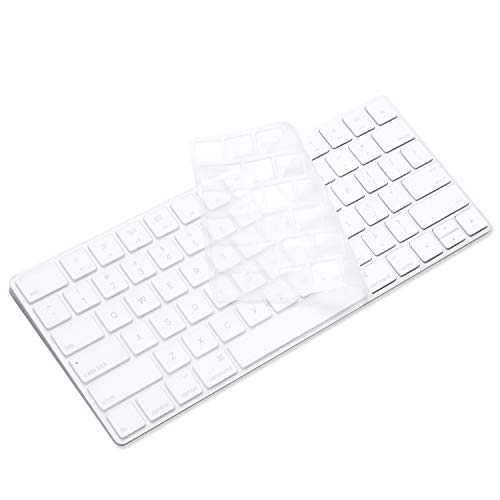
Desktop Apple keyboards need protection too, especially in shared offices and family rooms. ProElife cuts this ultra thin silicone skin for the original Apple Magic Keyboard and Magic Keyboard 2 in the compact layout without a numeric keypad, matching model A1644 with the US layout. The transparent finish keeps the white Apple board looking exactly as it did, and the thin membrane changes the crisp Magic Keyboard typing feel as little as a skin reasonably can. It guards against the usual desktop hazards — splashes, crumbs, dust, and fingernail wear on the busiest keys — and peels off for a rinse whenever it starts to look dull. If your Magic Keyboard has the full numeric keypad, choose the larger sibling version instead, because this one is shaped for the compact board only.
Specs
- Material: Silicone, ultra thin
- Fit: Apple Magic Keyboard and Magic Keyboard 2, model A1644 (MLA22LL/A), without numeric keypad
- Layout: US version
- Design: Transparent, molded to the compact Magic Keyboard layout
- Care: Washable and reusable
- Use case: Desktop protection for iMac and Mac setups
5. DOITOOL Acrylic Keyboard Cover for Desktop Keyboards

The DOITOOL cover takes the opposite approach to a skin: it is a rigid, clear acrylic lid that tents over a desktop keyboard whenever you are away from the desk. At 18.5 by 5.9 by 1.8 inches, it spans standard 104-key boards and smaller 87-key boards alike, shielding them from dust, splashes, and the classic problem of a cat settling onto warm keys and typing nonsense into open documents. The acrylic is scratch resistant, holds its shape, and wipes or rinses clean. Because it only protects while the keyboard is idle, it pairs well with a skin if you want both during-use and after-hours coverage, and it also works as a small raised shelf over the board in a pinch. For a desktop that sits in a kitchen, workshop, or pet-friendly home office, this is the sturdiest option in the guide.
Specs
- Material: Rigid acrylic, transparent
- Fit: Desktop keyboards up to full 104-key size; also suits 87-key boards
- Dimensions: 18.5 x 5.9 x 1.8 inches
- Design: Lift-off lid style; protects while keyboard is not in use
- Features: Water resistant, scratch resistant, removable
- Care: Wipeable and washable
Comparison Table
| Product | Type | Fits | Material | Washable |
|---|---|---|---|---|
| XSKN Shortcut Skin | Molded skin | MacBook Pro 14.2″/16.2″, Air 13.6″/15.3″ with Touch ID | Silicone | Yes |
| Kuzy MacBook Cover | Molded skin | MacBook Pro 13/15/17 (2010–2015), Air 13 (2010–2017) | Silicone | Yes |
| Goliton Universal Protector | Flat sheet | 15″–17.3″ laptops with numeric keypad | Silicone | Yes |
| ProElife Magic Keyboard Skin | Molded skin | Apple Magic Keyboard / Magic Keyboard 2 (A1644) | Silicone | Yes |
| DOITOOL Acrylic Cover | Rigid lid | Desktop keyboards up to 104 keys | Acrylic | Yes |
FAQ
Will a cover change how typing feels?
Yes, slightly. Any skin adds a thin layer over the keys, softening the landing of each keystroke and quieting the sound. Ultra thin silicone and TPU change the feel the least, while thicker molded skins feel more cushioned. Most people adjust within a day or two.
How do I clean a keyboard cover?
Peel it off, wash it in warm soapy water, rinse, and let it air-dry completely before putting it back. Acrylic lids can simply be wiped down or rinsed. Avoid harsh solvents, which can cloud clear materials.
Does a clear cover let keyboard backlight through?
Clear and translucent covers pass most of the light, so legends stay visible in the dark. Covers with printed legends or shortcut graphics block the backlight behind the printing, though small indicator lights usually still show.
How do I make sure a molded skin will fit?
Find the model number on the underside of the laptop or the back of the keyboard, and match it against the fit list on the product page. Also check the layout: a skin cut for a US keyboard will not align with a board that has a tall, L-shaped Enter key.
Verdict
For a current MacBook Pro or Air, the XSKN skin is the most useful pick, especially for editors who benefit from the printed shortcuts. Owners of older Apple laptops should look at the Kuzy, which still serves models most makers have dropped. If your Windows laptop has no fitted skin, the Goliton universal sheet covers wide keyboards without any model hunting. At a desktop, the ProElife skin guards a compact Magic Keyboard while you type, and the DOITOOL acrylic lid stands watch over any standard board when you walk away. Match the fit list first, and any of the five will keep a keyboard cleaner for longer.
More from Amazon
Programs that pair well with the guide above. Offers and eligibility are set by Amazon and may change.
A free business account with business pricing and bulk-buying tools for work, shop or home office.
Create a business accountFree shipping on eligible items, Prime Video and more. Eligible new members can start with a free trial.
Start a Prime free trialAudiobooks and podcasts to listen to on the go. Eligible new members can start with a free trial.
Try Audible freeAd-free music streaming. Eligible new subscribers can start with a free trial.
Try Music Unlimited freeAs an Amazon Associate we earn from qualifying purchases.





Write Your Review
No reviews yet. Be the first to share your experience!