
Key takeaways
- Compare five wireless mice for the Mac Mini, from the Logitech MX Master 3S for Mac and Apple Magic Mouse to ergonomic and multi-device picks.
A Mac Mini arrives as a small box with no mouse, no keyboard, and no trackpad, so the pointing device you choose defines how the whole desk feels. The decision that matters is not which mouse looks best in a photo, but which one fits a desktop Mac that stays in one place: a Bluetooth connection that leaves the Mini’s few USB-C ports free, a sensor that tracks cleanly across a large external monitor, and macOS support that makes gestures and shortcuts work the way Apple intended.
This guide is for Mac Mini owners setting up a home office desk, creators pairing the Mini with a 4K or 5K display, and anyone who switches the same mouse between a Mac Mini, a MacBook, and an iPad. Every mouse below was picked from its name and specifications on its Amazon listing, with Bluetooth pairing, macOS compatibility, and comfort checked against what the listing actually states.
Quick Picks
As an Amazon Associate we earn from qualifying purchases.
| Product | Best for | Key spec from title |
|---|---|---|
| Logitech MX Master 3S for Mac | Long desk sessions with heavy scrolling | 8K DPI track-on-glass sensor |
| Apple Magic Mouse (USB-C) | Native macOS gestures on a desktop | Multi-Touch gesture surface |
| Logitech Lift for Mac | Wrist comfort in a vertical grip | 57-degree vertical angle |
| Logitech MX Anywhere 3S for Mac | A compact mouse for a small desk | 8K DPI sensor in a compact body |
| Logitech M720 Triathlon | Switching one mouse across three computers | Pairs with up to 3 devices |
How to Choose
Bluetooth First, Because the Mini’s Ports Are Scarce
The Mac Mini gives you very few ports to work with, and every dongle you plug in is one fewer port for a drive, a display adapter, or a charger. Bluetooth is therefore the default worth building around: it uses no port at all and pairs directly with the Mini from the first setup. Check that the mouse supports Bluetooth Low Energy, since that keeps the connection steady while sipping power. Some mice still ship with a USB receiver, and on a Mini with no USB-A port that receiver needs an adapter, so confirm before ordering whether the box actually includes a receiver or expects Bluetooth only.
macOS Support, Not Just Mac Tolerance
A mouse can move a cursor on a Mac without truly understanding macOS, and the gap shows up within days. Look for Mac editions that ship with button defaults matching Apple shortcuts, and for companion software that lets you assign gestures such as Mission Control, App Expose, and switching desktops to buttons and wheels. The Magic Mouse is the native option, because its whole top surface is a gesture pad. Before ordering any model, read the system requirements on the listing: some current mice ask for a recent macOS version, and a mouse that needs an update you have not installed will feel broken out of the box.
Sensor Precision on a Big External Monitor
Mac Mini owners usually pair the little box with a large external display, and that changes what the sensor has to do. A low-resolution sensor forces long, repeated hand movements to cross a 4K or 5K screen, while an 8,000 DPI sensor covers the same distance with a short, relaxed movement. Glass tracking is worth having if your desk is a bare glass or glossy surface with no mouse pad. Adjustable DPI matters too, because the sensitivity that feels right for dragging files across a wide monitor can feel jumpy when you are editing a photo at full zoom, and a mouse that lets you switch on the fly saves constant trips into settings.
Shape, Size, and a Desk That Never Moves
A Mac Mini stays put, so the mouse you pick should be judged as a permanent desk tool rather than a travel companion. Full-size mice support the whole palm through eight-hour days, while compact models trade that support for portability you may never use at a fixed desk. Vertical mice hold the forearm in a handshake position and can ease wrist strain, though they need a few days of adjustment before the grip feels natural. Quiet clicks matter in a shared room, and battery life matters more on a desktop than on the road: a rechargeable mouse tops up over USB-C, while an AA-powered model can run for up to two years before it asks for a fresh cell.
The 5 Best Options
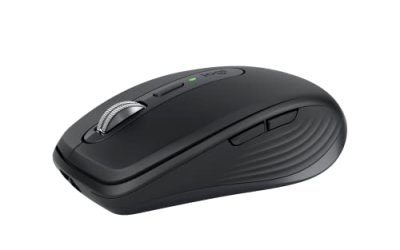
Logitech MX Master 3S for Mac
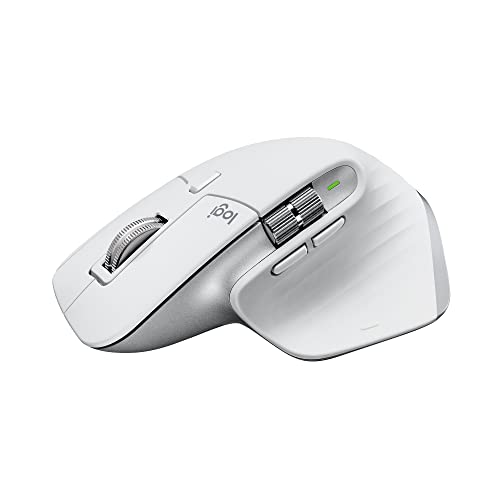
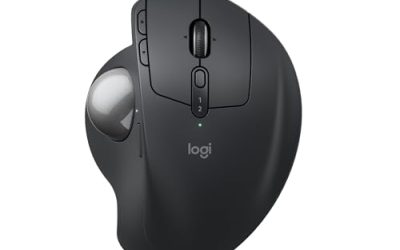
This is the strongest all-round desk mouse for a Mac Mini, because it was built for exactly the kind of long, heavy work a desktop invites. The sculpted body fills the palm, the electromagnetic MagSpeed wheel flies through thousand-line documents and then stops on a single line, and a second thumb wheel scrolls sideways through wide spreadsheets. Quiet clicks keep shared rooms peaceful, and Logi Options+ turns the seven buttons into Mac gestures and app-specific shortcuts. It pairs with three devices over Bluetooth and charges over USB-C while you keep working.
Specs
- 8,000 DPI track-on-glass sensor
- Quiet Clicks with 90% less click noise
- MagSpeed electromagnetic scrolling
- 7 buttons, customizable with Logi Options+
- Rechargeable 500 mAh Li-Po battery, up to 70 days per charge
- Bluetooth Low Energy, pairs with up to 3 devices
- USB-C charging, 1-minute quick charge for 3 hours of use
- Weight: 141 g; Dimensions: 51 x 84.3 x 124.9 mm
- Compatible with macOS and iPadOS; Logi Bolt receiver compatible, not included
Best for: All-day desk work on a Mac Mini with heavy scrolling and shortcuts.
Watch out for: No Logi Bolt receiver comes in the box, so buy one separately if you want a receiver connection; the right-handed shape does not suit left-handed users.
Apple Magic Mouse (USB-C)

No third-party mouse feels quite as native next to a Mac Mini as Apple’s own, because the entire top surface is a Multi-Touch pad. Swiping between pages, scrolling through documents, and switching desktops happen with finger gestures instead of buttons, and the mouse pairs automatically with a Mac the first time you connect it. The rechargeable battery lasts about a month or more, and the woven USB-C cable in the box matches modern Mac charging. The low, slim profile suits fingertip control and sits neatly beside the Mini’s small footprint on the desk.
Specs
- Multi-Touch surface for gestures such as swiping between web pages and scrolling through documents
- Bluetooth wireless connection
- Rechargeable battery, about a month or more between charges
- USB-C port on the underside, woven USB-C Charge Cable included
- Pairs automatically with Mac
- Dimensions: 0.85 x 2.25 x 4.47 inches; Weight: 0.22 lb
- Requires macOS 15.1 or later, iPadOS 18.1 or later
- Model MXK53AM/A, White
Best for: Mac Mini owners who want native gestures and the cleanest setup with Apple hardware.
Watch out for: The charging port sits on the underside, so the mouse cannot be used while charging; it needs macOS 15.1 or later, and the low profile favors a fingertip grip over a palm grip.
Logitech Lift for Mac
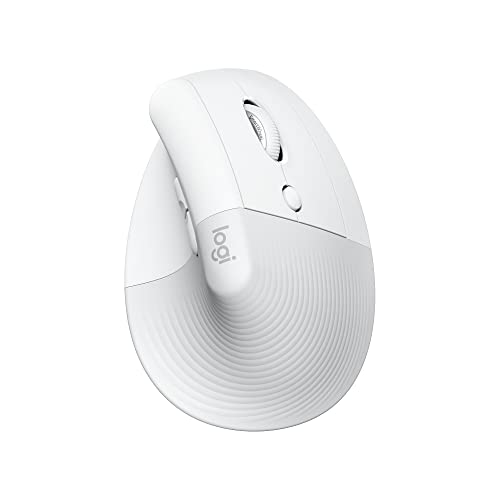
If your wrist aches by late afternoon, the vertical shape of this mouse is the feature that matters most. Its 57-degree angle holds the hand in a natural handshake position, which takes pressure off the forearm during long sessions, and the design was developed for small to medium hands. The SmartWheel shifts between precise line-by-line scrolling and fast free-spin, four buttons take custom shortcuts through Logi Options+, and a single AA cell powers it for up to two years. Give yourself a few days to adjust, and the grip starts to feel normal.
Specs
- 57-degree vertical angle for a handshake grip
- 4,000 DPI sensor, fully adjustable
- 1 x AA battery, up to 24 months of battery life
- 4 customizable buttons with Logi Options+
- SmartWheel for precision and speed scrolling
- Bluetooth Low Energy, pairs with up to 3 devices
- Weight: 125 g; Dimensions: 108 x 70 x 71 mm
- Compatible with macOS and iPadOS; Logi Bolt receiver compatible, not included
Best for: Mac Mini users with wrist strain who want a vertical grip for long workdays.
Watch out for: The vertical shape takes a few days to get used to; this Off White version suits small to medium right hands, and it runs on a disposable AA cell rather than a rechargeable battery.
Logitech MX Anywhere 3S for Mac

Not every Mac Mini desk has room for a full-size mouse, and this compact model carries most of the big MX Master experience into a much smaller body. It keeps the same 8,000 DPI Darkfield sensor and quiet clicks, so tracking stays precise on glass surfaces and glossy desks, and the MagSpeed wheel handles long pages without endless spinning. It pairs with three devices over Bluetooth, charges over USB-C, and weighs about as much as a small phone. For a Mini tucked into a tight corner, a shared family desk, or a setup that doubles as a laptop station, the small footprint is the whole point.
Specs
- 8,000 DPI Darkfield sensor, tracks on glass
- Quiet Clicks with 90% less click noise
- MagSpeed scrolling
- Bluetooth, pairs with up to 3 devices
- USB-C rechargeable battery, up to 70 days per charge
- Weight: about 99 g
- Compatible with macOS and iPadOS
Best for: Mac Mini owners with a small desk who still want a high-resolution sensor.
Watch out for: The small body can cramp larger hands during very long sessions; no receiver is included in the box.
Logitech M720 Triathlon
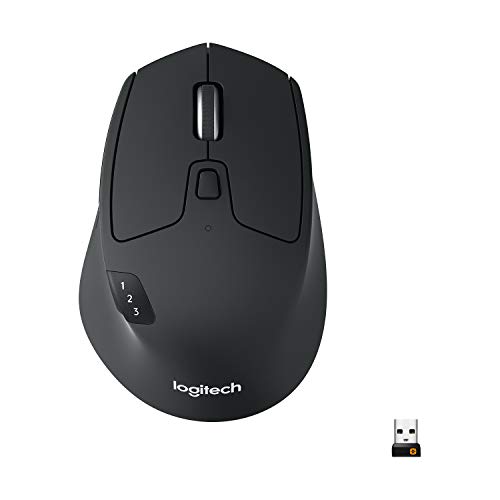
The M720 Triathlon is the practical pick for a Mac Mini desk that shares its mouse with other machines. It pairs with three devices and switches between them with a button on the underside, so the Mini, a laptop, and a tablet share one mouse without re-pairing. Six programmable buttons cover back, forward, and app switching, and the hyper-fast scroll wheel moves through long documents in a single spin. The full-size contoured body suits a fixed desk, and one AA cell runs for up to two years. It connects through Bluetooth or the included Unifying receiver.
Specs
- 1000 DPI optical sensor
- 6 programmable buttons
- Hyper-fast scroll wheel
- Bluetooth and USB Unifying receiver
- Pairs with up to 3 devices
- 2-year battery life on one AA cell
- Full-size contoured shape
Best for: Switching one mouse between a Mac Mini, a laptop, and a tablet at one desk.
Watch out for: The 1000 DPI sensor is fixed, so people who need very fine cursor control on a large monitor should check the DPI first; the Unifying receiver is USB-A, so it needs an adapter on a Mini with no USB-A port.
Which One Fits Your Situation
You Work at a Desk All Day
Pick the Logitech MX Master 3S for Mac. Its full-size shape supports the palm through long sessions, the MagSpeed wheel and thumb wheel chew through long documents and wide spreadsheets, and the seven programmable buttons put Mission Control and app shortcuts under your fingers. The 8,000 DPI sensor keeps cursor travel short on large external displays, and USB-C charging means it can top up while you keep working.
You Want the Most Native Mac Feel
Pick the Apple Magic Mouse (USB-C). Its Multi-Touch surface is the only option here that turns the whole top of the mouse into a gesture pad, so swiping between desktops and scrolling through pages feels exactly like the trackpad behavior Mac users already know. It pairs automatically, charges over USB-C, and looks like it belongs next to the Mini’s aluminum case.
Your Wrist Aches by Afternoon
Pick the Logitech Lift for Mac. The 57-degree vertical angle changes the angle of your forearm in a way no flat mouse can match, and the shape was designed for small to medium hands rather than adapted from a standard body. The two-year AA battery means you will rarely think about power, and the quiet clicks and SmartWheel keep the experience calm during long days.
One Mouse for the Mini, a Laptop, and an iPad
Pick the Logitech M720 Triathlon, or the Logitech MX Anywhere 3S for Mac if your desk is tight. The M720 switches between three paired devices with one button and runs for up to two years on a single AA cell, while the Anywhere 3S offers the same multi-device switching with a sharper 8,000 DPI sensor in a compact body. Both connect over Bluetooth, so no dongle takes up a port on the Mini.
Common Mistakes
- Buying a mouse that needs a USB-A receiver when the Mac Mini has no USB-A port, and discovering the adapter problem after delivery.
- Ignoring the system requirements on the listing, such as the Magic Mouse needing macOS 15.1 or later.
- Assuming a Mac edition includes a USB receiver, when several of them ship Bluetooth-only.
- Choosing a compact travel mouse for eight-hour desk days, or a heavy desk mouse for a shared family table with no space.
- Picking a low-resolution sensor for a 4K or 5K external monitor, then dragging the cursor across the screen in repeated strokes.
Frequently Asked Questions
Does the Mac Mini come with a mouse?
No, the Mac Mini ships as the computer alone, with no mouse, keyboard, or trackpad in the box. You need to supply your own pointing device, and a Bluetooth mouse is the simplest choice because it pairs during setup and uses none of the Mini’s few ports. Any of the mice in this guide works, though the Magic Mouse pairs the most automatically.
Can I use a Bluetooth mouse with a Mac Mini?
Yes, the Mac Mini has built-in Bluetooth, and all five mice in this guide connect over Bluetooth without a dongle. Pairing happens in System Settings under Bluetooth, and the connection stays with the Mini after the first setup. Bluetooth Low Energy models such as the Logitech Mac editions hold a steady link while using very little power.
Do Logitech mice support macOS gestures?
Yes, with Logi Options+ installed, Logitech mice let you assign Mac gestures and shortcuts to buttons and wheels, including Mission Control, App Expose, and switching desktops. The Mac editions ship with Mac-friendly defaults, so the buttons match Apple shortcuts from the first connection. The Magic Mouse is the exception in the other direction: its gestures are built in, with no software to install.
Is a USB receiver mouse a good idea for a Mac Mini?
It can work, but Bluetooth is usually the better default, because a receiver takes up a USB port and most receivers are USB-A, which the current Mini does not have. If you already own a receiver mouse, an adapter solves the port problem. Only add a Logi Bolt receiver if Bluetooth feels unstable in a room crowded with wireless signals.
FAQ
Does the Mac Mini come with a mouse?
Can I use a Bluetooth mouse with a Mac Mini?
Do Logitech mice support macOS gestures?
Is a USB receiver mouse a good idea for a Mac Mini?
More from Amazon
Programs that pair well with the guide above. Offers and eligibility are set by Amazon and may change.
A free business account with business pricing and bulk-buying tools for work, shop or home office.
Create a business accountFree shipping on eligible items, Prime Video and more. Eligible new members can start with a free trial.
Start a Prime free trialAudiobooks and podcasts to listen to on the go. Eligible new members can start with a free trial.
Try Audible freeAd-free music streaming. Eligible new subscribers can start with a free trial.
Try Music Unlimited freeAs an Amazon Associate we earn from qualifying purchases.
Write Your Review
No reviews yet. Be the first to share your experience!