
Our Top Picks
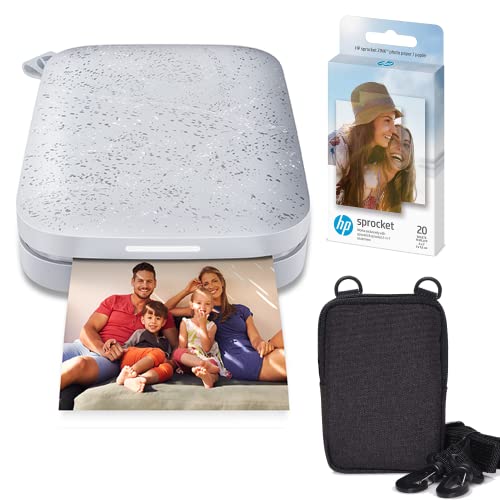
If you scrapbook or keep a photo journal, the best mini photo printer is the HP Sprocket: it prints 2 x 3 inch photos on sticky-back ZINK paper, so each print peels and sticks straight onto a page with no glue dots, tape runners, or photo corners to buy. The Canon IVY 2 runs it close with sharper ZINK output and USB-C charging, while the Fujifilm Instax Mini Link 3 suits crafters who prefer real instant film with a classic white border. For larger square prints, the KODAK Mini 3 Retro produces laminated 3 x 3 inch dye-sub photos, and the Polaroid Hi-Print delivers glossy dye-sub stickers from an all-in-one cartridge. All five connect to a phone over Bluetooth and work with iPhone and Android.
As an Amazon Associate, we earn from qualifying purchases.
Table of Contents
- HP Sprocket Portable 2×3 Instant Photo Printer
- Canon IVY 2 Mini Photo Printer
- Fujifilm Instax Mini Link 3 Smartphone Printer
- KODAK Mini 3 Retro 4PASS Portable Photo Printer
- Polaroid Hi-Print 2nd Generation Pocket Photo Printer
- How to Choose a Mini Photo Printer for Scrapbooking
- FAQ
- Conclusion
- Product and ASIN Reference
HP Sprocket Portable 2×3 Instant Photo Printer
The HP Sprocket is the easiest recommendation for scrapbookers because its prints are stickers by default. Every sheet of HP ZINK paper has a peel-off backing, so a finished print goes directly onto cardstock, a journal spread, or a planner page. The printer is roughly the size of a smartphone, charges over USB, and pairs over Bluetooth with the HP Sprocket app, where you can add frames, stickers, text, and filters before printing. Bundles such as the Luna Pearl ZINK paper bundle include starter paper so you can begin a project the day it arrives. Color is tuned for snapshots rather than gallery work, which suits memory keeping well. It sits in the mid-range tier of this group.
Specs
- Print size: 2 x 3 inches
- Print technology: ZINK Zero Ink thermal printing
- Paper: HP ZINK sticky-back photo paper
- Connectivity: Bluetooth, iOS and Android via the HP Sprocket app
- Editing: frames, filters, text, and sticker overlays in the app
- Power: rechargeable battery, USB charging
- Form factor: pocket-size portable printer
Canon IVY 2 Mini Photo Printer
The Canon IVY 2 is the pick for scrapbookers who want the cleanest ZINK prints. Canon rates its output at 313 x 512 dpi, the highest resolution in the ZINK category, and prints come out on the same 2 x 3 inch sticky-back paper format that drops neatly into journal grids and pocket-page protectors. The IVY 2 charges over USB-C, a practical upgrade for anyone whose phone and laptop already use that cable, and a full charge fits easily between crafting sessions. The Canon Mini Print app adds collage tiles, frames, and drawing tools that work well for themed spreads. Available finishes include Pure White and Blush Pink. It is a mid-range tier printer, positioned by Canon alongside the Sprocket line.
Specs
- Print size: 2 x 3 inches
- Print technology: ZINK Zero Ink thermal printing
- Resolution: 313 x 512 dpi
- Paper: Canon ZINK photo paper with peel-and-stick backing
- Connectivity: Bluetooth 5.0, iOS and Android via the Canon Mini Print app
- Power: built-in rechargeable battery, USB-C charging
- Extras: collage and tile printing modes in the app
Fujifilm Instax Mini Link 3 Smartphone Printer
The Instax Mini Link 3 takes a different route: instead of printing on paper, it exposes images onto real Instax Mini instant film. The finished prints measure about 3.4 x 2.1 inches including the familiar white border, with an image area of 62 x 46 mm, and that border gives you a built-in strip for handwritten captions, dates, and washi-tape accents. Because the prints are physical film rather than stickers, you mount them with corners, sleeves, or tape, which many traditional scrapbookers prefer. The Instax Mini Link app supports collage prints, frame templates, and augmented reality effects, and Fujifilm rates the battery at roughly 100 prints per charge, the strongest endurance figure here. It is a premium tier option once film refills are factored in, though the printer itself is mid-range hardware.
Specs
- Print size: Instax Mini film, 86 x 54 mm card with 62 x 46 mm image area
- Print technology: instant film exposure with a three-color OLED exposure system
- Media: Fujifilm Instax Mini instant film packs
- Connectivity: Bluetooth, iOS and Android via the Instax Mini Link app
- Battery: rechargeable, rated for about 100 prints per charge, USB-C charging
- Print time: about 15 seconds per print, plus film development time
- Extras: collage mode, video frame capture, AR print effects
KODAK Mini 3 Retro 4PASS Portable Photo Printer
Most mini printers stop at 2 x 3 inches, but the KODAK Mini 3 Retro prints a 3 x 3 inch square, a format that fills a scrapbook page faster and matches the square crop of social photos. It uses Kodak’s 4PASS dye-sublimation process, laying down yellow, magenta, and cyan layers and then a clear laminating layer that Kodak describes as fingerprint-proof and water-resistant, which helps pages that get handled often. Prints are borderless by default, with an optional bordered mode in the Kodak Photo Printer app. The starter bundle includes 8 sheets, and refill cartridges combine ink and paper in one unit, so there is no separate ribbon to load. The retro-styled body is larger than the ZINK models but still travels in a craft tote easily. It is the budget tier entry in this roundup.
Specs
- Print size: 3 x 3 inches, borderless or bordered
- Print technology: 4PASS dye sublimation with a protective laminate layer
- Media: all-in-one ink and paper cartridges, 8 sheets included in the starter bundle
- Connectivity: Bluetooth, iOS and Android via the Kodak Photo Printer app
- Finish: laminated surface described by Kodak as fingerprint-proof and water-resistant
- Power: rechargeable battery, USB charging
- Colors: black, white, and yellow variants
Polaroid Hi-Print 2nd Generation Pocket Photo Printer
The Polaroid Hi-Print is the dye-sub alternative for sticker fans. Its paper cartridges combine dye ribbon and 2 x 3 inch sticky-back paper in a single unit, and the second-generation printer produces glossy, vivid prints that resist fading better than thermal ZINK output. The Polaroid Hi-Print app lets you add filters, borders, and text before sending a job over Bluetooth. Because the cartridge carries the color, prints stay consistent from the first sheet to the last in a way ZINK packs sometimes do not. The printer-only package in white is the one to buy if you already stock Hi-Print cartridges; paper bundles exist if you do not. It sits in the mid-range tier, with running costs set by the cartridge format.
Specs
- Print size: 2 x 3 inches
- Print technology: dye sublimation
- Media: Polaroid Hi-Print 2×3 paper cartridges with sticky-back prints
- Connectivity: Bluetooth, iOS and Android via the Polaroid Hi-Print app
- Power: rechargeable battery, USB charging
- Compatibility note: works only with Polaroid Hi-Print 2×3 cartridges, not ZINK paper
- Package: printer only (white); paper sold separately or in bundles
How to Choose a Mini Photo Printer for Scrapbooking
Start with the print format, because it decides how a page comes together. Sticky-back 2 x 3 inch prints from the HP Sprocket, Canon IVY 2, and Polaroid Hi-Print need no adhesive, which keeps layouts fast and flat. Instax Mini prints from the Link 3 need mounting supplies but give you a caption border and the look of real film. The KODAK Mini 3 Retro is the only square option here, and its 3 x 3 inch prints anchor a page with fewer pieces.
Next, weigh print technology against running costs. ZINK printers carry no ink at all, since the color is embedded in the paper, so refills are simple paper packs. Dye-sub models like the Kodak and Polaroid use cartridges that pair ribbon and paper, which costs more per print but delivers a laminated or glossy finish that holds up in albums. Instax film is the most traditional consumable and the one most sensitive to storage conditions, so buy film in smaller quantities if you craft infrequently.
Finally, check the app and the battery. Every printer here depends on its companion app for cropping, borders, and collages, so confirm the app supports your phone before ordering. Crafters who travel to crops and retreats should note charging ports: the IVY 2 and Link 3 use USB-C, while older designs still rely on earlier USB cables. Battery ratings range from a few dozen prints on compact ZINK models to roughly 100 on the Link 3, which matters for a full afternoon of page building away from an outlet.
FAQ
Which mini photo printer is best for journaling every day?
The HP Sprocket and Canon IVY 2 fit daily journaling best. Both print small 2 x 3 inch stickers that sit flat on a page without extra adhesive, both recharge over USB, and both have apps with templates sized for planners and bullet journals. The IVY 2 prints at a higher rated resolution, while Sprocket bundles often include starter paper.
Are ZINK prints durable enough for scrapbook albums?
ZINK prints are water-resistant and smudge-resistant in normal handling, and they sit safely behind page protectors. They are thermal prints, though, so long exposure to heat and direct sunlight can fade them over the years. If archival life is the priority, the laminated dye-sub prints from the KODAK Mini 3 Retro or the real film prints from the Instax Mini Link 3 are the safer formats.
Can these printers print from both iPhone and Android?
Yes. All five printers in this roundup connect over Bluetooth and offer companion apps for both iOS and Android. None of them needs a computer, a memory card slot, or a Wi-Fi network, which is what separates this mini category from the full-size photo printers covered elsewhere on this site.
What else do I need to buy with a mini photo printer?
Plan on refills from day one. ZINK models need paper packs, the Instax Mini Link 3 needs Instax Mini film, and the Kodak and Polaroid models need their matching cartridges, and several starter bundles include only a handful of sheets. Instax prints also need mounting corners or tape since they are not self-adhesive, while the sticker-format printers need nothing extra to fill a page.
Conclusion
For most scrapbookers, the HP Sprocket is the simplest path from phone gallery to finished page: sticky-back prints, an easy app, and plenty of bundle options. Choose the Canon IVY 2 if you want the sharpest ZINK output and USB-C charging, the Instax Mini Link 3 if real film and caption borders suit your style, the KODAK Mini 3 Retro if square laminated prints fit your layouts, or the Polaroid Hi-Print if you prefer dye-sub stickers with cartridge-based consistency. Match the format to your albums first, and any of these five will keep your pages filling up.


FAQ
Which mini photo printer is best for journaling every day?
Are ZINK prints durable enough for scrapbook albums?
Can these printers print from both iPhone and Android?
What else do I need to buy with a mini photo printer?
More from Amazon
Programs that pair well with the guide above. Offers and eligibility are set by Amazon and may change.
A free business account with business pricing and bulk-buying tools for work, shop or home office.
Create a business accountFree shipping on eligible items, Prime Video and more. Eligible new members can start with a free trial.
Start a Prime free trialAudiobooks and podcasts to listen to on the go. Eligible new members can start with a free trial.
Try Audible freeAd-free music streaming. Eligible new subscribers can start with a free trial.
Try Music Unlimited freeAs an Amazon Associate we earn from qualifying purchases.

Write Your Review
No reviews yet. Be the first to share your experience!