
Key takeaways
- Find the best laptop docking station for dual monitors, fast charging, and a tidy desk. Compare five USB-C and Thunderbolt 4 docks for Windows and Mac.
A laptop docking station turns a single cable into a full desktop. Instead of plugging in a monitor, keyboard, mouse, network cable, and charger one by one, you connect everything to the dock once and then attach your laptop with one lead. That change saves time every morning and keeps cables out of sight.
The best laptop docking station depends on your laptop and your monitors. A Thunderbolt 4 dock suits a powerful laptop with two high-resolution displays, while a USB-C dock is often enough for a single monitor and everyday office work. Charging power matters too.
As an Amazon Associate, we earn from qualifying purchases.
Our top picks
Best for: Premium Thunderbolt desks with two monitors and many peripherals
Check price on AmazonBest for: Compact USB-C desks and triple-display Windows setups
Check price on AmazonBest for: Dell laptop offices and larger business laptops
Check price on AmazonBest for: Mixed-brand offices, ThinkPad users, and shared desks
Check price on AmazonBest for: Dual-display Thunderbolt desks with fast wired networking
Check price on AmazonQuick Answer
For most people, the CalDigit TS4 is the best laptop docking station overall, thanks to its wide port selection, strong charging, and dual-display support. If you want a smaller and simpler option, the Anker 575 covers triple-display USB-C setups well. Dell, Lenovo, and Plugable complete the list with office-ready docks for mixed Windows and Mac desks.
1. CalDigit TS4 Thunderbolt 4 Dock
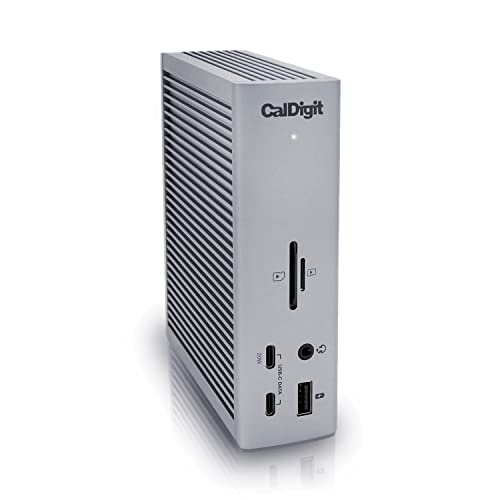
The CalDigit TS4 is a full-size Thunderbolt 4 dock built for a permanent desk. It gives a compatible laptop one-cable access to monitors, storage, wired networking, and a large set of USB devices. Its three Thunderbolt 4 ports move data at high speed, which helps when external drives and displays share the same connection. The dock also includes a fast 2.5 Gigabit Ethernet port, a useful upgrade over the Gigabit port found on many older docks.
Display support is a clear strength. The TS4 can drive a single 8K display or two 6K displays at 60Hz on a compatible host. Charging is rated at 98W, which covers most thin and light laptops and many larger models. If your laptop has Thunderbolt 4 or USB4, and you want a dock you can leave in place for years, this is the most capable pick in this roundup.
Specs
- Host connection: Thunderbolt 4, also works with USB4 and USB-C hosts at reduced speed
- Laptop charging: Up to 98W Power Delivery
- Display support: Single 8K at 30Hz or dual 6K at 60Hz on a compatible host
- Ports: 18 in total, including 3 Thunderbolt 4, 3 USB-C, and 5 USB-A
- Networking: 2.5 Gigabit Ethernet
- Card readers: SD and microSD, UHS-II
- Best for: Premium Thunderbolt desks with two monitors and many peripherals
2. Anker 575 USB-C Docking Station (13-in-1)

The Anker 575 is a compact USB-C dock that suits laptops without Thunderbolt. It uses native DisplayPort Alt Mode, so video works without extra driver software on most Windows laptops. The dock is small enough to fit on a crowded desk or carry between home and office, yet it still packs 13 ports into a tidy case.
Video is flexible for a USB-C dock. It offers two HDMI ports and one DisplayPort, with support for a single 4K display at 60Hz, dual 4K displays at 30Hz, or three 1080p displays, depending on the host laptop. That makes it a practical choice for a triple-monitor Windows setup where Thunderbolt is not available. Mac users should check the display limits first.
Specs
- Host connection: USB-C with DisplayPort Alt Mode, no Thunderbolt required
- Laptop charging: Up to 85W Power Delivery, plus 18W USB-C charging for a phone
- Display support: Single 4K at 60Hz, dual 4K at 30Hz, or triple 1080p, depending on host
- Ports: 13 in total, including 2 HDMI, 1 DisplayPort, 3 USB-A, and 2 USB-C
- Networking: Gigabit Ethernet
- Card readers: SD and microSD
- Best for: Compact USB-C desks and triple-display Windows setups
3. Dell WD19S USB-C Docking Station

The Dell WD19S is an office workhorse built around a single USB-C connection. It is designed for Dell laptops first, but it also works with many other USB-C laptops that support DisplayPort Alt Mode and Power Delivery. Its 180W power adapter delivers up to 130W to a compatible Dell laptop, which is higher than most compact docks and helps with larger business laptops that need more charging headroom.
Display options cover one, two, or three monitors, depending on the laptop and the ports used. The dock includes HDMI and two DisplayPort outputs, so a dual-monitor desk needs no adapter. It also provides several USB-A and USB-C ports for a keyboard, mouse, headset, and external storage, plus Gigabit Ethernet.
Specs
- Host connection: USB-C with DisplayPort Alt Mode
- Laptop charging: Up to 130W Power Delivery for a compatible Dell laptop, 180W adapter included
- Display support: Dual and triple monitor setups on a compatible host, with HDMI and DisplayPort
- Ports: HDMI, 2 DisplayPort, USB-A, USB-C, and audio
- Networking: Gigabit Ethernet
- Power adapter: 180W included
- Best for: Dell laptop offices and larger business laptops
4. Lenovo ThinkPad Universal USB-C Dock

The Lenovo ThinkPad Universal USB-C Dock is built for mixed offices where laptops come from different brands. It connects through one USB-C cable and provides a wide set of ports for monitors, accessories, and wired networking. Its universal design means a ThinkPad, an HP laptop, a Dell laptop, or a MacBook can share the same desk setup, which is useful in hot-desking and shared workspaces.
Display support includes a single HDMI port plus DisplayPort outputs, with dual 4K support on a compatible host. The dock also includes six USB ports in total, so a keyboard, mouse, webcam, headset, and external drive can stay connected at once. Charging is rated at 90W, which covers most ultrabooks and standard business laptops. Lenovo also builds in automatic firmware updates.
Specs
- Host connection: USB-C, universal design for Windows, Mac, and ChromeOS laptops
- Laptop charging: Up to 90W Power Delivery
- Display support: Dual 4K on a compatible host, with HDMI and DisplayPort
- Ports: 10 in total, including 6 USB ports, HDMI, and DisplayPort
- Networking: Gigabit Ethernet
- Warranty: Three-year manufacturer warranty
- Best for: Mixed-brand offices, ThinkPad users, and shared desks
5. Plugable TBT4-UDZ 16-in-1 Thunderbolt 4 Dock

The Plugable TBT4-UDZ is a 16-in-1 Thunderbolt 4 dock for users who want many ports and fast networking in one unit. It offers two HDMI ports and two DisplayPort outputs, so dual 4K monitors connect directly without adapters. A single 8K display is also supported on a compatible host. The dock works with Thunderbolt 4, Thunderbolt 5, USB4, and USB-C hosts, with the full display and speed benefits going to Thunderbolt and USB4 laptops.
Networking is a standout feature, with a 2.5 Gigabit Ethernet port. The USB layout is generous too, with seven USB ports across USB-C and USB-A, plus SD and microSD card slots for cameras. Charging is rated at 100W, with 98W certified, which covers most laptops in this class.
Specs
- Host connection: Thunderbolt 4, also works with Thunderbolt 5, USB4, and USB-C
- Laptop charging: Up to 100W Power Delivery, 98W certified
- Display support: Dual 4K monitors, or single 8K on a compatible host
- Ports: 16 in total, including 2 HDMI, 2 DisplayPort, and 7 USB ports
- Networking: 2.5 Gigabit Ethernet
- Card readers: SD and microSD
- Best for: Dual-display Thunderbolt desks with fast wired networking
How to Choose a Laptop Docking Station
Start with the port on your laptop. A Thunderbolt 4 or USB4 port unlocks the fastest docks and the best dual-display support, while a standard USB-C port with DisplayPort Alt Mode limits you to USB-C docks such as the Anker 575 or the Lenovo model. Check your laptop manual for the exact port type.
Next, count your monitors and check their resolution. A single 1080p monitor needs far less from a dock than two 4K monitors. Thunderbolt 4 docks handle dual high-resolution displays more reliably, while USB-C docks often accept lower refresh rates for a second screen. Mac users should pay extra attention here, because base Apple silicon models have stricter limits on external displays. Also check charging: most ultrabooks are happy with 65W to 90W, while larger laptops benefit from 98W or more.
Who Should Skip a Docking Station
A docking station is not the right buy for every laptop user. If you work from a single laptop screen and rarely plug in anything else, a small USB-C hub costs less and takes up less space. The same applies if you move desks several times a day: a full dock with its own power brick is awkward to carry.
You should also skip a Thunderbolt dock if your laptop has no Thunderbolt or USB4 port. The dock will still work at USB-C speed in many cases, but you will not get the display and bandwidth benefits that justify the higher tier. Chromebooks and older laptops with USB-C for charging only may not send video at all, so check DisplayPort Alt Mode support before buying.
Frequently Asked Questions
What is the best laptop docking station for dual monitors?
The CalDigit TS4 is the strongest dual-monitor pick in this roundup, with support for dual 6K displays at 60Hz on a compatible host. The Plugable TBT4-UDZ is a close alternative, with two HDMI and two DisplayPort outputs for dual 4K monitors. For a USB-C laptop without Thunderbolt, the Anker 575 supports dual 4K at 30Hz.
Do I need a Thunderbolt dock or is USB-C enough?
USB-C is enough for a single monitor, a keyboard, a mouse, and everyday office work. A Thunderbolt 4 dock is worth it when you run two high-resolution monitors, move large files to external drives, or want faster charging and more ports from one cable. Check your laptop port first: without Thunderbolt or USB4, a Thunderbolt dock cannot deliver its full benefits.
Will a docking station charge my laptop?
Most powered docks in this roundup charge the laptop through the same USB-C cable that carries video and data. Charging output ranges from 85W on the Anker 575 to 130W on the Dell WD19S for a compatible Dell laptop. If your laptop needs more power than the dock supplies, the battery may drain slowly under heavy load, so match the dock output to your laptop.
Can I use one docking station with Windows and Mac laptops?
Yes, in many cases. The Lenovo ThinkPad Universal USB-C Dock and the CalDigit TS4 are both designed for mixed Windows and Mac desks. Display behaviour still differs between systems, especially for dual monitors on Mac, so check the display limits for your exact laptop model before you buy.
Final Verdict
The best laptop docking station is the one that matches your laptop port, your monitors, and your charging needs. The CalDigit TS4 leads this roundup for a full Thunderbolt 4 desk. The Plugable TBT4-UDZ is the best alternative in the same class, with a different port mix and dual 4K outputs. For a USB-C laptop, the Anker 575 is the most flexible compact pick, while the Dell WD19S suits Dell offices and the Lenovo ThinkPad Universal USB-C Dock suits mixed-brand desks.
FAQ
What is the best laptop docking station for dual monitors?
Do I need a Thunderbolt dock or is USB-C enough?
Will a docking station charge my laptop?
Can I use one docking station with Windows and Mac laptops?
More from Amazon
Programs that pair well with the guide above. Offers and eligibility are set by Amazon and may change.
A free business account with business pricing and bulk-buying tools for work, shop or home office.
Create a business accountFree shipping on eligible items, Prime Video and more. Eligible new members can start with a free trial.
Start a Prime free trialAudiobooks and podcasts to listen to on the go. Eligible new members can start with a free trial.
Try Audible freeAd-free music streaming. Eligible new subscribers can start with a free trial.
Try Music Unlimited freeAs an Amazon Associate we earn from qualifying purchases.




Write Your Review
No reviews yet. Be the first to share your experience!