
Key takeaways
- Find the best memory card reader for photo and video transfers. Compare UHS-II SD, microSD, and CFexpress Type B readers for photographers and creators.
A slow card reader can turn a short shoot into a long wait at the computer. The camera writes files to the card quickly, yet moving them to a laptop can take far longer when the reader, cable, or port becomes the bottleneck. Choosing the best memory card reader is therefore about matching the reader to the cards already in the bag, the computer it will connect to, and the way files are offloaded after a shoot.
This guide compares five readers covering the main combinations photographers use today: UHS-II SD and microSD, CFexpress Type B paired with SD, and compact USB-C readers for travel and phone-based workflows. Each pick is described from its published specifications, with slot layout, interface, transfer ceiling, and practical limits spelled out.
As an Amazon Associate, we earn from qualifying purchases.
Our top picks
Quick Answer
For most photographers, the best memory card reader is one that matches the cards already in the camera bag. Choose a UHS-II SD reader for everyday mirrorless shooting, add CFexpress Type B support for high-resolution stills and video, and check that the USB connection is fast enough to avoid a bottleneck. The five readers below cover compact travel use, dual-slot offloading, and professional studio workflows.
1. ProGrade Digital CFexpress Type B and SD UHS-II Dual-Slot Reader
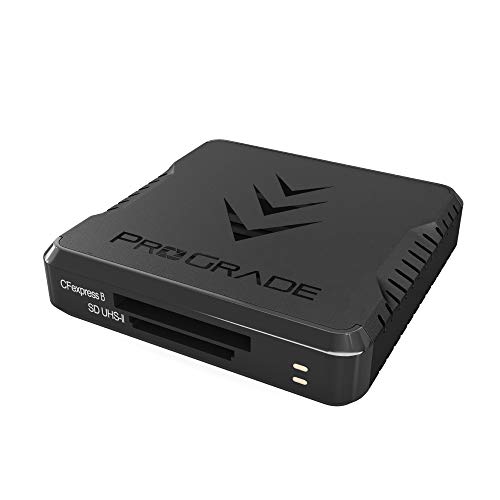
The ProGrade Digital CFexpress Type B and SD UHS-II Dual-Slot Reader is the premium pick for cameras that record to two different card formats at once. It pairs one CFexpress Type B slot with one UHS-II SDXC slot, so a dual-format camera can be offloaded through a single device. The USB 3.2 Gen 2 interface provides a 10 Gbps host connection with transfers up to 1.25 GB per second under suitable conditions.
The metal and plastic housing suits a desk setup as well as a location kit. A magnetic base and included adhesive metal plate let it mount to a laptop lid or a cart. Two cables are supplied, USB-C to USB-C and USB-C to USB-A. It accepts CFexpress Type B and SD, SDHC, and SDXC cards, including UHS-II, but not CFexpress Type A or XQD cards.
Specs
- Slots: 1 CFexpress Type B, 1 SDXC UHS-II
- Interface: USB 3.2 Gen 2, up to 10 Gbps
- Transfer ceiling: up to 1.25 GB per second
- Cables included: USB-C to USB-C and USB-C to USB-A
- Mounting: magnetic base with adhesive metal plate
- Model number: PGRWCFXSDANA
- Tier: premium
2. SanDisk Professional PRO-Reader SD and microSD

The SanDisk Professional PRO-Reader SD and microSD is a strong mid-range choice for photographers who work mainly with SD and microSD cards. It uses a USB 3.2 Gen 1 connection over USB-C at 5 Gbps and is designed around SanDisk Extreme PRO UHS-I cards with QuickFlow technology, which the maker describes as a way to shorten offload times for compatible cards. A USB-C cable is included.
The aluminum enclosure helps the reader stay cool during longer transfers. An integrated write-protect lock switch helps prevent accidental overwriting of footage or images while cards are being read. The reader also works with the SanDisk Professional PRO-DOCK 4 docking station for simultaneous offloads with other PRO-READER units. Supported systems include Windows 10 and later and macOS 10.9 and later. Its 5 Gbps interface suits UHS-I and many UHS-II workflows, but it cannot match a 10 Gbps dual-format reader when very large files move in bulk.
Specs
- Slots: SD and microSD
- Interface: USB 3.2 Gen 1 over USB-C, 5 Gbps
- Card support: SD and microSD, including UHS-I with QuickFlow
- Enclosure: aluminum
- Extras: write-protect lock switch, PRO-DOCK 4 compatible
- Dimensions: 4.54 x 2.36 x 0.75 inches
- Model number: SDPR5A8-0000-GBAND
- Tier: mid-range
3. Lexar Dual-Slot USB-A/C Reader RW310

The Lexar Dual-Slot USB-A/C Reader, model RW310, is the budget pick for photographers who want a simple reader that works with almost any laptop. It has one SD slot and one microSD slot, with transfer speeds up to 205 MB per second, and it supports simultaneous reading from both slots.
The reader carries both a USB-A connector and a USB-C connector, so it plugs into older laptops, newer ultrabooks, and many tablets without a separate dongle. It is compact at 3.07 by 0.92 by 0.46 inches, and a nylon rope is included. It is bus powered, so no external power supply is needed, and it works with Windows and macOS. At up to 205 MB per second, it suits UHS-I cards and everyday SD workflows, but it will not unlock the full pace of a UHS-II V90 card.
Specs
- Slots: SD and microSD
- Interface: USB-A and USB-C, USB 3.2 Gen 1
- Transfer ceiling: up to 205 MB per second
- Simultaneous reading: both slots at once
- Dimensions: 3.07 x 0.92 x 0.46 inches
- Extras: nylon rope, bus powered
- Model number: LRW310X-BNBNG
- Tier: budget
4. UGREEN USB C SD 4.0 Card Reader

The UGREEN USB C SD 4.0 Card Reader is a compact budget option for photographers who want genuine UHS-II speed in a pocket-sized device. It supports SD, SDXC, SDHC, and microSD cards in UHS-II and UHS-I modes, with transfers up to 312 MB per second on SD 4.0 cards.
The reader connects over USB-C and works with Windows, macOS, Linux, ChromeOS, iPadOS, and Android, so it fits laptops, tablets, and phones with a USB-C port. Its small body measures 2.2 by 1.34 by 0.43 inches. It has no CFexpress slot, so it cannot serve cameras that record to that format.
Specs
- Slots: SD and microSD
- Interface: USB-C
- Transfer ceiling: up to 312 MB per second, SD 4.0
- Card support: SD, SDXC, SDHC, microSD, UHS-II and UHS-I
- Systems: Windows, macOS, Linux, ChromeOS, iPadOS, Android
- Dimensions: 2.2 x 1.34 x 0.43 inches
- Model number: 15251
- Tier: budget
5. Anker MagGo USB-C Adapter

The Anker MagGo USB-C Adapter, model A83D1, is the most travel-friendly reader in this roundup, because it combines a card reader with a magnetic mount for a phone. It attaches magnetically to compatible phones, keeping the reader stable and hands-free while files move, and the built-in flat cable with a right-angle USB-C connector reduces strain on the port.
The adapter is designed for USB-C phones, tablets, and laptops, including iPhone 15 and 16 series models, MacBook Air and Pro models, and iPad Air and Pro models with USB-C. Its 10 Gbps USB-C connection is fast enough for the card slots to reach their rated speed, and the USB-C pass-through port supports charging, although it does not carry data for accessories such as headphones. SD and microSD slots support transfers up to 312 MB per second. It measures 2.36 by 2.36 by 0.59 inches and weighs 44 grams.
Magnetic attachment works only with MagSafe-compatible devices and magnetic cases, and it is not compatible with non-magnetic cases such as some rugged cases. It is best used for offloading and editing rather than as a live recording drive.
Specs
- Slots: SD and microSD
- Interface: USB-C, 10 Gbps
- Transfer ceiling: up to 312 MB per second
- Mounting: magnetic, MagSafe compatible
- Cable: built-in flat cable, right-angle USB-C connector
- Dimensions: 2.36 x 2.36 x 0.59 inches
- Model number: A83D1
- Tier: mid-range
How to Choose the Best Memory Card Reader
Start with the cards. List every card format in use, including SD, microSD, CFexpress Type B, CFexpress Type A, CFast, and XQD, and choose a reader that covers all of them. Dual-slot readers are worth considering when two formats are used together, since they cut the number of devices and cables in the bag.
Next, check the interface and the host port. UHS-II cards need a UHS-II reader and a fast USB connection to reach their rated speed, while a UHS-I reader will cap even the fastest card. A USB 3.2 Gen 2 connection at 10 Gbps suits heavy video and raw workflows, and a 5 Gbps connection suits most stills work.
Finally, think about where the reader will be used. A metal reader with a magnetic base suits a studio desk, a compact reader suits a travel bag, and a magnetic phone reader suits field offloads.
Who Should Skip These Readers
Photographers who shoot only to CFexpress Type A cards should skip every reader in this roundup, because none of them accepts that format. The same applies to XQD and CFast users. Owners of very old computers with only USB 2.0 ports should also pause, since the port will limit transfer speed regardless of the reader.
A dedicated reader may also be unnecessary for photographers whose camera already transfers files quickly over its own USB connection and who rarely fill a card in a single session. Readers are most useful when cards are swapped often or large volumes of files move every day.
Frequently Asked Questions
What is the best memory card reader for photographers?
The best memory card reader for most photographers is a UHS-II SD and microSD reader with a USB-C connection, because it covers the most common camera cards at full speed. Photographers with CFexpress Type B cameras should choose a dual-format reader such as the ProGrade Digital model in this guide.
Do I need a UHS-II card reader for UHS-II cards?
Yes, a UHS-II card needs a UHS-II reader to reach its rated transfer speed. A UHS-I reader will still read a UHS-II card, but transfers will run at the lower UHS-I pace. The same rule applies to the host port and cable.
Can one card reader read SD and microSD cards at the same time?
Some readers can, and others cannot. The Lexar RW310 and the UGREEN reader in this guide support simultaneous reading from their SD and microSD slots. Check the published specifications for simultaneous transfer support before assuming a dual-slot reader can use both slots at once.
Is USB-C faster than USB-A for card readers?
USB-C is a connector shape, not a speed rating, so it is not faster by itself. Speed depends on the USB standard behind the connector, such as USB 3.2 Gen 1 at 5 Gbps or USB 3.2 Gen 2 at 10 Gbps.
Final Verdict
The best memory card reader depends on the cards in use and the way files are offloaded. The ProGrade Digital dual-slot reader is the premium pick for CFexpress Type B and SD shooters who move large files every day. The SanDisk Professional PRO-Reader suits desk-based SD and microSD workflows, the Lexar RW310 is the flexible budget choice for older and newer laptops, the UGREEN SD 4.0 reader brings UHS-II speed to a compact USB-C device, and the Anker MagGo adapter is the best option for magnetic phone-based offloads. Match the reader to the cards first, and check the USB interface second.
FAQ
What is the best memory card reader for photographers?
Do I need a UHS-II card reader for UHS-II cards?
Can one card reader read SD and microSD cards at the same time?
Is USB-C faster than USB-A for card readers?
More from Amazon
Programs that pair well with the guide above. Offers and eligibility are set by Amazon and may change.
A free business account with business pricing and bulk-buying tools for work, shop or home office.
Create a business accountFree shipping on eligible items, Prime Video and more. Eligible new members can start with a free trial.
Start a Prime free trialAudiobooks and podcasts to listen to on the go. Eligible new members can start with a free trial.
Try Audible freeAd-free music streaming. Eligible new subscribers can start with a free trial.
Try Music Unlimited freeAs an Amazon Associate we earn from qualifying purchases.




Write Your Review
No reviews yet. Be the first to share your experience!