
Key takeaways
- Five desk lamps with USB charging ports for home offices, compared by ports, brightness and color modes, so your phone charges while you work.
A desk lamp that only lights the desk leaves one job undone. Most home office desks already run short on outlets, with a laptop charger, a monitor, and a phone cable competing for the same strip, so a lamp with a built-in USB port solves two problems at once: it lights the work surface and keeps a phone or earbuds topped up without another wall adapter.
This guide is for remote workers with crowded desks, students in dorm rooms with one free outlet, and anyone who wants fewer cables trailing across the work surface. Every lamp below was picked from its Amazon listing name and specifications, and each one has at least one USB charging port in its base, so the charging claim comes from the listing itself rather than from a feature wish list.
Quick Picks
As an Amazon Associate we earn from qualifying purchases
| Product | Best for | Key spec from title |
|---|---|---|
| Addtam LED Desk Lamp with Power Strip | A desk with one outlet and many devices | 3 AC outlets and 4 USB ports |
| Honeywell HWT-H01 Sunturalux LED Desk Lamp | Color-accurate light plus dual charging | USB A+C dual charging ports |
| Honeywell HWT-H2 LED Desk Lamp | Long sessions with eye-friendly light | USB A+C charging ports, CRI 94 |
| Lepro LED Desk Lamp with USB Charging Port | A simple lamp that charges a phone | 5V/1A USB charging port |
| BOHON LED Desk Lamp with USB Charging Port | Flexible light aimed exactly where needed | USB charging port usable with lamp on or off |
How to Choose
Count the USB ports you actually need
A single USB port suits one phone, but a desk that also charges earbuds, a tablet, or a second phone needs more. Lamps in this guide range from one port to four, and the four-port models split between USB-A and USB-C, which matters because newer phones and tablets ship with USB-C cables while older accessories still use USB-A. Check the port output too: a 5V/1A port trickle-charges a phone slowly, while a 5V/2A port tops it up noticeably faster. If the lamp also has AC outlets in its base, it can replace a small power strip entirely, which is the real win on a desk with only one wall outlet free.
Match brightness and color range to your work
Brightness is measured in lumens, and the lamps here run from about 550 to 900 lumens, which covers reading, writing, and screen work without flooding a small room. More important than raw brightness is the color temperature range: warm light around 2700K to 3000K suits evening work, neutral light near 4000K suits daytime focus, and cool daylight near 5500K to 6500K suits detailed tasks. A lamp with three to five color modes lets the same desk shift from morning paperwork to late-night reading. Stepless dimming beats fixed brightness steps here, because the right level for a paper notebook is rarely the same as the right level beside a glowing monitor.
Check the arm, head, and footprint
A lamp that cannot reach across the work surface leaves half the desk in shadow, so arm length and head width deserve as much attention as brightness. Foldable arms collapse flat when the desk needs clearing, clamp lamps free the base area entirely, and wide rectangular heads spread light evenly across a keyboard and a notebook at once. Measure the desk depth before ordering: a lamp with a wide base on a narrow desk crowds the keyboard, while a clamp lamp needs a desk edge thick enough to grip and free of a lip or glass overhang. The head should also tilt or swivel, because fixed heads force the whole lamp to move whenever the task changes.
Look at controls, memory, and timers
Touch controls keep the base clean but can be hard to find in the dark, while a rotary knob gives precise dimming with one twist and a push button is the easiest to learn. A memory function matters more than it sounds: it returns the lamp to the last brightness and color mode instead of resetting to full brightness every morning. An auto-off timer helps in bedrooms and shared spaces, shutting the lamp down after a set period so it never burns all night. Auto dimming senses room light and adjusts itself, which suits desks near windows where daylight changes through the day.
The 5 Best Options
Addtam LED Desk Lamp with Power Strip

The Addtam is the only lamp here that replaces a power strip outright, which makes it the natural pick for a desk served by a single wall outlet. Its base holds three AC outlets plus four USB ports, two USB-C and two USB-A, so a laptop charger, a monitor, a phone, and earbuds can all live on the desk at once. The light itself offers four color temperatures and five brightness levels with touch control and a memory function, and the arm folds flat when the desk needs clearing.
Specs
- 3 AC outlets and 4 USB ports (2 USB-C, 2 USB-A) in the base
- 4 color temperatures and 5 brightness levels, up to 6500K
- Touch control with memory function
- 180-degree adjustable head and 90-degree foldable arm
- 5-foot power cord with 45-degree flat plug
- 10 watts
- Model AD3WLCDB
Best for: A desk with one free outlet and several devices to charge.
Watch out for: The power-strip base is bulkier than a plain lamp base, so measure the desk space it will occupy before ordering.
Honeywell HWT-H01 Sunturalux LED Desk Lamp

The HWT-H01 is the color-accuracy pick, built around full-spectrum Sunturalux LEDs with a CRI of 95 or higher, so printed pages and on-screen colors look closer to daylight than under a standard lamp. Two charging ports, one USB-A and one USB-C, sit in the base for a phone and earbuds, and the stepless dimming slides smoothly from 10 to 100 percent instead of jumping between fixed steps. It folds to 180 degrees, which makes it easy to pack away or tuck behind a monitor at the end of the day.
Specs
- USB A+C dual charging ports in the base
- CRI 95 or higher full-spectrum Sunturalux LEDs
- 3 color modes: 3000K, 4000K, 5500K
- Stepless dimming from 10% to 100%
- Foldable design that folds to 180 degrees
- 48 full-spectrum LED beads
- Touch control
Best for: Reading, writing, and color-sensitive work with a phone charging nearby.
Watch out for: The two USB ports share modest output, so they top up phones and earbuds rather than fast-charging larger devices.
Honeywell HWT-H2 LED Desk Lamp

The HWT-H2 is the step-up Honeywell for people who spend long hours at the desk and want the widest light control in this guide. Its 11-inch rectangular head spreads even light across a keyboard and an open notebook, and four color modes run from warm 2700K to daylight 5700K with stepless dimming and a memory function that restores the last setting. The base carries USB-A and USB-C charging ports, and a 30-minute auto-off timer covers the evenings when the lamp gets left on.
Specs
- USB A+C charging ports in the base
- 48 full-spectrum LED beads with CRI 94 or higher
- 550 lumens
- 4 color modes: 2700K, 4000K, 5000K, 5700K
- Stepless dimming from 10% to 100%
- 11-inch rectangular lamp head
- 30-minute auto-off timer and memory function
- 24W power adapter included
- Foldable design
Best for: Long study and work sessions where light quality and a wide lit area matter most.
Watch out for: The wide head takes up more desk space than a slim gooseneck lamp, and the USB ports are not fast-charging ports.
Lepro LED Desk Lamp with USB Charging Port

The Lepro is the straightforward pick: a folding base lamp with a USB charging port, five color modes, and five brightness levels, without the extra outlets or wireless charging that push other lamps up in size and complexity. Its diffused lighting softens glare on paper and screens, touch controls sit on the base within easy reach, and the 15.1-inch height covers a standard workspace without towering over a monitor. The 5V/1A USB port in the base charges a phone or earbuds while the lamp is in use.
Specs
- 5V/1A USB charging port in the base
- 700 lumens maximum brightness
- 5 color modes and 5 brightness levels
- Touch control
- 15.1 inches in height
- Diffused lighting that reduces eye strain
- Model PR31000
Best for: A clean, simple desk setup that needs light plus one charging spot.
Watch out for: The 5V/1A USB port charges slowly, so it suits overnight or all-day top-ups rather than a quick charge before heading out.
BOHON LED Desk Lamp with USB Charging Port
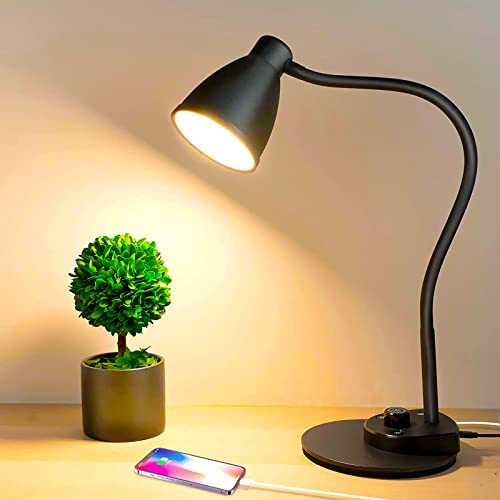
The BOHON suits desks where the light needs to move: a flexible gooseneck aims the beam at a notebook, a keyboard, or a craft project without shifting the base, and the USB port on the base keeps working whether the lamp is on or off. Its 56 LED beads put out up to 900 lumens across three color modes from 3000K to 5500K, with a rotary knob for dimming and a push button for switching modes. Auto dimming senses the room light and adjusts output, which helps on desks near a window where daylight changes through the day.
Specs
- 1 USB charging port on the base, usable with the lamp on or off
- 56 SMD2835 LED beads
- Up to 900 lumens, maximum 10W
- 3 color modes, 3000K to 5500K
- CRI 90 or higher
- Flexible gooseneck
- 5V/2A adapter included
- Rotary knob and push button control
Best for: A small desk where the lamp must bend the light onto one task at a time.
Watch out for: One USB port means one device charging at a time, so a second phone or tablet still needs its own charger.
Which One Fits Your Situation
Your desk has one free outlet and three devices to charge
Pick the Addtam. Its base is a power strip with three AC outlets and four USB ports, so the lamp, the laptop charger, the monitor, and a phone can all run from one wall outlet. No other lamp in this guide replaces a strip, and the foldable arm keeps the footprint small once everything is plugged in.
You work long hours and your eyes tire first
Pick the Honeywell HWT-H2. Its full-spectrum CRI 94 light, four color modes from warm to daylight, and wide 11-inch head spread even light across the whole work area, while stepless dimming lets the brightness sit exactly where it feels comfortable. The USB-A and USB-C ports keep a phone charging through the session.
Your desk is small and the lamp must fold away
Pick the Honeywell HWT-H01. It folds flat to 180 degrees, so it tucks behind a monitor or into a drawer gap when the desk needs clearing, and its dual USB ports still charge two small devices while it works. The CRI 95 light stays easy on the eyes during evening sessions.
You want the simplest lamp that still charges a phone
Pick the Lepro or the BOHON. The Lepro gives five color modes, five brightness levels, and a USB port in a folding base lamp with nothing extra to learn, while the BOHON adds a flexible neck and a port that works with the lamp off. Choose the Lepro for a fixed spot and the BOHON when the beam needs to move.
Common Mistakes
- Buying a lamp for its USB port without checking the output, then finding a 5V/1A port trickle-charges a phone all day.
- Choosing a clamp lamp without checking the desk edge thickness, lip, or glass top it must grip.
- Picking a single fixed color temperature and living with harsh cool light for late-night reading.
- Placing the lamp behind a monitor where its touch controls are out of reach.
- Assuming a USB-C port on a lamp can charge a laptop, when most lamp ports are built for phones and earbuds.
Frequently Asked Questions
Can a desk lamp USB port charge a tablet?
A tablet charges from most lamp USB ports, but slowly. Ports at 5V/1A or 5V/2A deliver far less power than a tablet wall charger, so a tablet may gain charge only gradually while in use. For tablets, a lamp with a 5V/2A port or a multi-port model like the Addtam is the safer choice, and the tablet should be left to charge while idle.
Does the USB port work when the lamp is off?
It depends on the model. The BOHON port is listed as usable whether the lamp is on or off, and the Addtam power-strip ports work independently of the light as well. Other lamps may cut power to the port when switched off, so check the listing for the specific model before assuming overnight charging will work.
Is a USB-C port on a lamp enough to charge a laptop?
No, not in practice. Lamp USB ports are designed for phones, earbuds, and small accessories, and their output is far below what a laptop needs. A laptop still needs its own charger plugged into a wall outlet or into the AC outlets on a lamp base like the Addtam, which provides full AC sockets alongside its USB ports.
Do USB desk lamps need a special outlet?
No. Every lamp in this guide plugs into a standard wall outlet with its included adapter or cord. The USB ports are powered from the lamp itself, so no extra outlet is needed for charging. The only exception is placement: a lamp with a short cord needs an outlet close to the desk, while the Addtam 5-foot cord reaches further.
FAQ
Can a desk lamp USB port charge a tablet?
Does the USB port work when the lamp is off?
Is a USB-C port on a lamp enough to charge a laptop?
Do USB desk lamps need a special outlet?
More from Amazon
Programs that pair well with the guide above. Offers and eligibility are set by Amazon and may change.
A free business account with business pricing and bulk-buying tools for work, shop or home office.
Create a business accountFree shipping on eligible items, Prime Video and more. Eligible new members can start with a free trial.
Start a Prime free trialAudiobooks and podcasts to listen to on the go. Eligible new members can start with a free trial.
Try Audible freeAd-free music streaming. Eligible new subscribers can start with a free trial.
Try Music Unlimited freeAs an Amazon Associate we earn from qualifying purchases.



Write Your Review
No reviews yet. Be the first to share your experience!