
Key takeaways
- Find the best wireless mouse for iPad Pro: compact Bluetooth picks, Apple's gesture mouse, a desk flagship, a vertical option, and a quiet budget choice.
An iPad Pro handles touch beautifully, but the moment you start editing documents, trimming a timeline, or working across a large external display, a pointer earns its place. The real decision is not whether to add a mouse, but which kind of wireless mouse fits how you use the tablet: a compact travel mouse that rides in the same sleeve, a full-size desk mouse for long sessions, or a quiet budget mouse for shared rooms. Bluetooth matters more here than on a laptop, because every current iPad Pro ships with USB-C ports only and no USB-A slot for a receiver.
This guide covers five mice chosen from their Amazon listing names and specifications, for five kinds of iPad Pro owner: the frequent traveller, the Apple loyalist who wants gestures, the desk worker who wants a flagship, the owner whose wrist aches by evening, and the buyer who wants simple, silent pointing. Each pick connects over Bluetooth, so no port is blocked and no adapter is needed.
Quick Picks
As an Amazon Associate we earn from qualifying purchases
| Product | Best for | Key spec from title |
|---|---|---|
| Logitech MX Anywhere 3S | Travelling with the iPad Pro every day | 8K DPI any-surface tracking |
| Apple Magic Mouse (USB-C) | Gesture scrolling and Apple-only setups | Multi-Touch surface for gestures |
| Logitech MX Master 3S for Mac | Long desk sessions with an external display | 8,000 DPI track-on-glass sensor |
| Logitech Lift Vertical Ergonomic Mouse | Wrist comfort during long workdays | 57-degree vertical grip |
| Logitech M240 Silent | Quiet, simple pointing on a small budget | 90% quieter clicks |
How to Choose
Bluetooth First, Because the Ports Are USB-C
Every current iPad Pro carries USB-C ports and nothing else, so a Bluetooth mouse is the natural match. It pairs directly from iPadOS settings, leaves every port free for charging, a hub, or an external display, and reconnects when the tablet wakes. A mouse that ships with a USB-A receiver only works with an adapter, which adds a part to lose and defeats the point of a tablet bought to travel light. Multi-device Bluetooth is worth having too, because one mouse can switch between the iPad Pro, a phone, and a second computer without re-pairing. Before buying, confirm the listing states Bluetooth and iPadOS compatibility, since a receiver-only mouse will disappoint the moment it arrives.
Size and Shape for the Bag and the Desk
An iPad Pro changes shape through the day, and the mouse has to keep up with that. On a train tray, a lecture hall desk, or a cafe table, a compact mouse that fits beside the tablet in its sleeve is the only thing that works. At a fixed desk with a monitor, a full-size contoured mouse supports the palm far better through hours of work. Weight matters more here than on a desktop, because the mouse rides in the same bag as the tablet and every gram adds up. A right-hand contoured shape suits long sessions, while an ambidextrous body suits either hand and shared use.
Precision, Scrolling, and Gestures
iPad Pro owners live between touch and pointer, so the sensor and the scroll wheel deserve real attention. A high-resolution sensor tracks cleanly on glass cafe tables, glossy hotel desks, and other surfaces where a basic sensor stutters, which matters when the tablet itself has no mousepad to fall back on. The scroll wheel carries most of the navigation work in long documents and timelines, so a wheel that shifts between line-by-line steps and fast free spin saves real effort. Extra buttons help too: back and forward buttons speed up browsing, and a middle click opens links in new tabs. Apple’s own mouse trades buttons for a touch surface, so swipes and scrolls happen with finger gestures instead.
Battery and Charging on the Go
Battery type decides whether the mouse is ready when the tablet is. A USB-C rechargeable mouse tops up from the same cable and charger as the iPad Pro, which means one less cable in the bag and no spare cells to remember. A mouse on a single AA or AAA cell can last a year or two, which suits a desk mouse but leaves you hunting for a spare cell if it dies mid-trip. Auto-sleep matters on the move, because a mouse that stays awake in a bag drains itself before you reach the next meeting. Check the listed battery life on the Amazon listing and confirm whether the battery is included, so the mouse works the moment it arrives.
The 5 Best Options
Logitech MX Anywhere 3S

This is the mouse for an iPad Pro that leaves the house every day. Its compact body drops into a jacket pocket or a bag sleeve beside the tablet, and the 8K DPI sensor tracks on glass, glossy tables, and library desks without a pad. Quiet clicks keep lectures and shared rooms undisturbed, and the MagSpeed wheel spins through long research pages. It pairs with three devices through Bluetooth or the Logi Bolt receiver, and the rechargeable cell lasts up to 70 days per charge over USB-C, the same cable your iPad Pro uses.
Specs
- 8K DPI any-surface tracking, works on glass
- Quiet Clicks
- MagSpeed scroll wheel with SmartShift
- Bluetooth and Logi Bolt connectivity
- Pairs with up to 3 devices with Flow
- Rechargeable battery, up to 70 days per charge
- USB-C charging
- Compact body for small desks and travel
Best for: Travellers who want premium tracking in a pocket-size mouse.
Watch out for: The Logi Bolt receiver needs a USB-C adapter on an iPad Pro, so pair over Bluetooth instead.
Apple Magic Mouse (USB-C)

No other mouse behaves quite like Apple’s own, because the whole top surface is a Multi-Touch pad. Swiping between pages, scrolling through a long document, and moving between apps happen with finger gestures instead of buttons, which feels like an extension of the iPad Pro’s touchscreen rather than a replacement for it. The mouse pairs over Bluetooth, charges over USB-C with the woven cable in the box, and its slim body slips into a tablet sleeve without adding bulk. It is the simplest choice for owners who want their mouse to feel like Apple hardware.
Specs
- Multi-Touch surface for gestures such as swiping between web pages and scrolling through documents
- Bluetooth wireless connection
- Rechargeable battery, about a month or more between charges
- USB-C port on the underside, woven USB-C Charge Cable included
- Pairs automatically with Mac
- Dimensions: 0.85 x 2.25 x 4.47 inches; Weight: 0.22 lb
- Requires macOS 15.1 or later, iPadOS 18.1 or later
- Model MXK53AM/A, White
Best for: Owners who want gestures and a seamless Apple setup.
Watch out for: The charging port sits on the underside, so the mouse cannot be used while it charges.
Logitech MX Master 3S for Mac
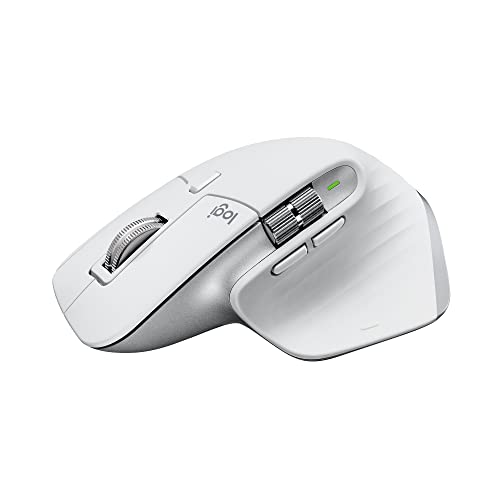
This is the flagship for an iPad Pro docked at a desk with an external display. The 8,000 DPI sensor tracks on glass, quiet clicks keep the room calm, and the MagSpeed wheel handles long timelines and spreadsheets without endless spinning. Seven buttons take shortcuts through Logi Options+, and Bluetooth Low Energy pairs with up to three devices, so the same mouse can serve the tablet, a laptop, and a desktop. The rechargeable cell lasts up to 70 days per charge, and a one-minute quick charge gives three hours of use when you forget to plug it in.
Specs
- 8,000 DPI track-on-glass sensor
- Quiet Clicks with 90% less click noise
- MagSpeed electromagnetic scrolling
- 7 buttons, customizable with Logi Options+
- Rechargeable 500 mAh Li-Po battery, up to 70 days per charge
- Bluetooth Low Energy, pairs with up to 3 devices
- USB-C charging, 1-minute quick charge for 3 hours of use
- Weight: 141 g; Dimensions: 51 x 84.3 x 124.9 mm
Best for: Desk workers who pair the iPad Pro with a large external display.
Watch out for: At 141 g it is the heaviest mouse here, so it suits a fixed desk better than a travel sleeve.
Logitech Lift Vertical Ergonomic Mouse

The Lift Vertical suits iPad Pro owners whose wrist aches after a full day of writing and research. Its 57-degree grip holds the hand in a natural handshake position instead of flattening the wrist onto the desk, and the soft rubber grip plus a thumb rest keeps the hand relaxed without gripping hard. It is sized for small to medium right hands, and quiet clicks suit libraries and shared rooms. It connects to three devices through Bluetooth or the Logi Bolt receiver, and a single AA cell runs it for up to two years.
Specs
- 57-degree vertical grip for a natural handshake position
- Quiet clicks
- 4 buttons
- Bluetooth or Logi Bolt USB receiver
- Connects to up to 3 devices
- Up to 24-month battery life on one AA cell
- Sized for small to medium hands, right hand
- Weight: 125 g; dimensions: 108 x 71 x 70 mm
Best for: Owners with wrist strain who work long sessions at a desk.
Watch out for: The vertical grip needs a few days of adjustment, and the right-hand shape does not suit left-handed users.
Logitech M240 Silent

This is the mouse for iPad Pro owners who want quiet, simple pointing without extra buttons, software, or setup. It connects over Bluetooth in seconds with no dongle taking up a port, and its clicks are 90% quieter than a standard mouse, which matters in libraries, shared offices, and late-night work. The compact, ambidextrous body fits either hand and small bags, tracks at 1,000 DPI for everyday pointing, and runs for up to 18 months on the included AAA battery. It does one job, and it does it without demanding attention.
Specs
- Bluetooth wireless connection, no dongle required
- 90% reduced click sound with the same click feel
- Up to 18-month battery life with auto sleep
- 1 AAA battery included
- 1,000 DPI optical sensor
- 3 buttons, ambidextrous design
- Weight: 73.8 g; Dimensions: 1.54 x 2.36 x 3.9 inches
- Compatible with macOS, Windows, ChromeOS, and Linux
Best for: Quiet rooms and buyers who want the simplest Bluetooth mouse here.
Watch out for: There are no side buttons and no fast scroll wheel, so heavy document work feels slower than on the MX models.
Which One Fits Your Situation
You Travel With the iPad Pro Every Day
Pick the Logitech MX Anywhere 3S. It is the smallest premium mouse here, it tracks on glass cafe tables without a pad, and it charges over the same USB-C cable as the tablet. The three-device Bluetooth pairing also covers a phone and a second computer, so one mouse handles the whole kit you carry.
You Want Gestures, Not Buttons
Pick the Apple Magic Mouse. Its Multi-Touch surface turns scrolling and swiping into finger gestures, and the listing confirms it works with iPadOS 18.1 or later. It is the only pick here that feels like a direct extension of the iPad Pro’s touchscreen, which makes it the natural choice for owners who live inside Apple’s ecosystem.
You Dock the iPad Pro at a Desk
Pick the Logitech MX Master 3S for Mac. Its full-size body supports the palm through long sessions, the high-resolution sensor stays precise on a large external display, and seven customizable buttons cover the shortcuts that a small travel mouse cannot. If your wrist aches instead, the Lift Vertical is the better desk pick.
You Want Quiet and Simple Above All
Pick the Logitech M240 Silent. It pairs over Bluetooth in seconds, its clicks are 90% quieter than a standard mouse, and one AAA cell lasts up to 18 months. It gives up extra buttons and fast scrolling, but for reading, browsing, and note-taking in shared rooms, that trade is easy to accept.
Common Mistakes
- Buying a receiver-only mouse and discovering the iPad Pro has no USB-A port for it.
- Choosing a full-size desk mouse for a tablet that travels in a small sleeve every day.
- Expecting a mouse to replace the Apple Pencil for sketching and handwriting.
- Ignoring battery type and ending up with a dead mouse and no spare cell on a trip.
- Picking a vertical mouse without checking whether it is shaped for your dominant hand.
Frequently Asked Questions
Does a wireless mouse work with an iPad Pro?
Yes. iPadOS supports Bluetooth mice, and the pointer appears as a small circle that changes shape over links and text fields. Pair the mouse from Settings, then Bluetooth, and it reconnects automatically when switched on. Right-click works in most apps, and scroll wheels handle long pages. Some apps treat the pointer differently from touch, so a few gestures still need a finger on the screen.
Do I need a USB receiver for an iPad Pro?
No, and a receiver is usually the wrong choice. Every current iPad Pro has USB-C ports only, so a USB-A receiver needs an adapter and occupies a port. All five mice in this guide connect over Bluetooth, which leaves every port free. A USB-C adapter will let a receiver-only mouse work, but buying Bluetooth from the start is simpler.
Can I use the same mouse with my iPad Pro and a Mac?
Yes, if the mouse pairs with more than one device. The Logitech MX Anywhere 3S, MX Master 3S, and Lift all pair with up to three devices and switch between them with a button, so the iPad Pro, a Mac, and a phone can share one mouse. The Magic Mouse pairs with Apple devices too. Check the listing for multi-device support before buying.
Is the Magic Mouse a good match for an iPad Pro?
It is the best match for owners who want gestures, since its Multi-Touch surface handles scrolling and swiping the way the touchscreen does. The listing states it requires iPadOS 18.1 or later, so update the tablet first if it runs an older version. The charging port sits on the underside, so it cannot be used while charging, and the flat shape suits short sessions better than all-day desk work.
FAQ
Does a wireless mouse work with an iPad Pro?
Do I need a USB receiver for an iPad Pro?
Can I use the same mouse with my iPad Pro and a Mac?
Is the Magic Mouse a good match for an iPad Pro?
More from Amazon
Programs that pair well with the guide above. Offers and eligibility are set by Amazon and may change.
A free business account with business pricing and bulk-buying tools for work, shop or home office.
Create a business accountFree shipping on eligible items, Prime Video and more. Eligible new members can start with a free trial.
Start a Prime free trialAudiobooks and podcasts to listen to on the go. Eligible new members can start with a free trial.
Try Audible freeAd-free music streaming. Eligible new subscribers can start with a free trial.
Try Music Unlimited freeAs an Amazon Associate we earn from qualifying purchases.



Write Your Review
No reviews yet. Be the first to share your experience!