
Key takeaways
- Find a keyboard for your iPad Air, from the pocketable Logitech K380 to the mechanical Keychron K2 Max, with Bluetooth, USB-C, and Mac-layout picks.
The real choice for an iPad Air owner is not which brand to buy but which shape of keyboard fits the way the tablet gets used. A keyboard case turns the tablet into a laptop-like unit, while a standalone Bluetooth board pairs with the tablet, a phone, and a computer, and usually types better for the same money. Connection matters just as much: the iPad Air has a single USB-C port and no USB-A socket, so Bluetooth keeps that port free for charging, and any board that depends on a wireless receiver needs an adapter before it will work.
This guide is for students taking notes in lectures, remote workers turning the tablet into a second workstation, and writers who want a full-size typing feel without carrying a laptop. Every board below was picked from its name and specifications on its Amazon listing, with attention to the connection type, the layout, the size, and how it charges, so the choice comes down to where and how long you type.
Quick Picks
As an Amazon Associate we earn from qualifying purchases
| Product | Best for | Key spec from title |
|---|---|---|
| Logitech K380 | Packing light for class or a cafe | Multi-device Bluetooth keyboard |
| Apple Magic Keyboard (USB-C) | A clean Mac-style desk setup | Bluetooth keyboard with USB-C charging |
| Logitech MX Mechanical Mini for Mac | Quiet mechanical typing in a small frame | Low-profile mechanical keyboard for Mac |
| Keychron K2 Max | Custom mechanical typing with three connections | 75% QMK mechanical keyboard, 84 keys |
| Logitech MX Keys S for Mac | Switching between tablet, Mac, and phone | Backlit Mac keyboard with Easy-Switch |
How to Choose
Keyboard case or standalone board
A keyboard case clips onto the tablet, adds a stand and a layer of protection, and folds into a laptop shape that is ready the moment it opens. That convenience has a trade: the case fits one tablet size only, and the keys are shallow to keep the unit thin. A standalone board skips the attachment and pairs over Bluetooth, so it works with any tablet or computer you own and offers a free choice of key feel and layout. The catch: the tablet needs its own stand to hold it upright. Pick a case when the tablet travels as a single unit every day; pick a standalone board when typing comfort matters more than the one-piece shape.
Bluetooth or USB-C connection
Bluetooth is the natural fit for the iPad Air because it leaves the single USB-C port open for charging or a monitor while you type. Pairing takes seconds, and most boards below remember three devices, so one board can serve the tablet, a phone, and a computer. A wired USB-C connection is the fallback for low-battery moments, but it ties up the port while the cable is plugged in, which blocks charging at the same time. Boards that also offer a 2.4 GHz wireless receiver need a USB-C adapter, since the tablet has no USB-A socket for the dongle. Choose Bluetooth first, keep USB-C as the backup, and skip receiver-only boards unless the adapter is already in the bag.
Layout that matches iPadOS
iPadOS borrows its shortcuts from the Mac, so a board with Mac legends pays off from the first day. Look for Command, Option, and Control in the right places, plus a function row that reaches brightness, volume, and media without touching the screen. A Globe key or a shortcut row that opens search and the app switcher keeps the hands on the keys instead of the glass. Windows legends put Alt and a Windows key where the fingers expect Command, which slows down copy, paste, and undo for weeks. If a board offers a physical switch between Mac and Windows legends, set it to Mac before the first pairing so the legends and the shortcuts agree.
Size, key feel, and battery
A board that lives in a bag needs a different shape from one that never leaves a desk. Compact boards around eleven inches wide slip beside the tablet in a sleeve, though they drop the number pad and shrink a few keys. Full-size boards suit spreadsheets and data entry, but their width makes them a poor travel companion. Key feel decides whether typing stays comfortable after the first hour: mechanical switches give a firm, tactile press, while quiet scissor keys suit shared rooms and libraries. Check how the board charges, too: USB-C rechargeable boards top up with the same cable as the tablet, while boards that run on disposable cells need spares in the bag.
The 5 Best Options
Logitech K380

The Logitech K380 is the board to pack when the iPad Air travels everywhere and the bag has no room to spare. Its round, low-profile keys sit in a compact frame barely wider than the tablet itself, and the whole board weighs under a pound, so it disappears into a sleeve beside the tablet. Easy-Switch keys move it between the tablet, a phone, and a computer with one tap, which suits students and commuters who switch devices all day. It runs on a single AA battery and pairs over Bluetooth, so there is no cable to pack and no port taken up on the tablet.
Specs
- Bluetooth wireless connection
- Easy-Switch pairing for up to 3 devices
- Compatible with macOS, iPadOS, iOS, Windows, Chrome OS, and Android
- Product dimensions: 10.9 x 4.9 x 0.6 inches
- Item weight: 14.4 ounces
- Batteries: 1 AA battery required, included
- Item model number: 920-007558
Best for: Students and commuters who want the lightest board that still types well.
Watch out for: No backlight for dim rooms, and it runs on a disposable AA battery rather than USB-C charging.
Apple Magic Keyboard (USB-C)

The Apple Magic Keyboard with USB-C is the desk pick for iPad Air owners who want the same typing feel as a MacBook. Its scissor keys give a quiet, stable press with very little travel, and the low-profile aluminum frame sits flat on a desk without sliding around. The board pairs over Bluetooth and charges through its USB-C port, using the same cable as the tablet, and the woven USB-C charge cable comes in the box. The US English layout matches iPadOS shortcuts exactly, so Command, Option, and the function row behave the way Mac users expect from the first keystroke.
Specs
- Bluetooth wireless connectivity
- USB-C port for charging and pairing
- Woven USB-C Charge Cable included
- US English layout
- Product dimensions: 12.13 x 6 x 0.73 inches
- Item model number: MXCL3LL/A
Best for: A clean desk setup where the tablet pairs with a board that feels like a MacBook.
Watch out for: No backlight, no multi-device switching, and the full-width frame is wider than the tablet, so it suits a desk better than a bag.
Logitech MX Mechanical Mini for Mac
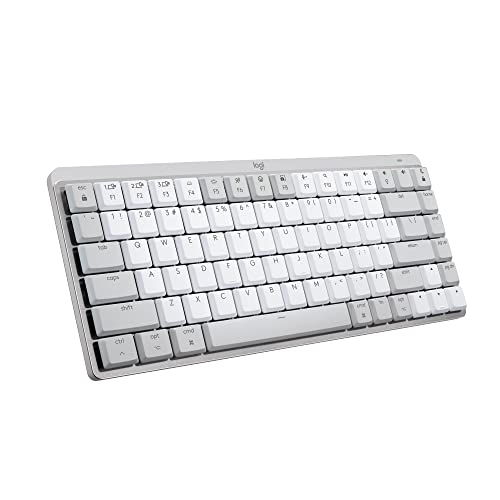
The Logitech MX Mechanical Mini for Mac is the pick for iPad Air owners who want mechanical feedback without the noise and bulk of a full mechanical board. Its low-profile Tactile Quiet switches give a clear press with far less clatter than standard mechanical switches, which matters in a shared room or a library. The compact frame drops the number pad to keep the footprint small, and the backlit keys stay readable in dim light. Bluetooth pairing and USB-C charging match the tablet, and the Mac-specific layout puts Command, Option, and Control exactly where iPadOS expects them.
Specs
- Compact low-profile mechanical design
- Tactile Quiet switches
- Backlit keys
- Bluetooth connection with USB-C charging
- Mac-specific layout for Apple computers and iPad
Best for: Writers who want a mechanical feel in a quiet, travel-friendly frame.
Watch out for: The included wireless receiver needs a USB-C adapter since the iPad Air has no USB-A port, so pair over Bluetooth instead.
Keychron K2 Max

The Keychron K2 Max is the board for iPad Air owners who type for hours and want to shape the board to their own habits. Its 75 percent layout packs 84 keys into a compact frame, and the hot-swappable design lets the switches change later without soldering. QMK support allows remapping keys and building shortcuts, while a system toggle flips the legends between Mac and Windows, with extra keycaps for both systems in the box. It connects by 2.4 GHz wireless, Bluetooth, or wired USB-C, so the tablet pairs over Bluetooth while the cable stays ready as a backup, and the white backlight keeps evening sessions readable.
Specs
- 75% layout with 84 keys
- QMK support for remapping keys
- Connects by 2.4 GHz wireless, Bluetooth, or wired USB-C
- Bluetooth 5.1 pairs with up to 3 devices
- White backlight in this listing
- Super Red switches in this listing
- 4000 mAh rechargeable li-polymer battery
- Works with Mac, Windows, and Linux
Best for: Tinkerers who want a mechanical board they can remap and rebuild over time.
Watch out for: The 2.4 GHz receiver needs a USB-C adapter on the iPad Air, and at 3.3 pounds it is heavy for a travel bag.
Logitech MX Keys S for Mac

The Logitech MX Keys S for Mac is the desk pick for iPad Air owners who switch between the tablet, a Mac, and a phone all day. Its spherically dished keys give a fluid, laptop-like press, and the backlight brightens as the hands approach, then fades when typing stops. Easy-Switch keys pair with up to three devices, so one tap moves the board from the tablet to the computer, and the Mac-specific layout puts Command and Option where iPadOS users expect them. Programmable keys handle shortcuts and repeated actions, and the USB-C rechargeable battery tops up with the same cable as the tablet.
Specs
- Mac-specific layout with Command and Option keys
- Backlit keys
- Easy-Switch keys pair with up to three devices
- Fluid, precise laptop-like typing
- Programmable keys for shortcuts and repeated actions
- Bluetooth connection with USB-C rechargeable battery
Best for: A shared desk where one board serves the tablet, a Mac, and a phone.
Watch out for: No number pad, so heavy spreadsheet work may call for a full-size board instead, and confirm the listing is the Mac version before ordering.
Which One Fits Your Situation
You carry the iPad Air everywhere
Pick the Logitech K380. Its compact frame and light weight fit in a sleeve beside the tablet, and Bluetooth pairing means no cable or dongle to pack. Easy-Switch moves it between the tablet and a phone in one tap, and the single AA battery lasts long enough that charging never interrupts a lecture or a commute.
You want a MacBook-like desk setup
Pick the Apple Magic Keyboard with USB-C. Its scissor keys and low-profile frame feel like a MacBook, and the USB-C port charges with the same cable as the tablet. The US English layout matches iPadOS shortcuts exactly. If multi-device switching matters more than the Apple feel, step up to the MX Keys S for Mac instead.
You want mechanical keys without the noise
Pick the Logitech MX Mechanical Mini for Mac. Its Tactile Quiet switches give a clear mechanical press with far less clatter than standard switches, and the backlight keeps dim rooms readable. The compact frame travels well, and the Mac layout matches iPadOS from the first pairing. For a board you can remap and rebuild, choose the Keychron K2 Max instead.
You switch between tablet, Mac, and phone
Pick the Logitech MX Keys S for Mac. Easy-Switch pairs with up to three devices, so one tap moves the board from the tablet to the computer and back in seconds. The backlit, laptop-like keys suit long desk sessions, and the USB-C battery charges with the same cable as the tablet.
Common Mistakes
- Buying a board that only connects through a USB receiver, then finding the iPad Air has no USB-A socket for the dongle.
- Choosing a keyboard case sized for a different iPad model, then finding it does not fit the Air.
- Picking a Windows-first layout, then fighting Alt and Windows legends where iPadOS expects Command and Option.
- Choosing a full-size board for a travel bag, then leaving it home because it never fits beside the tablet.
- Assuming every Bluetooth keyboard supports iPadOS, without checking the listing for iPadOS compatibility first.
Frequently Asked Questions
Do Bluetooth keyboards work with iPad Air?
Yes. iPadOS pairs with standard Bluetooth keyboards, and Command, Option, and Control shortcuts work the same way they do on a Mac. Turn on Bluetooth in Settings, put the board in pairing mode, and select it from the device list. A board with Mac legends avoids confusion, and Easy-Switch or multi-device pairing lets one board move between the tablet and a computer.
Can I use a wired keyboard with iPad Air?
Yes, through the USB-C port. A board with a USB-C cable connects directly, and the tablet treats it like any standard keyboard. The trade-off is the port: while the cable is plugged in, you cannot charge or attach a monitor through that same socket. For most owners, Bluetooth is the better daily connection, with the wired cable kept as a backup for low-battery moments.
Do I need a keyboard case instead of a standalone board?
Not necessarily. A keyboard case adds a trackpad, protection, and a built-in stand, which suits owners who want a laptop shape in one unit. A standalone board gives better key feel, more layout choices, and the freedom to pair with any tablet or computer. If the tablet mostly sits on a desk, a standalone board wins; if it travels everywhere in one bag, a case is the tidier choice.
Will a Mac keyboard work with iPad Air?
Yes, as long as it connects over Bluetooth or USB-C. Mac layouts match iPadOS shortcuts, so Command, Option, and the function row behave as expected. Two things will not carry over: Touch ID only works with Apple silicon Macs, and a USB receiver needs an adapter since the tablet has no USB-A port. Check the connection and the legends before ordering, and the board should feel at home.
FAQ
Do Bluetooth keyboards work with iPad Air?
Can I use a wired keyboard with iPad Air?
Do I need a keyboard case instead of a standalone board?
Will a Mac keyboard work with iPad Air?
More from Amazon
Programs that pair well with the guide above. Offers and eligibility are set by Amazon and may change.
A free business account with business pricing and bulk-buying tools for work, shop or home office.
Create a business accountFree shipping on eligible items, Prime Video and more. Eligible new members can start with a free trial.
Start a Prime free trialAudiobooks and podcasts to listen to on the go. Eligible new members can start with a free trial.
Try Audible freeAd-free music streaming. Eligible new subscribers can start with a free trial.
Try Music Unlimited freeAs an Amazon Associate we earn from qualifying purchases.

Write Your Review
No reviews yet. Be the first to share your experience!