
Key takeaways
- Find the best printers for Mac users, from AirPrint all-in-ones to compact lasers. Compare five Mac-friendly picks and choose the right one.
Disclosure: As an Amazon Associate, we earn from qualifying purchases made through links in this article.
Finding a printer that plays nicely with a Mac should be simple, yet anyone who has wrestled with a missing driver knows it is not always that easy. Apple computers work best with printers that support AirPrint, offer a proper macOS driver, and connect over Wi-Fi without extra software.
This guide covers five printers that work well with macOS, from versatile color all-in-ones to a tiny monochrome laser. Each one supports AirPrint, so you can print from a Mac, iPhone, or iPad without installing anything.
How to Choose a Printer for Your Mac
Before comparing models, it helps to know which features matter most on macOS. A printer that checks these boxes will give you the smoothest experience.
AirPrint support. AirPrint is Apple’s driver-free printing technology. When a printer supports it, your Mac discovers it automatically on the same Wi-Fi network and prints without a driver download. Every printer in this guide supports AirPrint, and it is the single most useful feature for Mac owners.
A native macOS driver and app. AirPrint covers everyday printing, but a full driver unlocks extras such as borderless photo printing, custom paper sizes, and ink level monitoring. Check that the manufacturer still ships a current macOS driver for your version of the operating system. HP Smart, Canon PRINT, Epson Smart Panel, and Brother iPrint&Scan all run on macOS and add scanning and maintenance tools.
Connection options. Wi-Fi is the default for most Mac setups. If your desk sits far from the router, dual-band Wi-Fi or a USB connection is worth having.
Print, scan, and copy in one box. An all-in-one handles scanning and copying as well as printing, which is handy for digitizing paperwork. If you only ever print documents, a single-function laser saves space and stays simpler.
Duplex printing. Automatic two-sided printing halves paper use and keeps multi-page documents tidy. It is a standard feature on most mid-range models now and is worth prioritizing.
Ink or toner running costs. Cartridge inkjets suit light use. Tank printers suit heavy color printing. Laser printers suit mostly black-and-white documents and sit idle for weeks without clogged nozzles.
Size and noise. Measure your desk before you buy. Compact lasers fit on a shelf, while full-featured all-in-ones need more room and make more noise during warm-up.
1. HP OfficeJet Pro 9125e
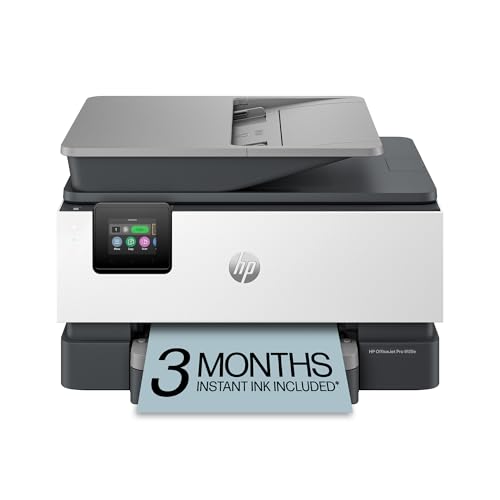
The HP OfficeJet Pro 9125e is a strong all-round choice for Mac users who want one machine that handles documents, color graphics, and scanning without fuss. It connects over dual-band Wi-Fi with self-healing, supports AirPrint, and works with the HP Smart app on macOS for scanning, copying, and ink monitoring.
Print speeds reach up to 22 pages per minute in black and 18 in color, with automatic duplex printing built in. The 250-sheet input tray suits a busy household or small home office, and the 35-sheet automatic document feeder makes multi-page scanning straightforward.
For Mac users, the appeal is the setup experience. Add the printer in System Settings and it appears over AirPrint right away, while HP Smart adds deeper controls when you want them.
Specs
- Type: Color inkjet all-in-one (print, scan, copy, fax)
- Connectivity: Dual-band Wi-Fi with self-healing, USB, Ethernet, AirPrint
- Print speed: Up to 22 ppm black, 18 ppm color
- Duplex printing: Automatic
- Paper capacity: 250-sheet input tray, 35-sheet ADF
- Display: 2.7-inch color touchscreen
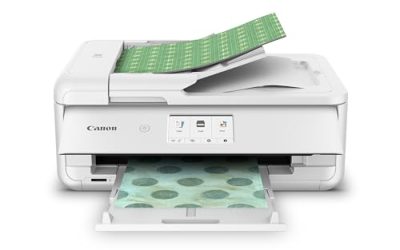
2. Canon PIXMA TR8620a

The Canon PIXMA TR8620a suits Mac users who print photos as well as documents. Its five individual ink tanks include a pigment black for crisp text and dye-based colors for vivid images, and it prints borderless photos up to 8.5 by 11 inches. A built-in SD card slot lets you print photos straight from a camera card.
AirPrint support means it works with a Mac out of the box, and the Canon PRINT app adds wireless scanning and cloud printing. The 4.3-inch touchscreen, 200-sheet capacity across two trays, and 20-sheet feeder cover most home office needs.
This is the pick for a Mac user with a photo library to enjoy. Color output is rich, and the separate ink tanks mean you replace only the color that runs out.
Specs
- Type: Color inkjet all-in-one (print, scan, copy, fax)
- Connectivity: Wi-Fi, USB, AirPrint, SD card slot
- Print speed: Up to 15 ipm black, 10 ipm color
- Duplex printing: Automatic
- Paper capacity: 100-sheet front cassette, 100-sheet rear tray, 20-sheet ADF
- Display: 4.3-inch color touchscreen
- Photo printing: Borderless up to 8.5 x 11 inches
3. Epson EcoTank ET-2850

The Epson EcoTank ET-2850 takes a different approach to ink. Instead of cartridges, it uses large refillable tanks that hold enough ink for thousands of pages. That makes it a smart choice for Mac users who print a lot of color documents, school projects, or photos and want to refill ink rarely.
It supports AirPrint and works with the Epson Smart Panel app on macOS for setup, scanning, and maintenance. Print speeds reach 10.5 pages per minute in black and 5 in color, with automatic two-sided printing and a 100-sheet rear feed.
The ET-2850 is available in black and white finishes, so it blends into most desks. Its compact footprint is a bonus in a small home office.
Specs
- Type: Color inkjet all-in-one with refillable ink tanks (print, scan, copy)
- Connectivity: Wi-Fi, USB, AirPrint
- Print speed: Up to 10.5 ppm black, 5 ppm color
- Duplex printing: Automatic
- Paper capacity: 100-sheet rear feed
- Display: 1.44-inch color display
- Ink system: Cartridge-free EcoTank with refillable bottles
4. Brother MFC-J4335DW

The Brother MFC-J4335DW is a compact color inkjet all-in-one built around Brother’s INKvestment Tank system, which ships with up to a year of ink in the box. It is a practical fit for a Mac-based home office that needs color printing, scanning, and copying without a large machine taking over the desk.
AirPrint covers printing from any Mac, iPhone, or iPad on the same network, and Brother iPrint&Scan adds scanning and device management on macOS. Print speeds reach up to 20 pages per minute in black and 19 in color, with automatic duplex printing and a 20-sheet feeder.
Brother’s macOS drivers have a solid track record, and the machine wakes quickly from sleep, which matters when you print in short bursts between tasks.
Specs
- Type: Color inkjet all-in-one (print, scan, copy, fax)
- Connectivity: Wi-Fi, USB, AirPrint
- Print speed: Up to 20 ppm black, 19 ppm color
- Duplex printing: Automatic
- Paper capacity: 150-sheet tray, 20-sheet ADF
- Display: 1.8-inch color display
- Ink system: INKvestment Tank with up to a year of ink included
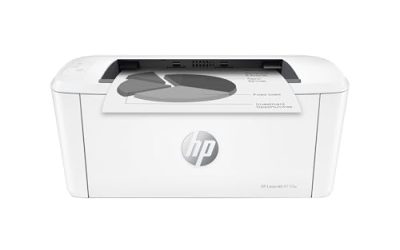
5. HP LaserJet M110w
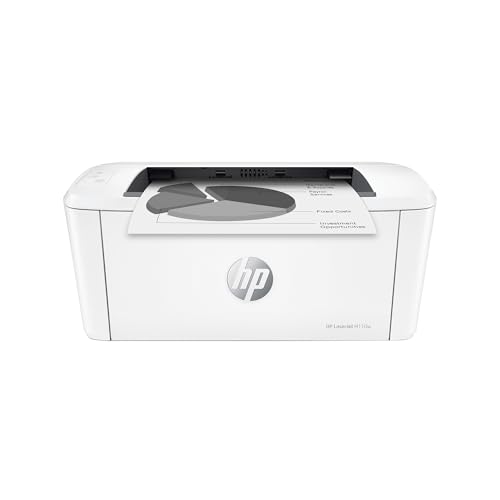
The HP LaserJet M110w is the simplest printer in this guide, and for many Mac users that is exactly the point. It prints black-and-white documents only, but it does so quickly, quietly, and from a body small enough to fit on a bookshelf. HP calls it the smallest laser printer in its class.
AirPrint and the HP Smart app cover setup and printing on macOS, and dual-band Wi-Fi with self-reset keeps the connection stable. It prints up to 21 pages per minute, holds 150 sheets, and uses a preinstalled toner cartridge.
Choose this one if your printing is almost entirely documents, forms, and school or work papers, and you want a machine that simply works whenever you need it.
Specs
- Type: Monochrome laser printer (print only)
- Connectivity: Dual-band Wi-Fi with self-reset, USB, AirPrint
- Print speed: Up to 21 ppm black
- Duplex printing: Manual
- Paper capacity: 150-sheet input tray
- Size: Compact, smallest laser in its class
- Toner: Preinstalled HP toner cartridge included
Comparison
| Printer | Type | Best For | Duplex | AirPrint |
|---|---|---|---|---|
| HP OfficeJet Pro 9125e | Color inkjet all-in-one | Busy home offices | Automatic | Yes |
| Canon PIXMA TR8620a | Color inkjet all-in-one | Photos and documents | Automatic | Yes |
| Epson EcoTank ET-2850 | Tank inkjet all-in-one | Heavy color printing | Automatic | Yes |
| Brother MFC-J4335DW | Color inkjet all-in-one | Compact home offices | Automatic | Yes |
| HP LaserJet M110w | Monochrome laser | Documents only | Manual | Yes |
If you want one machine for everything, the HP OfficeJet Pro 9125e or the Brother MFC-J4335DW cover the most ground. Photo lovers should lean toward the Canon PIXMA TR8620a, heavy color printers toward the Epson EcoTank ET-2850, and document-only users toward the HP LaserJet M110w.
Frequently Asked Questions
Do I need to install a driver to print from a Mac?
No, not for basic printing. Every printer here supports AirPrint, so your Mac finds it on your Wi-Fi network and prints without a driver. Install the manufacturer’s app only if you want extras such as advanced scanning.
Can I print from an iPhone or iPad to these printers?
Yes. AirPrint works across Apple devices, so the same printer serves your Mac, iPhone, and iPad with no extra setup.
Which type is better for a Mac user, inkjet or laser?
It depends on what you print. Inkjets handle color and photos, and tank models keep refills rare. Lasers suit mostly black-and-white documents, since toner never dries out between uses.
Will these printers work with Apple silicon Macs?
Yes. AirPrint is built into macOS on both Intel and Apple silicon Macs, and the manufacturers’ current macOS apps support Apple silicon.
What should I do if my Mac cannot find the printer?
Check that the printer and the Mac share the same Wi-Fi network, restart both devices, and confirm the printer firmware is current.
Conclusion
The best printer for a Mac is one you never have to think about, and AirPrint support is what makes that possible. The HP OfficeJet Pro 9125e is the most versatile all-rounder here, the Canon PIXMA TR8620a is the pick for photo printing, the Epson EcoTank ET-2850 suits heavy color use, the Brother MFC-J4335DW fits smaller desks, and the HP LaserJet M110w is the no-fuss choice for documents. Match the machine to what you print most, check that it fits your space, and your Mac will handle the rest.
More from Amazon
Programs that pair well with the guide above. Offers and eligibility are set by Amazon and may change.
A free business account with business pricing and bulk-buying tools for work, shop or home office.
Create a business accountFree shipping on eligible items, Prime Video and more. Eligible new members can start with a free trial.
Start a Prime free trialAudiobooks and podcasts to listen to on the go. Eligible new members can start with a free trial.
Try Audible freeAd-free music streaming. Eligible new subscribers can start with a free trial.
Try Music Unlimited freeAs an Amazon Associate we earn from qualifying purchases.

Write Your Review
No reviews yet. Be the first to share your experience!