
Key takeaways
- Compare five printers for crafting stickers, greeting cards, decals and iron-on transfers, with media handling, ink systems and paper sizes explained.
The real decision when buying a printer for crafting is not which machine prints the prettiest photo on plain paper. It is which machine handles the unusual media a craft room actually uses: thick card stock, sticker sheets, printable vinyl, iron-on transfer sheets, and 12 x 12 inch scrapbook paper, without jamming, smearing, or curling the sheet. A standard home printer can choke on those materials, waste expensive specialty sheets, and turn a fun afternoon into a troubleshooting session.
This guide is for sticker makers, card makers, scrapbookers, and home sellers who print decals, labels, and iron-on designs from a home craft room. Every printer below was chosen from its Amazon listing name and the specifications shown on that listing, with attention to media handling, print resolution, ink system, and supported paper sizes, so you can match a machine to the projects you make most often.
Quick Picks
As an Amazon Associate we earn from qualifying purchases
| Product | Best for | Key spec from title |
|---|---|---|
| Canon PIXMA TS9521Ca | Scrapbooking and greeting cards on 12 x 12 inch paper | 4800 x 1200 dpi, 12 x 12 inch borderless printing |
| Epson EcoTank ET-2800 | Daily sticker and printable batches on refillable ink | Cartridge-free supertank with scan and copy |
| Epson EcoTank Photo ET-8550 | Large art prints and posters up to 13 x 19 inches | 6-color Claria ET inks, wide-format 13 x 19 inch |
| Epson Expression Photo XP-970 | Compact wide-format photo and art prints | 6-color Claria Photo HD inks, up to 11 x 17 inch |
| HP ENVY 6055e | Starting out with cards and stickers on a tight budget | Wireless color inkjet with mobile printing |
How to Choose
Media Thickness and Paper Path
Crafting media is thicker and stiffer than office paper, so the paper path matters more than raw speed. Look for a rear feed or a straight-through path, and check the listing for card stock support before you buy. A printer that only feeds from a front cassette may curl thick sheets or jam on printable vinyl. Test the heaviest material you plan to use, such as 65 lb card stock or vinyl sheets, with a single sheet first. If the printer handles that sheet cleanly, it will handle lighter sticker paper and transfer sheets too. Also check whether borderless printing works on your chosen media, since many crafters print edge-to-edge designs for stickers and cards.
Print Size and Borderless Output
Most craft projects use letter size, but scrapbookers need 12 x 12 inch square sheets and art sellers often want 11 x 17 or 13 x 19 inch prints. A printer limited to letter size forces you to cut designs down or send large work elsewhere, which adds time and waste. Check the maximum media size on the listing and confirm that borderless printing covers the sizes you use, because a white edge around a sticker sheet or a greeting card looks unfinished. If you make posters, banners, or large art prints, a wide-format model is worth the extra desk space. For cards and stickers alone, a standard-size model with 12 x 12 inch support is enough.
Ink System and Output Durability
Cartridge printers are cheaper to buy, while refillable tank printers hold far more ink and suit people who print sticker batches every week. Dye inks give bright, vivid color on glossy sticker paper and photo paper, while pigment inks resist water and fading better on items that get handled a lot, such as labels and decals. Think about how your finished pieces will be used: a sticker on a water bottle needs tougher output than a greeting card kept indoors. Also consider how often you print, because inkjets that sit unused for weeks can clog. A tank system rewards frequent printing, while an occasional crafter may prefer simple cartridges.
Print-and-Cut Workflow and Connectivity
Many crafters print a design and then cut it with a cutting machine, so the printer must place the image accurately on the sheet with clean edges and correct colors. Wireless printing from a phone or tablet helps when your design app lives on a mobile device, and an SD card slot lets you print photos without a computer nearby. Check that the printer works with the design software and cutting machine you already own, since a mismatch can force you to export files through extra steps. Auto two-sided printing is a bonus for folded greeting cards and booklet-style projects, saving you from flipping sheets by hand.
The 5 Best Options
Canon PIXMA TS9521Ca

Canon built this model specifically for crafters, and it shows in the media support: it prints borderless 12 x 12 inch scrapbook sheets and 11 x 17 inch pages, which covers the two sizes crafters ask about most. The 4.3-inch touchscreen and SD card slot make it easy to print photos straight from a camera card, and the built-in pattern library helps with quick greeting cards and scrapbook backgrounds. It suits scrapbookers, card makers, and anyone who prints on thick card stock regularly.
Specs
- Print resolution up to 4800 x 1200 dpi
- Borderless printing on 12 x 12 inch and 11 x 17 inch media
- 4.3-inch touchscreen display
- SD card slot for PC-free photo printing
- Auto two-sided printing
- Wi-Fi and Bluetooth connectivity
- Print, scan, and copy functions
Best for: Scrapbookers and card makers who print 12 x 12 inch sheets and thick card stock.
Watch out for: It uses cartridges rather than refillable tanks, so check how often you print sticker and card batches before committing.
Epson EcoTank ET-2800
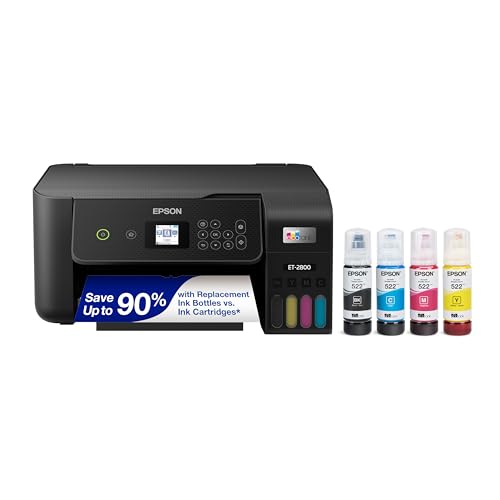
The ET-2800 is the workhorse pick for crafters who print stickers and printables in volume. Its refillable ink tanks hold far more ink than cartridges, so a single fill covers many batches of sticker sheets, planner pages, and iron-on designs. Wireless printing from a phone keeps the workflow simple, and the compact body fits a crowded craft desk. It suits sticker sellers and hobbyists who print color sheets several times a week and want to stop thinking about ink.
Specs
- Cartridge-free refillable ink tank system
- Print, scan, and copy functions
- Wireless printing from phones, tablets, and computers
- Up to 4,500 black pages per ink set
- Up to 7,500 color pages per ink set
- Print resolution up to 5760 x 1440 dpi
Best for: Sticker makers and printable sellers who print color sheets in volume every week.
Watch out for: It handles standard and photo media well, but confirm your thickest card stock feeds cleanly before running a large batch.
Epson EcoTank Photo ET-8550
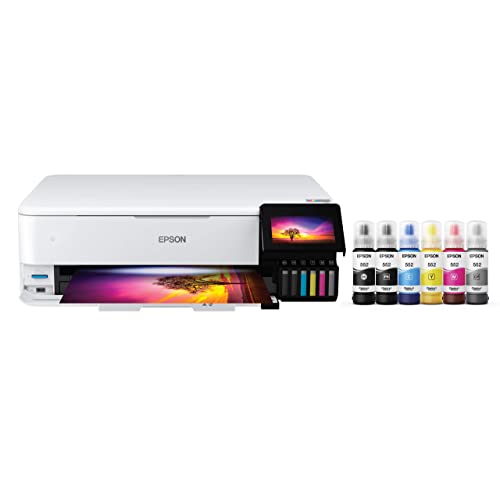
The ET-8550 is the wide-format choice for crafters who sell art prints, posters, and large decals. Its six-color Claria ET ink set produces smooth gradients and rich color on photo paper, and it prints media up to 13 x 19 inches, which covers poster-size work without a trip to a print shop. The refillable tanks keep ink spending low across large runs, and the 4.3-inch touchscreen makes it easy to print without a computer. It suits art sellers and serious hobbyists with desk space to spare.
Specs
- 6-color Claria ET ink set with photo black and gray
- Wide-format printing up to 13 x 19 inches
- Print resolution up to 5760 x 1440 dpi
- 4.3-inch color touchscreen display
- Print, scan, and copy functions
- 100-sheet input capacity
- Ethernet and wireless connectivity
Best for: Art print sellers and crafters who need poster-size 13 x 19 inch output.
Watch out for: It is a large, heavy machine, so measure your craft desk and shelf clearance before ordering.
Epson Expression Photo XP-970

The XP-970 packs wide-format printing into a compact body, making it a good fit for craft rooms where desk space is tight. Its six-color Claria Photo HD ink set delivers vivid color on photo paper and sticker sheets, and it prints up to 11 x 17 inches for larger art prints and posters. Wireless printing and auto two-sided printing cover everyday card and photo jobs, while the scanner handles copying hand-drawn designs. It suits crafters who want large prints without a large machine.
Specs
- 6-color Claria Photo HD ink set
- Wide-format printing up to 11 x 17 inches
- Print resolution up to 5760 x 1440 dpi
- Auto two-sided printing
- Wireless printing from phones, tablets, and computers
- Print, scan, and copy functions
- 4.3-inch touchscreen display
Best for: Crafters with limited desk space who still want 11 x 17 inch art prints.
Watch out for: Availability of new units is less certain than for the other models here, so confirm the listing shows a new unit in stock before buying.
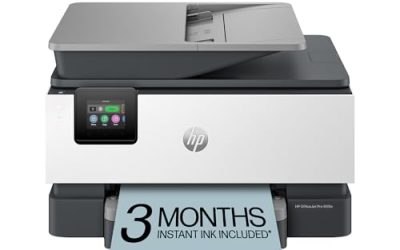
HP ENVY 6055e
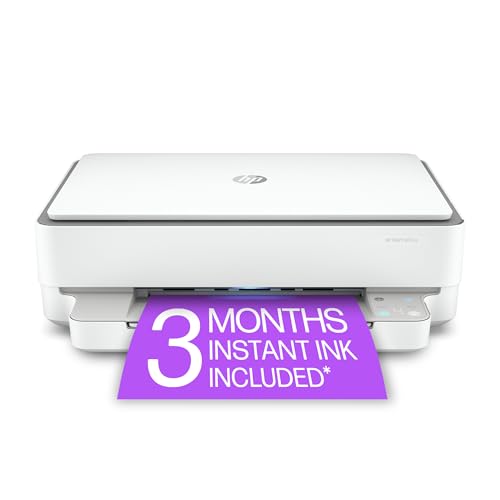
The ENVY 6055e is the simplest way to start printing crafts at home. It is a compact wireless all-in-one that prints, scans, and copies, with mobile printing through the HP Smart app so designs can go straight from a phone to the printer. It handles greeting cards, sticker sheets, and iron-on transfers for occasional projects, and its small footprint fits a shelf or a corner desk. It suits beginners and occasional crafters who want a low-commitment first machine.
Specs
- Wireless color inkjet all-in-one printer
- Print, scan, and copy functions
- Mobile printing through the HP Smart app
- Auto two-sided printing
- 3-month Instant Ink trial included with HP+
- Compact design for small desks and shelves
Best for: Beginners and occasional crafters printing cards and stickers a few times a month.
Watch out for: It uses cartridges, so heavy sticker batches will need refills more often than a tank model; also confirm the listing is for a new unit rather than a refurbished one.
Which One Fits Your Situation
You Sell Stickers and Printables Every Week
Choose the Epson EcoTank ET-2800, because its refillable tanks cover many batches of sticker sheets without constant cartridge swaps. The high color page yield keeps a busy sticker shop running smoothly week after week, and wireless printing from a phone keeps the workflow fast while you cut and package each finished batch.
You Scrapbook and Make Greeting Cards
Choose the Canon PIXMA TS9521Ca, because it was designed for crafters and prints borderless 12 x 12 inch scrapbook sheets. The SD card slot and built-in patterns make card and scrapbook projects quicker, and the auto two-sided printing helps with folded cards. Its pattern library also gives you quick backgrounds when you want a finished look without designing from scratch.
You Sell Large Art Prints and Posters
Choose the Epson EcoTank Photo ET-8550, because it prints up to 13 x 19 inches with a six-color ink set that renders smooth gradients. The refillable tanks suit large print runs, and the touchscreen makes PC-free printing simple when you are working at the craft table. The large format also means fewer trips to a print shop, which keeps more of each sale with you.
You Want the Lowest Commitment to Start
Choose the HP ENVY 6055e, because it is a compact wireless all-in-one that handles cards, stickers, and transfer sheets for occasional projects. Mobile printing from a phone keeps setup simple, and its small size fits a shelf or a corner of a desk. If crafting becomes a weekly habit, you can upgrade to a tank model later without having wasted much.
Common Mistakes
- Buying a printer that cannot feed thick card stock, then discovering jams only after opening specialty paper packs.
- Choosing a standard-size printer when your main projects need 12 x 12 inch scrapbook sheets or 11 x 17 inch art prints.
- Picking a cartridge printer for daily sticker batches without considering how often refills interrupt your work.
- Using dye ink for stickers and labels that will get wet, instead of checking water resistance first.
- Skipping a test sheet on expensive vinyl or transfer paper before running a full batch.
Frequently Asked Questions
Can I use a regular home printer for crafting?
Yes, if it feeds your chosen media cleanly and prints borderless on the sizes you need. Check the listing for card stock support, maximum media size, and borderless printing before buying, and test one sheet of each specialty material first. A printer built for crafters simply removes more of that guesswork.
Do I need a tank printer for stickers?
Not always. A tank printer suits people who print sticker sheets several times a week, since the large ink supply covers many batches. Occasional crafters who print a few sheets a month do fine with a cartridge model, as long as they accept more frequent cartridge changes.
What paper size matters most for crafters?
Letter size covers cards and small stickers, but scrapbookers need 12 x 12 inch square sheets and art sellers often want 11 x 17 or 13 x 19 inch prints. Pick the maximum size from the projects you make most, not from the projects you might try someday.
Can these printers handle iron-on transfer sheets?
Yes, most inkjet models here print iron-on transfer sheets, since transfers are designed for inkjet printing. Load one sheet at a time through the rear feed when available, follow the transfer paper instructions for mirror printing, and run a test sheet before a full batch.
FAQ
Can I use a regular home printer for crafting?
Do I need a tank printer for stickers?
What paper size matters most for crafters?
Can these printers handle iron-on transfer sheets?
More from Amazon
Programs that pair well with the guide above. Offers and eligibility are set by Amazon and may change.
A free business account with business pricing and bulk-buying tools for work, shop or home office.
Create a business accountFree shipping on eligible items, Prime Video and more. Eligible new members can start with a free trial.
Start a Prime free trialAudiobooks and podcasts to listen to on the go. Eligible new members can start with a free trial.
Try Audible freeAd-free music streaming. Eligible new subscribers can start with a free trial.
Try Music Unlimited freeAs an Amazon Associate we earn from qualifying purchases.
Write Your Review
No reviews yet. Be the first to share your experience!