
Key takeaways
- Find the best ink cartridges for HP Envy printers, from high-yield 67XL and 64XL cartridges to the 65XL for Envy 5000. Compare yields, fit, and color.
An HP Envy printer only prints as well as the cartridge inside it, and the Envy family is easy to get wrong: a cartridge that fits an Envy 6055 will not fit an Envy Photo 7855. Once you know your printer’s cartridge number, choosing is simple. This guide rounds up five strong options, explains how to match a cartridge to your printer, and compares yields.
Disclosure: As an Amazon Associate, we earn from qualifying purchases.
How to Choose an Ink Cartridge for Your HP Envy Printer
Match the cartridge number first
Every HP Envy printer takes one specific cartridge series. The Envy 6000 and Envy Pro 6400 series take HP 67 cartridges, the Envy Photo 6200, 7100, and 7800 series plus Envy Inspire models take HP 64 cartridges, and the Envy 5000 series takes HP 65 cartridges. These series are not interchangeable, so check the number printed on your current cartridge, in the printer manual, or in the HP Smart app before ordering.
Standard yield or high yield
HP sells each cartridge in a standard version and an XL high-yield version, marked with an XL in the name. The XL cartridge holds more ink and prints roughly twice as many pages as the standard version, which means fewer cartridge changes. If you print school work, homework, and home office documents in steady volume, the XL version is the sensible default. Occasional printers who print a few pages a week can stick with standard cartridges.
Black, tri-color, or a combo pack
Envy printers use two cartridges: one black and one tri-color that holds cyan, magenta, and yellow in a single unit. If you mostly print text, the black cartridge is the one you will replace most often, so it deserves the most attention. If you print photos, school projects, or color documents, keep a tri-color cartridge on hand as well. Combo packs that bundle one black and one tri-color cartridge restock both at once, and suit households where both cartridges run low around the same time.
Original HP ink and fade resistance
Original HP cartridges are built by HP for its own printers, with ink formulas tuned to the printheads in each Envy line. Pigment-based black ink keeps text sharp and resists smudging on plain paper, while dye-based tri-color ink produces vivid color for photos and graphics. HP also designs its inks to resist fading, so documents and photos keep their look over time. Third-party cartridges may fit, but they can vary in output quality and may not be recognized by printers with HP+ enabled.
Instant Ink eligibility
Many Envy printers ship with HP Instant Ink, the subscription service that monitors ink levels and mails replacements before you run out. All five cartridges in this guide are eligible for Instant Ink, so you can pair them with a plan that matches your monthly page volume.
Storage and installation
Store spare cartridges in a cool, dry place, sealed until you need them. When installing a new cartridge, remove the orange protective tape, push it firmly into its slot until it clicks, and run a printhead alignment from the printer menu or the HP Smart app.
1. HP 67XL Black High-Yield Ink Cartridge (3YM57AN)

The HP 67XL Black is the default black cartridge for the Envy 6000 and Envy Pro 6400 series, and it is the one most Envy 6055 and 6455 owners will reach for first. Its high-yield design delivers about 240 pages, roughly double the standard HP 67 black cartridge, so it suits households that print homework, work documents, and everyday forms on a regular schedule. Pigment-based black ink keeps text sharp on plain paper.
Specs
- Cartridge: HP 67XL Black, high yield
- HP part number: 3YM57AN
- Page yield: about 240 pages
- Ink type: pigment-based black
- Fits: HP Envy 6000 series, Envy Pro 6400 series, DeskJet 1255, 2700, and 4100 series
- Instant Ink: eligible
- ASIN: B08412PTS8
2. HP Original 67 Tri-Color / 67XL Black Ink Cartridges 2-Pack (3YP30AN)
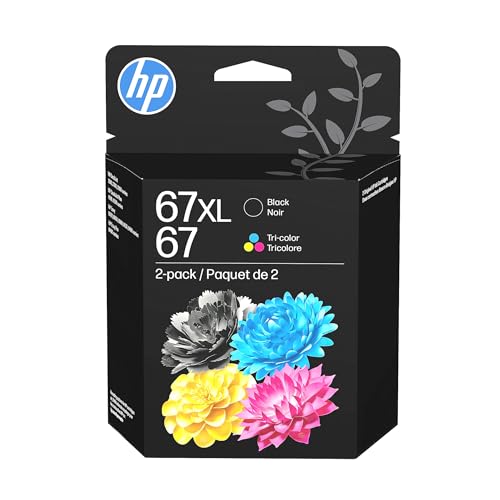
This two-pack pairs a standard HP 67 tri-color cartridge with a high-yield HP 67XL black cartridge, covering both slots in an Envy 6000 or Envy Pro 6400 printer in a single box. It is the practical restock option for homes where color printing matters as much as black text: the tri-color cartridge handles photos, charts, and school projects with vivid dye-based color, while the XL black cartridge carries the text load at about 240 pages.
Specs
- Cartridge: HP 67 tri-color plus HP 67XL black, 2-pack
- HP part number: 3YP30AN
- Page yield: about 240 pages black, about 100 pages tri-color
- Ink type: pigment-based black, dye-based tri-color
- Fits: HP Envy 6000 series, Envy Pro 6400 series, DeskJet 1255, 2700, and 4100 series
- Instant Ink: eligible
- ASIN: B08SWN848G
3. HP 64XL Black High-Yield Ink Cartridge (N9J92AN)

For the photo-focused Envy lines, the HP 64XL Black is the workhorse. It fits the Envy Photo 6200, 7100, and 7800 series, the Envy Inspire 7950e, and the Tango series, and its high-yield design produces about 600 pages, the largest black yield in this guide. That makes it a strong match for home offices and busy households that print long documents and reports alongside photos. The pigment black ink delivers crisp, smudge-resistant text.
Specs
- Cartridge: HP 64XL Black, high yield
- HP part number: N9J92AN
- Page yield: about 600 pages
- Ink type: pigment-based black
- Fits: HP Envy Photo 6200, 7100, and 7800 series; Envy Inspire 7950e; Tango series
- Instant Ink: eligible
- ASIN: B071YHCML6
4. HP 64XL Tri-Color High-Yield Ink Cartridge (N9J91AN)

The HP 64XL Tri-Color is the color partner to the cartridge above, and it is the one to choose when your Envy Photo or Envy Inspire printer handles photos, invitations, and color graphics. Its tri-color design holds cyan, magenta, and yellow in a single cartridge and produces about 415 pages. Dye-based inks keep colors vivid in photo prints, while HP’s fade-resistant formula helps printed photos hold their look. Pair it with the 64XL black for a full high-yield setup that needs changing far less often.
Specs
- Cartridge: HP 64XL Tri-Color, high yield
- HP part number: N9J91AN
- Page yield: about 415 pages
- Ink type: dye-based tri-color (cyan, magenta, yellow)
- Fits: HP Envy Photo 6200, 7100, and 7800 series; Envy Inspire 7950e; Tango series
- Instant Ink: eligible
- ASIN: B0722C491T
5. HP 65XL Black High-Yield Ink Cartridge (N9K04AN)

The Envy 5000 series runs on HP 65 cartridges, and the 65XL Black is the high-yield version of that line. It produces about 300 pages, roughly two and a half times the output of the standard HP 65 black cartridge, which makes it the right pick for Envy 5055 and 5052 owners who print regularly. Pigment black ink keeps everyday documents sharp, and the cartridge also fits DeskJet 2600 and 3700 series printers and the HP AMP 100 series.
Specs
- Cartridge: HP 65XL Black, high yield
- HP part number: N9K04AN
- Page yield: about 300 pages
- Ink type: pigment-based black
- Fits: HP Envy 5000 series, DeskJet 2600 and 3700 series, AMP 100 series
- Instant Ink: eligible
- ASIN: B01BYKV8FK
Comparison
| Cartridge | Fits Envy Series | Yield | Type |
|---|---|---|---|
| HP 67XL Black | Envy 6000, Envy Pro 6400 | About 240 pages | Black, high yield |
| HP 67 / 67XL 2-Pack | Envy 6000, Envy Pro 6400 | About 240 black, 100 tri-color | Black plus tri-color |
| HP 64XL Black | Envy Photo, Envy Inspire | About 600 pages | Black, high yield |
| HP 64XL Tri-Color | Envy Photo, Envy Inspire | About 415 pages | Tri-color, high yield |
| HP 65XL Black | Envy 5000 | About 300 pages | Black, high yield |
Match the number to your printer first, then choose XL for volume. Envy 6000 and 6400 owners should choose the 67XL black first and add the tri-color cartridge or the two-pack when color printing matters. Envy Photo and Envy Inspire owners get the biggest yields from the 64XL pair, with the black cartridge reaching about 600 pages. Envy 5000 owners have one clear high-yield choice in the 65XL black.
FAQ
Which ink cartridge does my HP Envy printer take?
It depends on the Envy line. Envy 6000 and Envy Pro 6400 printers take HP 67 cartridges, Envy Photo and Envy Inspire printers take HP 64 cartridges, and Envy 5000 printers take HP 65 cartridges. Check the number on your current cartridge to be sure.
What is the difference between a standard cartridge and an XL cartridge?
An XL cartridge holds more ink and prints more pages than the standard version of the same number. For example, the HP 67XL black prints about 240 pages while the standard HP 67 black prints about 120 pages. XL cartridges suit regular printing; standard cartridges suit light, occasional use.
Can I use HP 67 ink in an Envy Photo printer?
No. Envy Photo printers take HP 64 cartridges, and HP 67 cartridges will not fit them. The cartridge series is tied to the printer hardware, so always match the number: 67 for Envy 6000 and 6400, 64 for Envy Photo and Inspire, 65 for Envy 5000.
How long does an ink cartridge last once installed?
It depends on how much you print. A black XL cartridge can last several months in a household that prints a few pages a week, and far less in a busy home office. Page yield figures assume about five percent coverage, roughly a typical text page, so photo-heavy printing uses ink faster.
Do these cartridges work with HP Instant Ink?
Yes. All five cartridges in this guide are eligible for Instant Ink, and they work with Envy printers enrolled in the program. The service tracks ink levels and sends replacements before you run out.
Conclusion
The best ink cartridge for an HP Envy printer is the one that matches your printer’s cartridge number and your printing volume. Envy 6000 and Envy Pro 6400 owners should choose the HP 67XL black, with the two-pack as a handy full restock. Envy Photo and Envy Inspire owners get the longest runs from the HP 64XL black and tri-color pair, while Envy 5000 owners should pick the HP 65XL black. In every case, the XL high-yield version is the better default for regular use: more pages per cartridge and fewer changes. Check your cartridge number, pick the matching XL option, and keep a spare on the shelf so the next print job never has to wait.
More from Amazon
Programs that pair well with the guide above. Offers and eligibility are set by Amazon and may change.
A free business account with business pricing and bulk-buying tools for work, shop or home office.
Create a business accountFree shipping on eligible items, Prime Video and more. Eligible new members can start with a free trial.
Start a Prime free trialAudiobooks and podcasts to listen to on the go. Eligible new members can start with a free trial.
Try Audible freeAd-free music streaming. Eligible new subscribers can start with a free trial.
Try Music Unlimited freeAs an Amazon Associate we earn from qualifying purchases.
Write Your Review
No reviews yet. Be the first to share your experience!