
Key takeaways
- Compare five monitor arms with laptop trays that lift a laptop beside a monitor, from budget pole mounts to gas-spring dual arms, and pick the right fit.
A laptop beside an external monitor is the most common dual-screen desk, and it is also the most awkward one. The laptop sits low, its screen tilts at a different angle than the monitor, and the two displays never quite line up. A monitor arm with a laptop tray fixes that by lifting the laptop to the same height as the monitor, on the same mount, so both screens share one footprint on the desk.
These mounts are a different product from monitor-only arms. Every pick here carries a vented tray that holds a laptop, plus at least one arm for a monitor, or a tray that swaps for a VESA plate.
As an Amazon Associate, we earn from qualifying purchases.
Quick Answer
The HUANUO HNCM2 is the pick to buy first: one monitor arm plus a vented laptop tray on a single clamp, with a five-year warranty. For two monitors plus a laptop, the HUANUO HNTS4B adds a second screen. For easy height changes, the WALI GSMP001NLP brings a gas spring. The VIVO STAND-V001L suits a laptop-only setup, and the WALI M001LP covers a laptop and a monitor on a tight budget.
HUANUO Adjustable Monitor Arm with Laptop Tray HNCM2 — Best Overall
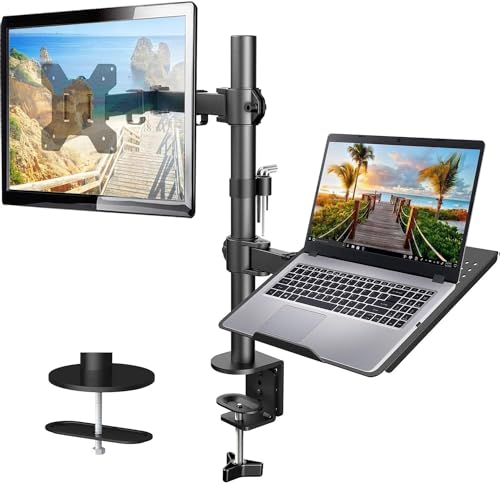
The HUANUO HNCM2 is the simplest version of this idea done well: a single monitor arm and a vented laptop tray sharing one desk clamp. The tray holds a laptop up to 17 inches and about 22 pounds, and the monitor arm takes a screen with VESA 75 by 75 or 100 by 100 mounting. The tray has ventilation holes that let air move under the laptop, which matters because a laptop on a solid tray runs hotter than one on an open stand. Both the tray and the monitor arm tilt, swivel, and rotate, so the two screens can be angled toward the same chair.
The mount fits desks with a C-clamp or a grommet base, and HUANUO backs it with a five-year warranty. Height is set with hand screws rather than a spring, so changes take two hands, but once set, the tray and the screen stay put.
Specs
- Devices: 1 monitor plus 1 laptop
- Laptop: Up to 17 inches, about 22 lb
- Tray: Vented, tilts and swivels
- Mount: C-clamp and grommet
- VESA: 75×75, 100×100
- Warranty: 5 years
| Spec | Detail |
|---|---|
| Devices | 1 monitor plus 1 laptop |
| Laptop | Up to 17 inches, about 22 lb |
| Tray | Vented, tilts and swivels |
| Mount | C-clamp and grommet |
| VESA | 75×75, 100×100 |
| Warranty | 5 years |
HUANUO Dual Monitor and Laptop Mount HNTS4B — Best Dual Monitor

The HUANUO HNTS4B is the pick for a desk that runs two external monitors and a laptop at the same time. It pairs a dual monitor stand with a laptop tray, so the laptop sits beside a pair of screens up to 32 inches each. The monitor side uses VESA 75 by 75 and 100 by 100 brackets, and each arm tilts, swivels, and rotates independently. That matters on a three-screen desk, where the laptop often sits off to one side and needs a different angle than the two monitors.
The tray holds a laptop up to 17 inches. Because the whole assembly shares one base, the desk needs only one clamp point for three screens, which frees the rest of the edge for a microphone arm, a lamp, or a notebook. Three screens on one base need a sturdy desk edge, so measure the desk thickness before ordering.
Specs
- Devices: 2 monitors plus 1 laptop
- Monitors: Up to 32 inches each
- Laptop: Up to 17 inches
- VESA: 75×75, 100×100
- Movement: Tilt, swivel, rotation
- Mount: Desk clamp base
| Spec | Detail |
|---|---|
| Devices | 2 monitors plus 1 laptop |
| Monitors | Up to 32 inches each |
| Laptop | Up to 17 inches |
| VESA | 75×75, 100×100 |
| Movement | Tilt, swivel, rotation |
| Mount | Desk clamp base |
WALI Single Arm Laptop and Monitor Desk Mount GSMP001NLP — Best Gas Spring

The WALI GSMP001NLP is the gas-spring pick in this guide, and it is the one to choose if the laptop or the monitor moves height several times a day. A gas spring inside the arm carries the load, so a laptop up to 17 inches and about 22 pounds, or a monitor up to 34 inches and about 26.4 pounds, rises or drops with a light push and stays where it stops. The mount is a two-in-one design: the same arm carries either the vented laptop tray or a VESA monitor plate, so the desk can switch between a laptop-led setup and a monitor-led setup without buying a second mount.
The gas spring has a weight window, so a very light laptop may need the tension adjusted before the arm holds its height. Weigh the laptop before ordering.
Specs
- Devices: 1 laptop or 1 monitor
- Laptop: Up to 17 inches, about 22 lb
- Monitor: Up to 34 inches, about 26.4 lb
- Mechanism: Gas spring
- Tray: Detachable, vented
- Mount: Clamp 0.39 to 2.76 inches, grommet
| Spec | Detail |
|---|---|
| Devices | 1 laptop or 1 monitor |
| Laptop | Up to 17 inches, about 22 lb |
| Monitor | Up to 34 inches, about 26.4 lb |
| Mechanism | Gas spring |
| Tray | Detachable, vented |
| Mount | Clamp 0.39 to 2.76 inches, grommet |
VIVO Single Laptop Notebook Desk Mount STAND-V001L — Best Convertible

The VIVO STAND-V001L is the laptop-only pick in this guide, and it suits a desk where the laptop is the main screen and the external monitor is a sometimes thing. A vented tray on a short steel pole holds a laptop up to 17 inches and about 22 pounds. The tray tilts, swivels, and spins all the way around the pole, and a raised lip along the front edge stops the machine from sliding off when the tray is steep. The clamp fits desks up to about 3.4 inches thick, and a grommet base covers desks with a cable hole.
The useful detail is the conversion: lift the tray off and the same arm carries a VESA monitor instead, so the mount can change roles if the desk setup changes later. The joints are friction-set by hand screws rather than a spring, so the tray can shake a little when keys are tapped hard.
Specs
- Devices: 1 laptop, converts to 1 monitor
- Laptop: Up to 17 inches, about 22 lb
- Tray: Vented, tilts, swivels, rotates
- Mount: Clamp up to 3.4 inches, grommet
- VESA: 75×75, 100×100 on conversion
- Warranty: 3 years
| Spec | Detail |
|---|---|
| Devices | 1 laptop, converts to 1 monitor |
| Laptop | Up to 17 inches, about 22 lb |
| Tray | Vented, tilts, swivels, rotates |
| Mount | Clamp up to 3.4 inches, grommet |
| VESA | 75×75, 100×100 on conversion |
| Warranty | 3 years |
WALI Laptop and Monitor Stand M001LP — Best Budget

The WALI M001LP is the budget dual-arm pick: two fully adjustable arms on one base, one carrying a vented laptop tray and the other a monitor up to 27 inches. Each side holds about 22 pounds, and the laptop side fits a notebook up to 17 inches. The arms tilt, swivel, and rotate, so the laptop and the monitor can sit at matching heights and angles. The tray has ventilation holes, and the whole assembly mounts with a C-clamp or a grommet base.
It is the cheapest way to get a laptop and a monitor onto one mount with independent arms. The trade is finish and refinement: the arms are steel rather than aluminum, and height is set by sliding the arms along the pole and locking them down, which takes longer than a gas spring.
Specs
- Devices: 1 laptop plus 1 monitor
- Laptop: Up to 17 inches, about 22 lb
- Monitor: Up to 27 inches, about 22 lb
- Tray: Vented, tilts and swivels
- Mount: C-clamp and grommet
- VESA: 75×75, 100×100
| Spec | Detail |
|---|---|
| Devices | 1 laptop plus 1 monitor |
| Laptop | Up to 17 inches, about 22 lb |
| Monitor | Up to 27 inches, about 22 lb |
| Tray | Vented, tilts and swivels |
| Mount | C-clamp and grommet |
| VESA | 75×75, 100×100 |
How to Choose
Start with the laptop, not the arm. Measure the width of the laptop and weigh it, then compare both figures with the tray limits. Most trays in this guide fit laptops up to 17 inches and about 22 pounds, which covers nearly every mainstream notebook, but a heavy 17-inch gaming laptop can exceed the limit. A laptop thicker than about one inch may also sit awkwardly on a tray with a low front lip, so check the thickness guidance on the listing.
Next, count the screens. One monitor plus one laptop needs a single-arm-plus-tray mount like the HNCM2 or the M001LP. Two monitors plus a laptop needs the HNTS4B. A desk that switches between a laptop-led setup and a monitor-led setup suits a two-in-one arm like the GSMP001NLP or the STAND-V001L, where the tray swaps for a VESA plate.
Then look at the desk. Measure the thickness of the edge where the clamp will sit, and check whether the top is solid wood, particleboard, or glass. A heavy three-screen assembly needs a solid edge, and a glass top needs a reinforcement plate or a grommet mount. Finally, think about movement: a gas spring suits a screen that changes height often, while a friction or pole arm suits a set-and-forget layout.
Who Should Skip It
A monitor arm with a laptop tray is not the right buy for every desk. Skip it if the laptop is heavier than the tray limit, since an overloaded tray sags and the laptop slides. Skip it if the desk has a glass top with no reinforcement, a very thin or hollow edge, or a lip that blocks a clamp from gripping. Skip a gas-spring arm if the laptop sits below the spring minimum weight, since the spring will push the tray upward and refuse to stay low. And skip the whole category if the laptop is a 17-inch gaming machine with blocked side vents, since a tray that covers the vents makes heat worse.
FAQ
Will a laptop tray block the laptop cooling vents?
It can, if the tray is solid and the vents sit on the bottom or the sides. Every tray in this guide is vented, with holes that let air move under the machine, but a vented tray still covers part of the base. Keep the vents clear of the tray lip and leave the rear of the laptop open.
Can I use the tray for a monitor instead?
On two-in-one mounts, yes. The WALI GSMP001NLP and the VIVO STAND-V001L both swap the laptop tray for a VESA plate, so the same arm carries a monitor. The HUANUO HNCM2, HNTS4B, and WALI M001LP keep the tray fixed on its own arm, so the laptop side stays a laptop side. Check the listing for the exact swap parts before ordering.
Do I need to remove the laptop lid or close it?
No. The laptop stays open on the tray and works as a second screen, with its keyboard available if needed. Most people close the lid only when the laptop drives a single external monitor and the laptop screen is not in use. On a tray, a closed laptop still needs airflow, so leave the rear vents clear.
How do I keep the laptop and monitor at the same height?
Set the monitor first, with the top of its screen near eye level, then raise the tray until the top of the laptop screen lines up. Aim to align the tops, which keeps the neck level when glancing between screens, and accept that the laptop screen ends lower.
Final Verdict
For most desks, the HUANUO HNCM2 is the mount to buy first: one monitor arm plus a vented laptop tray, a five-year warranty, and a low outlay. The HUANUO HNTS4B is the pick for two monitors plus a laptop, and the WALI GSMP001NLP is the pick for smooth gas-spring height changes. The VIVO STAND-V001L suits a laptop-only desk that may convert to a monitor later, and the WALI M001LP covers a laptop and a monitor on a tight budget. Weigh the laptop first, measure the desk edge, and match the model code on the listing before ordering.
Product and ASIN Reference
| Product | ASIN |
|---|---|
| HUANUO Adjustable Monitor Arm with Laptop Tray HNCM2 | B07DWM9WNM |
| HUANUO Dual Monitor and Laptop Mount HNTS4B | B08DNTVY8Y |
| WALI Single Arm Laptop and Monitor Desk Mount GSMP001NLP | B0DYP11P7C |
| VIVO Single Laptop Notebook Desk Mount STAND-V001L | B00CM9NG1W |
| WALI Laptop and Monitor Stand M001LP | B072QZ2XZ3 |
FAQ
Will a laptop tray block the laptop cooling vents?
Can I use the tray for a monitor instead?
Do I need to remove the laptop lid or close it?
How do I keep the laptop and monitor at the same height?
More from Amazon
Programs that pair well with the guide above. Offers and eligibility are set by Amazon and may change.
A free business account with business pricing and bulk-buying tools for work, shop or home office.
Create a business accountFree shipping on eligible items, Prime Video and more. Eligible new members can start with a free trial.
Start a Prime free trialAudiobooks and podcasts to listen to on the go. Eligible new members can start with a free trial.
Try Audible freeAd-free music streaming. Eligible new subscribers can start with a free trial.
Try Music Unlimited freeAs an Amazon Associate we earn from qualifying purchases.


Write Your Review
No reviews yet. Be the first to share your experience!