
Key takeaways
- Find the best microphone for podcasting for solo shows, interviews, and noisy rooms. Compare five USB and XLR podcast mics, specs, and setup tips.
Choosing the best microphone for podcasting starts with the room you record in, not with the brand name on the box. A sensitive condenser microphone can pick up keyboard clicks, street noise, and room echo that a dynamic microphone would ignore. The right choice also depends on how you connect it, whether you record alone or with a guest, and whether you want a simple setup or a path toward an audio interface.
This guide compares five podcast microphones for those situations: USB models for beginners, hybrid USB and XLR models that can grow with your setup, and a broadcast-style dynamic microphone. Each pick is described from its published specifications, with notes on pickup pattern and connection.
As an Amazon Associate, we earn from qualifying purchases.
Our top picks
Best for: Solo hosts, weekly shows, and rooms with some background noise
Check price on AmazonBest for: Solo hosts, interviews, and quiet rooms
Check price on AmazonBest for: Beginners, budget setups, and untreated rooms
Check price on AmazonBest for: First podcasts, budget setups, and guest microphones
Check price on AmazonBest for: Broadcast-style voice, weekly shows, and boom-arm setups
Check price on AmazonQuick Answer
For most new podcasters, the Shure MV7+ is the strongest all-around choice, combining a focused dynamic capsule with USB and XLR outputs, level control, and a touch panel for quick muting. For a simpler budget start, the Samson Q2U offers the same hybrid idea at a lower tier. For a bright condenser sound in a quiet room, the Blue Yeti remains a popular pick.
1. Shure MV7+ Podcast Dynamic Microphone

The Shure MV7+ is built for spoken-word recording. It uses a dynamic capsule with a cardioid pattern, which focuses on sound from in front and reduces sound from the sides and rear. It offers both USB-C and XLR outputs, so you can start with a direct computer connection and move to an audio interface later. An auto level mode helps keep your voice steadier when you move during a long conversation. A touch panel on top gives you a quick way to mute, and the headphone output lets you monitor your voice in real time. The MV7+ sits in the premium tier and suits a weekly host.
Specs
- Type: Dynamic microphone with cardioid pickup pattern
- Outputs: USB-C and XLR
- Digital audio: Up to 24-bit and 48 kHz over USB
- Controls: LED touch panel for mute and level, headphone volume
- Monitoring: 3.5 mm headphone output
- Mounting: Built-in stand in the bundled version, thread mount for a boom arm
- Best for: Solo hosts, weekly shows, and rooms with some background noise
2. Blue Yeti USB Microphone
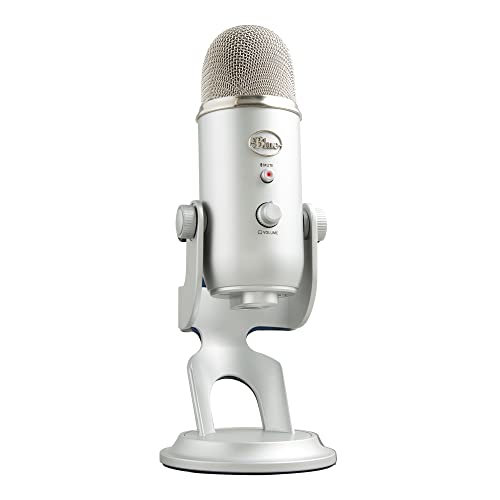
The Blue Yeti is one of the most widely used USB microphones for podcasting, and its strength is flexibility. It uses three condenser capsules and offers four pickup patterns: cardioid, bidirectional, omnidirectional, and stereo. Cardioid suits a solo host, bidirectional suits two people face to face, omnidirectional suits a small group, and stereo adds a sense of space.
Because it is a condenser microphone, the Yeti is more sensitive than the dynamic models in this guide. That sensitivity brings out detail in a voice, but it also picks up more of the room, so it works best in a quiet space with soft furnishings and closed windows. On-body controls cover gain, mute, and headphone volume, and the headphone output provides zero-latency monitoring. The Yeti is a mid-range USB microphone for podcasting, voice calls, and voiceover work.
Specs
- Type: Condenser microphone with three capsules
- Pickup patterns: Cardioid, bidirectional, omnidirectional, and stereo
- Output: USB
- Digital audio: 16-bit and 48 kHz
- Controls: Gain control, mute button, and headphone volume
- Monitoring: Headphone output
- Best for: Solo hosts, interviews, and quiet rooms
3. Audio-Technica ATR2100x-USB Cardioid Dynamic Microphone

The Audio-Technica ATR2100x-USB is a practical hybrid microphone for podcasters who want a focused sound and a simple upgrade path. It is a dynamic microphone with a cardioid pattern, so it rejects sound from the sides and rear and keeps the voice front and center. It connects over USB-C for direct recording, and it also has an XLR output for use with an audio interface or a portable recorder. You can learn the basics with a laptop, then connect the same microphone to an interface when you add a second microphone. A headphone jack with volume control sits on the body, and it ships with a tripod desk stand, a mic clip, and cables. The ATR2100x-USB sits in the budget to mid-range tier and suits a new podcaster.
Specs
- Type: Dynamic microphone with cardioid pickup pattern
- Outputs: USB-C and XLR
- Digital audio: Up to 24-bit and 192 kHz over USB
- Controls: On and off switch and headphone volume dial
- Monitoring: 3.5 mm headphone output
- Best for: Beginners, budget setups, and untreated rooms
4. Samson Q2U Dynamic USB and XLR Microphone

The Samson Q2U is the most affordable hybrid microphone in this guide, and it covers the basics well. It is a dynamic microphone with a cardioid pattern, which keeps the voice clear while reducing room noise and sound from behind. Like the ATR2100x-USB, the Q2U offers both USB and XLR outputs. USB works with a computer for direct recording, while XLR lets you connect to an interface later, so a beginner does not need to replace the microphone when the setup grows. The pack includes a desktop stand, a mic clip, a windscreen, and cables. A headphone output with volume control allows real-time monitoring, which helps you catch plosive sounds before you record a full episode.
Specs
- Type: Dynamic microphone with cardioid pickup pattern
- Outputs: USB and XLR
- Controls: Headphone volume and on and off switch
- Monitoring: Headphone output
- Included: Desktop stand, mic clip, windscreen, and cables
- Best for: First podcasts, budget setups, and guest microphones
5. Rode PodMic USB Dynamic Broadcast Microphone

The Rode PodMic USB is a broadcast-style dynamic microphone designed for podcasting, streaming, and voice recording. It uses a dynamic capsule with a cardioid pattern and an internal pop filter, which helps reduce plosive sounds. The result is a warm, close voice that suits long spoken-word episodes.
It offers both USB-C and XLR outputs. Over USB, it works as a plug-and-play microphone with a computer and includes a headphone output for monitoring. Over XLR, it connects to an interface or mixer for a more advanced setup. Built-in digital signal processing is available over USB, with a high-pass filter and a noise gate that can help clean up low rumble. The PodMic USB sits in the mid-range to premium tier and suits a host who wants a broadcast sound and plans to use a boom arm.
Specs
- Type: Dynamic broadcast microphone with cardioid pickup pattern
- Outputs: USB-C and XLR
- Digital audio: Up to 24-bit and 48 kHz over USB
- Controls: Built-in digital signal processing, high-pass filter, and noise gate
- Monitoring: 3.5 mm headphone output
- Best for: Broadcast-style voice, weekly shows, and boom-arm setups
How to Choose
Start with your room. If the room is quiet, with carpet, curtains, or bookshelves, a condenser microphone such as the Blue Yeti can sound detailed and open. If the room is noisy, echoey, or shared, a dynamic microphone such as the Shure MV7+, the ATR2100x-USB, the Samson Q2U, or the Rode PodMic USB is usually safer, because it focuses on your voice and rejects more of the room.
Next, decide how you want to connect. A USB microphone is the simplest start: plug it in, select it in your recording software, and record. A hybrid USB and XLR microphone adds a second path, so you can start on USB and move to XLR with an interface when you want a second microphone. A solo host needs only a cardioid pattern, while two hosts are better served by two microphones on separate tracks. A microphone on a boom arm, close to your mouth and slightly to the side, usually sounds better than a desk stand at arm’s length.
Who Should Skip
A premium podcast microphone is not the right buy for every voice project. If you only record short voice notes, occasional video calls, or a quick update for a small audience, a headset or a basic USB microphone may be enough. A large microphone on a boom arm can also be awkward in a small desk space or a shared room.
Skip a sensitive condenser microphone if your room is noisy, echoey, or next to a busy street. The extra detail it captures will include the room as well as your voice. Skip a hybrid USB and XLR microphone if you are certain you will never use an interface and you want the simplest setup.
Frequently Asked Questions
Is a USB microphone good enough for podcasting?
Yes, a USB microphone is good enough for most new podcasts. Models such as the Blue Yeti, the Samson Q2U, and the Shure MV7+ connect directly to a computer, need no separate interface, and produce a clear voice when placed close to the speaker in a quiet room. An XLR setup can offer more control, but it adds cost and complexity.
Do I need an audio interface for a podcast microphone?
You do not need an audio interface for a USB microphone, because the microphone includes its own digital converter. You need an interface only if you choose an XLR-only microphone, or if you want to use the XLR output of a hybrid microphone such as the MV7+, the ATR2100x-USB, the Q2U, or the PodMic USB. An interface also helps when you record two or more microphones at once.
What is the difference between a dynamic and a condenser microphone?
A dynamic microphone uses a moving coil and is generally less sensitive, which makes it good at rejecting room noise and handling loud voices at close range. A condenser microphone uses a charged capsule and is generally more sensitive, which makes it good at capturing detail, but also more likely to pick up room echo and background sound. For most home podcasters, a dynamic microphone is the safer first choice.
How close should I sit to a podcast microphone?
Sit about a hand span from a dynamic podcast microphone, with the microphone slightly to the side of your mouth and angled toward you. That distance keeps your voice full and present while reducing breath noise. Test a short recording at two distances, listen back on headphones, and keep the position that sounds clearest.
Final Verdict
The best microphone for podcasting depends on your room, your budget tier, and how far you want your setup to grow. The Shure MV7+ is the strongest all-around pick, with a focused dynamic sound, USB and XLR outputs, auto level control, and a touch panel for quick muting. It suits a weekly host who wants a polished voice and a clear upgrade path.
If your room is quiet and you want a flexible USB microphone for solo shows, interviews, and voice work, the Blue Yeti is a proven choice. If you want a hybrid microphone at a lower tier, the Audio-Technica ATR2100x-USB and the Samson Q2U both offer USB and XLR in one body. For a broadcast-style voice on a boom arm, the Rode PodMic USB rounds out the set with a warm, close sound. Pick the microphone that matches your room first, place it close, and record a short test before you commit to a full episode.
FAQ
Is a USB microphone good enough for podcasting?
Do I need an audio interface for a podcast microphone?
What is the difference between a dynamic and a condenser microphone?
How close should I sit to a podcast microphone?
More from Amazon
Programs that pair well with the guide above. Offers and eligibility are set by Amazon and may change.
A free business account with business pricing and bulk-buying tools for work, shop or home office.
Create a business accountFree shipping on eligible items, Prime Video and more. Eligible new members can start with a free trial.
Start a Prime free trialAudiobooks and podcasts to listen to on the go. Eligible new members can start with a free trial.
Try Audible freeAd-free music streaming. Eligible new subscribers can start with a free trial.
Try Music Unlimited freeAs an Amazon Associate we earn from qualifying purchases.



Write Your Review
No reviews yet. Be the first to share your experience!