
Key takeaways
- Find the best webcam for streaming with our guide to five proven cameras, from budget 1080p picks to 4K AI tracking, plus how to choose the right one.
A good webcam is the difference between a stream that looks polished and one that looks like an afterthought. Viewers forgive a lot, but muddy video, blown-out lighting, and a stuttering frame rate push them away fast. The right camera keeps your face sharp, your colors natural, and your stream running smoothly, even in an ordinary room.
This guide rounds up five webcams that cover the full range of streaming needs, from a simple plug-and-play camera for casual broadcasts to a 4K tracking camera for creators who move around on screen. Each pick is judged on resolution, frame rate, low-light handling, focus, microphone quality, and ease of use with OBS, Zoom, or Twitch.
As an Amazon Associate, we earn from qualifying purchases.
Our top picks
Quick Answer
For most streamers, the Elgato Facecam is the strongest all-round choice, with clean uncompressed 1080p video at 60 frames per second and deep manual controls. The Razer Kiyo Pro is the best option for dim rooms, while the OBSBOT Tiny 2 suits creators who want 4K resolution and automatic tracking. Budget streamers should start with the Logitech Brio 101 or the Logitech C920s Pro HD.
1. Elgato Facecam

The Elgato Facecam is built for streamers who want their video to look deliberate rather than accidental. It outputs uncompressed 1080p video at 60 frames per second, keeping motion smooth during gameplay reactions and commentary. Its Sony STARVIS sensor keeps skin tones natural under desk lamps and LED panels.
What sets the Facecam apart is control. The free Camera Hub software lets you adjust ISO, white balance, contrast, saturation, and zoom, then save those settings directly to the camera, so your look travels with you from one computer to another. The fixed-focus prime lens keeps you sharp from a normal desk distance, and the wide 82-degree field of view frames you comfortably. The trade-off is that there is no built-in microphone and no autofocus, so you will want a separate mic and a fairly fixed seating position.
Specs
- Resolution and frame rate: 1080p at 60 frames per second, uncompressed
- Sensor: Sony STARVIS CMOS
- Lens: f/2.4 24 mm all-glass prime lens, fixed focus
- Field of view: 82 degrees
- Connection: USB 3.0, USB-C cable included
- Software: Elgato Camera Hub with onboard memory for saved settings
- Mount: monitor mount with universal tripod thread
2. Razer Kiyo Pro

The Razer Kiyo Pro is the webcam to reach for when your room lighting is less than ideal. Its adaptive light sensor adjusts automatically to changing conditions, and its Sony STARVIS sensor pulls in noticeably more detail in dim rooms than most 1080p webcams manage, so evening streams keep your face visible instead of turning it into a silhouette.
It records uncompressed 1080p video at 60 frames per second, with HDR available at 30 frames per second for scenes with strong contrast between bright windows and dark corners. The adjustable field of view is a thoughtful touch: choose a narrow angle for a tight head-and-shoulders shot, a medium angle for a desk setup, or a wide angle when you want more of the room in frame. The Kiyo Pro has no built-in ring light, unlike the original Kiyo, so pair it with a decent mic and a light source if your room runs dark.
Specs
- Resolution and frame rate: 1080p at 60 frames per second, uncompressed; HDR at 30 frames per second
- Sensor: Sony STARVIS CMOS with adaptive light sensor
- Lens: adjustable field of view, 80, 90, or 103 degrees
- Connection: USB 3.0
- Compatibility: OBS, XSplit, Twitch, Zoom, Microsoft Teams
- Mount: monitor mount with tripod thread
3. OBSBOT Tiny 2
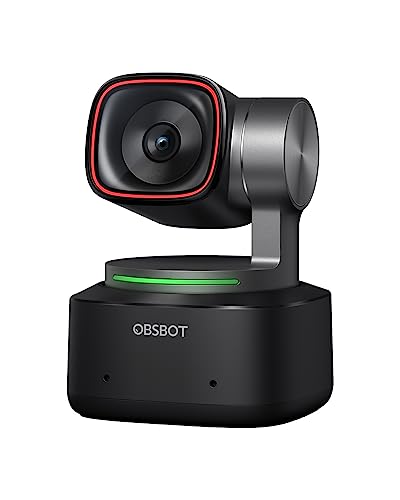
The OBSBOT Tiny 2 is the most ambitious camera on this list, and the only one that shoots in 4K. It pairs a large 1/1.5-inch CMOS sensor with a pan-tilt-zoom gimbal, so the camera can follow you around the room instead of locking you to one spot. For fitness streamers, cooking creators, musicians, and anyone who presents standing up, that freedom changes what a stream can look like.
AI tracking offers several modes: the camera can follow your upper body, zoom in for a close-up, or hold a wider shot while you move. Gesture control starts or stops tracking with a hand signal. It outputs 4K at 30 frames per second or 1080p at 60 frames per second, and dual microphones with noise reduction handle voice pickup. The Tiny 2 is heavier and more complex than a fixed webcam, so streamers who sit still at a desk will not use half of what it can do.
Specs
- Resolution and frame rate: 4K at 30 frames per second; 1080p at 60 frames per second
- Sensor: 1/1.5-inch CMOS
- Tracking: AI auto tracking with multiple modes, pan-tilt-zoom gimbal
- Controls: gesture control and voice control
- Microphones: dual microphones with noise reduction
- Connection: USB-C
- Compatibility: OBS, Zoom, Microsoft Teams, Twitch
4. Logitech C920s Pro HD

The Logitech C920s Pro HD has been a default recommendation for streamers for years, and it remains a sensible buy. It records full HD 1080p video at 30 frames per second with autofocus that keeps you sharp as you lean in and out, and its dual stereo microphones capture clear voice audio for casual streams and video calls alike.
The built-in privacy shutter is a small but genuinely useful feature: flip it closed and you know the camera is off. HD light correction automatically adjusts exposure in dim or uneven lighting. The 78-degree field of view frames one person well without pulling in too much background clutter. Thirty frames per second is the main limitation, so fast gestures look slightly less fluid than on a 60-frame camera, but for talking-head streams and creators starting out, the C920s delivers reliable quality at a friendly budget tier.
Specs
- Resolution and frame rate: 1080p at 30 frames per second
- Focus: autofocus
- Microphones: dual integrated stereo microphones
- Privacy: built-in privacy shutter
- Light correction: HD automatic light correction
- Field of view: 78 degrees
- Connection: USB-A
- Compatibility: Skype, Zoom, FaceTime, OBS, Microsoft Teams
5. Logitech Brio 101

The Logitech Brio 101 is the simplest camera on this list, and for many new streamers that is exactly the point. It is a compact 1080p webcam with a built-in microphone, a sliding privacy shutter, and RightLight auto-light balance that brightens your face in dim rooms. Plug it in over USB-A and it works immediately with Zoom, Microsoft Teams, Google Meet, and OBS, with no software to install.
Image quality is solid for the budget tier: full HD resolution at 30 frames per second, a fixed-focus lens that keeps you sharp at a normal desk distance, and a 58-degree field of view that frames a single person tightly while hiding a messy background. It will not match the 60-frame smoothness or low-light performance of the premium picks, but as a first streaming webcam it is hard to fault.
Specs
- Resolution and frame rate: 1080p at 30 frames per second
- Focus: fixed focus
- Microphone: built-in microphone
- Privacy: integrated privacy shutter
- Light balance: RightLight auto-light balance
- Field of view: 58 degrees
- Connection: USB-A
- Compatibility: Zoom, Microsoft Teams, Google Meet, OBS
How to choose
Start with frame rate. If your stream involves fast movement, gaming reactions, or expressive hand gestures, a 60-frame camera such as the Elgato Facecam or Razer Kiyo Pro looks noticeably smoother. For seated talking-head streams, 30 frames per second is perfectly watchable and opens up cheaper options.
Next, look at your lighting. A camera with a large sensor and good low-light handling, like the Kiyo Pro, matters more than extra resolution if you stream in a dim room. If you already own a key light, sensor size matters less and you can prioritize resolution and frame rate instead.
Think about how you move. A fixed webcam is fine if you sit at a desk, but if you stand, pace, or demonstrate things with your hands, the OBSBOT Tiny 2 and its tracking gimbal are worth the extra complexity. Also check your microphone situation: cameras with no built-in mic, like the Facecam, assume you already own one. Finally, confirm the USB port, software compatibility, and field of view.
Who should skip
If you already own a mirrorless camera or a DSLR with a clean video output, a dedicated webcam is a step down in image quality, and your money is better spent on a capture card and a decent lens. Webcams are also the wrong tool if you need optical zoom or interchangeable lenses for product close-ups.
Streamers on a very tight setup should also skip the premium 4K options. A 4K camera only helps if your platform and upload speed can actually carry that resolution to viewers; otherwise you are paying for detail nobody sees.
Frequently Asked Questions
Is 1080p enough for streaming, or do I need 4K?
For most streamers, 1080p is enough. Most viewers watch on phones or laptops, and many platforms cap viewer-side resolution below 4K anyway. A good 1080p camera at 60 frames per second looks better than a mediocre 4K camera, because frame rate and low-light handling matter more than raw pixel count.
Do I need a separate microphone with a streaming webcam?
A separate microphone almost always sounds better than a built-in webcam mic, which sits far from your mouth and picks up keyboard clicks and room echo. The Logitech C920s and Brio 101 include usable built-in microphones for casual streams and calls. The Elgato Facecam has no built-in mic at all, so budget for a USB microphone if you choose it.
What frame rate should a streaming webcam have?
Sixty frames per second is the sweet spot for streaming, because it keeps motion smooth and looks professional next to gameplay footage. Thirty frames per second is acceptable for talking-head streams, interviews, and podcasts, where movement is limited. Below 30 frames per second, video starts to look choppy and viewers notice.
Can I use a webcam with OBS and Twitch?
Yes. Every camera on this list works as a standard video input in OBS, Streamlabs, and other broadcasting software, and the feed streams to Twitch, YouTube, or Facebook Live like any other source. Connect the camera, add it as a video capture device in OBS, and set your resolution and frame rate to match. Most models need no extra drivers on Windows or macOS.
Final verdict
The best webcam for streaming depends on how you broadcast, but the Elgato Facecam is the strongest choice for most creators, thanks to its clean uncompressed 1080p video at 60 frames per second and its deep manual controls. The Razer Kiyo Pro is the pick for dim rooms, the OBSBOT Tiny 2 is the pick for creators who move, and the Logitech C920s Pro HD and Brio 101 cover the budget end without embarrassing compromises.
Whatever you choose, pair the camera with decent lighting and a proper microphone. A mid-range webcam in a well-lit room with clear audio will outperform a premium camera in the dark with a muffled mic every time.
FAQ
Is 1080p enough for streaming, or do I need 4K?
Do I need a separate microphone with a streaming webcam?
What frame rate should a streaming webcam have?
Can I use a webcam with OBS and Twitch?
More from Amazon
Programs that pair well with the guide above. Offers and eligibility are set by Amazon and may change.
A free business account with business pricing and bulk-buying tools for work, shop or home office.
Create a business accountFree shipping on eligible items, Prime Video and more. Eligible new members can start with a free trial.
Start a Prime free trialAudiobooks and podcasts to listen to on the go. Eligible new members can start with a free trial.
Try Audible freeAd-free music streaming. Eligible new subscribers can start with a free trial.
Try Music Unlimited freeAs an Amazon Associate we earn from qualifying purchases.




Write Your Review
No reviews yet. Be the first to share your experience!