
Key takeaways
- Find the best tablet stand for iPad, Samsung Galaxy Tab, and Kindle. Compare five adjustable stands for desk work, drawing, reading, and video calls.
A good tablet stand turns a handheld screen into a second display, a recipe reader, a drawing surface, or a video call camera that stays put. The best tablet stand holds the device steady, adjusts to a comfortable viewing angle, and leaves room for a charging cable, so the tablet stays useful through a long session instead of sliding flat on the desk.
This guide compares five tablet stands built for different jobs, from a compact folding dock that travels in a bag to a tall floor stand for watching video from a sofa or bed. Every pick is described from its published specifications, so you can match size range, materials, and adjustment to your tablet and desk.
As an Amazon Associate, we earn from qualifying purchases.
Our top picks
Quick Answer
For most people, the Lamicall Adjustable Tablet Stand is the best tablet stand: it fits tablets from 4.7 to 13 inches, adjusts its viewing angle, and uses an alloy steel frame with rubber grips. Readers who want more height should choose the SAIJI extra-height stand, while travelers will prefer the folding UGREEN portable dock.
1. Lamicall Adjustable Tablet Stand
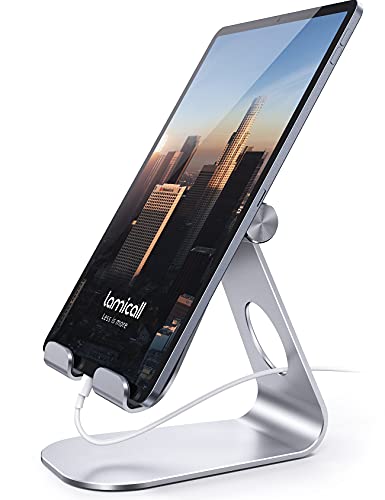
The Lamicall Adjustable Tablet Stand is the straightforward pick for a desk. It is a tabletop stand with an angle-adjustable cradle that holds tablets and phones from 4.7 to 13 inches, covering iPad Pro, iPad Air, iPad mini, Kindle, Galaxy Tab, and Switch models. The open cradle design leaves the charging port accessible, so the tablet can charge while it sits in the stand.
Its frame is alloy steel with rubber contact points, and the published dimensions are 5 by 5.5 by 4.5 inches with a weight of 8.81 ounces. That compact footprint suits a crowded desk or bedside table, and the rubber grips protect the tablet case from scratches while keeping the device from sliding. It is best for viewing and tapping rather than raising the screen to full eye level, and it also works well as a reference display beside a computer during a photo shoot.
Specs
- Compatibility: tablets and phones from 4.7 to 13 inches
- Material: alloy steel frame with rubber grips
- Dimensions: 5 x 5.5 x 4.5 inches
- Weight: 8.81 ounces
- Mounting type: tabletop
- Adjustment: viewing angle adjustable
- Model: ISD 0003
2. UGREEN Tablet Stand with Thicker Base

The UGREEN Tablet Stand with a thicker base is built for heavier tablets and longer sessions. Its dual-rod aluminum frame raises the tablet higher than a simple cradle, and the wider base keeps the stand planted when a large tablet is tapped or swiped. It fits devices from 4 to 12.9 inches, including the iPad Pro, iPad Air, iPad mini, and similar Android tablets.
Height and angle both adjust, so the screen can sit closer to eye level than a low dock allows. A charging notch lets a cable reach the tablet while mounted, which matters for video calls and long editing sessions. The published dimensions are 7.2 by 4.72 by 6.98 inches and the weight is 1.01 pounds, making it a desk fixture rather than a travel accessory.
This is the pick for a home office desk where the tablet serves as a second screen for email, notes, or a video call, since the heavier base and dual rods hold a 12.9 inch tablet more securely in portrait orientation.
Specs
- Compatibility: devices from 4 to 12.9 inches
- Material: aluminum with thicker base
- Dimensions: 7.2 x 4.72 x 6.98 inches
- Weight: 1.01 pounds
- Mounting type: tabletop
- Adjustment: height and angle adjustable, dual-rod design
- Charging notch: built into the cradle
- Model: 15163
3. SAIJI Extra-Height Adjustable Tablet Stand

The SAIJI Extra-Height Adjustable Tablet Stand is the tallest desk stand in this roundup, and it suits anyone who wants the tablet screen near eye level without stacking books under a low dock. Its telescoping post adjusts the height from about 11.4 inches to about 18.1 inches, and the cradle rotates a full 360 degrees, so the screen can turn toward a colleague or a client without moving the base.
Compatibility is the widest here, covering devices from 4.7 to 15.6 inches, including e-readers, phones, and portable monitors. The cradle is aluminum alloy with silicone contact points, and the published item weight is 0.95 kilograms. That range makes it the only pick in this guide that comfortably holds a 15 inch class portable monitor alongside a tablet, and its height and rotation suit a proofing display beside a monitor that can turn toward a client for a quick review.
Specs
- Compatibility: devices from 4.7 to 15.6 inches, including portable monitors
- Material: aluminum alloy cradle with silicone contact points
- Height range: about 11.4 to 18.1 inches
- Rotation: 360 degrees
- Weight: 0.95 kilograms
- Mounting type: tabletop
- Adjustment: extra-height telescoping post with angle adjustment
- Model: S3E-2
4. UGREEN Foldable Portable Tablet Stand
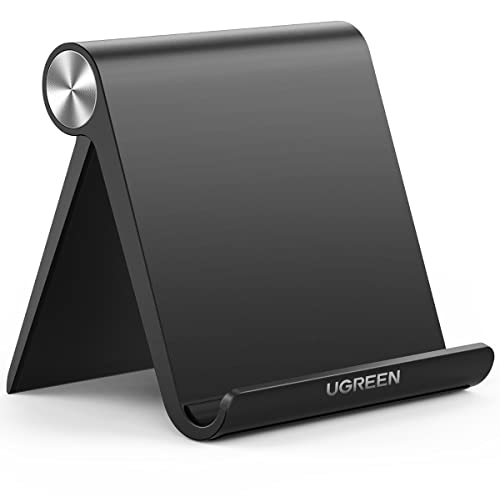
The UGREEN Foldable Portable Tablet Stand is the travel pick. It folds flat to published dimensions of 4.72 by 0.79 by 4.21 inches and weighs 4.2 ounces, so it slips into a laptop sleeve or a camera bag pocket without adding noticeable bulk. Unfolded, it holds iPad Pro, iPad Air, iPad mini, and phones in a stable desktop dock.
The foldable design uses a simple hinge rather than a telescoping post, so height adjustment is limited and the screen sits low, close to the desk surface. That is a fair trade for portability: the stand is meant for hotel desks, coffee shop tables, and location shoots where a full-size stand would stay at home.
Specs
- Compatibility: iPad Pro 11, 9.7, and 10.5, iPad Air, iPad mini, and phones
- Material: aluminum, foldable frame
- Folded dimensions: 4.72 x 0.79 x 4.21 inches
- Weight: 4.2 ounces
- Mounting type: tabletop
- Adjustment: folding angle adjustment
- Model: 50748
5. Lamicall Tablet Floor Tripod Stand
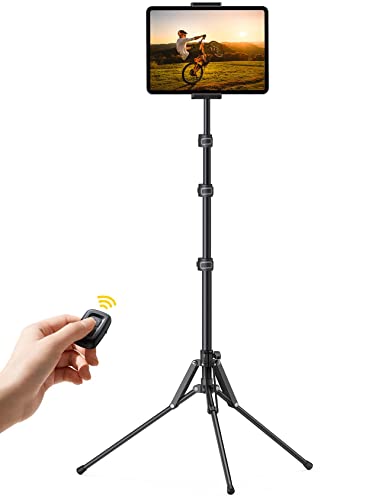
The Lamicall Tablet Floor Tripod Stand is the only floor stand in this guide, and it solves a different problem from the desk stands above: watching video, reading, or following a workout from a sofa, bed, or armchair. Its tripod base stands on the floor, and the height adjusts from 16.7 inches to 64.9 inches, so the tablet can sit at eye level whether the viewer is lying down or standing.
The holder rotates 360 degrees and fits tablets and phones from 4.7 to 13 inches, including iPad Pro, iPad Air, iPad mini, Galaxy Tab, and Kindle models. The tripod and main pole are aluminum alloy, and the listing includes a Bluetooth remote for controlling playback from a distance.
This stand is a poor fit for a desk, since the tripod legs need floor space, but it is the strongest option for hands-free viewing away from a table, and it also works as a steady holder for recording video with the tablet at standing height.
Specs
- Compatibility: tablets and phones from 4.7 to 13 inches
- Material: aluminum alloy tripod and main pole
- Height range: 16.7 to 64.9 inches
- Rotation: 360 degrees
- Mounting type: floor stand, tripod base
- Adjustment: height, angle, and rotation adjustable
- Included accessory: Bluetooth remote
- Model: FT02
How to choose
Start with where the tablet will sit. A desk stand should match the tablet size first: check the published size range against your device, including its case, since a thick case can push a tablet past a narrow cradle. A stand rated to 13 inches covers most iPad Pro and Galaxy Tab models, while a stand rated to 15.6 inches also covers portable monitors.
Next, decide how much height matters. Low folding docks are fine for tapping and watching, but a full workday of video calls or editing calls for a stand that raises the screen toward eye level, such as a dual-rod or telescoping model. A rotating cradle lets the screen turn toward someone else without lifting the tablet out of the stand.
Material and base weight decide stability. Aluminum stands with a wide or weighted base hold a large tablet more securely than a light plastic dock, especially in portrait orientation. Check the charging access too: a notch or open cradle lets the cable stay connected through long sessions.
Who should skip
A tablet stand is the wrong purchase when the tablet is mainly used handheld for reading in bed or carried around the house, since a stand only helps when the device stays in one place. People who already use a keyboard case with a built-in kickstand may also find a separate stand redundant.
Very small tablets and phones can use a simple phone dock instead of a full-size tablet stand, and a large laptop should never go on a tablet stand: laptop stands use a wider base and stronger hinges rated for heavier devices. Anyone who needs the tablet mounted to a wall or a car headrest should look for a dedicated wall or vehicle mount instead.
Frequently Asked Questions
What size tablet stand do I need for an iPad Pro 12.9?
A stand rated to 13 inches covers the iPad Pro 12.9 with a slim case, while a stand rated to 15.6 inches leaves room for a thick case or a portable monitor. The Lamicall adjustable stand, the UGREEN thicker-base stand, and the Lamicall floor stand all list 12.9 inch iPad Pro models as compatible.
Can a tablet stand hold a tablet in portrait orientation?
Most adjustable tablet stands hold a tablet in portrait or landscape orientation, but stability varies. Heavier bases and dual-rod designs hold a tall portrait tablet more securely than a light folding dock, and a rotating cradle makes switching orientation easier.
Is a floor tablet stand better than a desk stand?
They serve different rooms. A desk stand suits work, drawing, and video calls at a table, while a floor stand suits watching video or reading from a sofa or bed. A floor stand needs open floor space for its tripod legs, so it is a poor choice for a small desk setup.
Do tablet stands work with a case on the tablet?
Most stands in this guide hold tablets with a case, since their cradles fit a range of device thicknesses. Very thick rugged cases may need a stand with wider cradle arms, such as the SAIJI extra-height model or the UGREEN thicker-base model.
Final verdict
For most people, the Lamicall Adjustable Tablet Stand is the best tablet stand: it fits nearly every tablet, adjusts its angle, and takes up little desk space. The UGREEN thicker-base stand suits a large tablet used all day, and the SAIJI extra-height stand is the pick for eye-level viewing or a portable monitor. Travelers should take the folding UGREEN portable dock, and sofa or bed viewing calls for the Lamicall floor tripod stand.
FAQ
What size tablet stand do I need for an iPad Pro 12.9?
Can a tablet stand hold a tablet in portrait orientation?
Is a floor tablet stand better than a desk stand?
Do tablet stands work with a case on the tablet?
More from Amazon
Programs that pair well with the guide above. Offers and eligibility are set by Amazon and may change.
A free business account with business pricing and bulk-buying tools for work, shop or home office.
Create a business accountFree shipping on eligible items, Prime Video and more. Eligible new members can start with a free trial.
Start a Prime free trialAudiobooks and podcasts to listen to on the go. Eligible new members can start with a free trial.
Try Audible freeAd-free music streaming. Eligible new subscribers can start with a free trial.
Try Music Unlimited freeAs an Amazon Associate we earn from qualifying purchases.





Write Your Review
No reviews yet. Be the first to share your experience!