
Key takeaways
- The Canon PIXMA G3270 MegaTank in Black pairs refillable ink tanks with wireless print, scan and copy. See who this home all-in-one suits before buying.
Choosing between a refillable-tank printer and a cartridge model is a decision about how you want to pay for ink over the machine’s life. A tank printer asks more of you up front: you fill reservoirs from bottles, keep an eye on ink levels yourself, and accept a more involved routine. In exchange, the running-cost model shifts away from frequent cartridge swaps. A cartridge printer is simpler day to day, but the replacement cycle never ends. Which side suits your household depends on how much you print and how much upkeep you tolerate.
This review is for home users who print regularly enough that cartridge costs have become annoying, families sharing one machine across laptops and phones, and home workers who also need scanning and copying in the same unit. It looks at one specific listing: the Canon MegaTank G3270 All-in-One Wireless Inkjet Printer in Black, model 5805C002, chosen from the name and specs on its Amazon page as a refillable-tank all-in-one positioned for home use.
Quick Picks
As an Amazon Associate we earn from qualifying purchases
| Product | Best for | Key spec |
|---|---|---|
| Canon PIXMA G3270 MegaTank (Black) | Homes that print often and want refillable ink tanks | Wireless all-in-one with print, scan and copy |
How to Choose
Print Volume Fit for Tank Systems
A refillable-tank printer makes the most sense when ink actually moves through the machine on a regular basis. Households printing schoolwork, forms, recipes, shipping labels and documents every week give the tank system a chance to do what it is designed for, which is steady output without a cartridge replacement looming over every job. If a printer sits untouched for months at a time, the economics change and the upkeep habits matter more than the ink format. Before choosing any tank model, look honestly at your last few months of printing. Frequent, predictable volume is the strongest argument for this design; rare, occasional printing is a weaker one. Count the jobs, not the pages on your best week: a realistic average across a school term or a work quarter is the number that should drive this choice. If that average is healthy, the tank format is working for you from the first fill.
Refill Process and Ink Handling
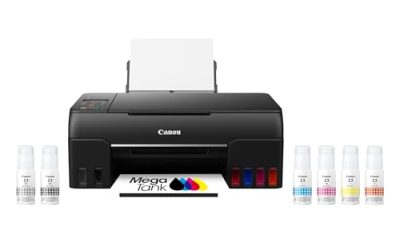
Living with a tank printer means refilling reservoirs from ink bottles rather than sliding in a cartridge. With the G3270, the box includes a set of GI-21 ink bottles in PGBK, C, M and Y, so the first fill is part of the purchase rather than a separate errand. Refilling is a deliberate task: you open the tank, pour carefully, and check levels through the tank itself instead of relying on a cartridge gauge. Buyers who are comfortable with that small routine usually adapt quickly. Buyers who want the printer to be completely invisible between jobs should think about whether bottle refills and level checks fit their habits before committing. It also helps to keep the printer somewhere you can open the tank cover comfortably, with the bottles stored upright nearby. A refill takes minutes, but it goes better as a planned task at a clear desk than as a rushed job in the middle of a print run.
Wireless Setup Expectations
A wireless all-in-one is expected to serve every device in the house, and the G3270 is listed as a wireless model for print, scan and copy. The realistic expectation is a one-time setup session: connecting the printer to your home network, then adding it on each computer or phone that will use it. Homes with a stable router and a fixed spot for the printer usually find this painless. If your network drops devices often, or the printer will live far from the router, sort the placement out first, because a tank printer you cannot reach from your laptop quickly becomes a printer nobody uses. Also decide who in the household owns that setup session. One person connecting the printer and then helping everyone else add it avoids the confusion of several half-finished attempts, and a note of the network name kept near the printer saves guesswork later.
All-in-One Needs Beyond Printing
The G3270 combines print, scan and copy in one unit, which matters more than it first appears. Scanning is what turns a home printer into a small document hub: signed forms, school permission slips, receipts and ID copies can be digitised without a separate device, and copying handles the quick duplicate without a trip anywhere. If you only ever print, a print-only machine could serve you, but most households discover scanning needs within the first year. When you evaluate an all-in-one, think about the flat, accessible placement scanning requires, not just the desk footprint the printer occupies while printing. Think about the last year of paperwork in your home and count how many times you needed a copy or a scan rather than a printout. For most families that number is surprisingly high, and it is the reason a combined unit usually outlasts a print-only purchase in usefulness.
The 1 Best Options
Canon PIXMA G3270 MegaTank (Black)

The Canon PIXMA G3270 is built around a simple proposition: replace the cartridge routine with refillable MegaTank reservoirs and cover the three jobs a home actually asks of a printer. It prints, scans and copies as a wireless all-in-one, and it is positioned by Canon for home use rather than office duty, which sets sensible expectations about who it is for. The Black version reviewed here is model 5805C002. The box contents support the tank concept properly: alongside the printer itself you get a full set of GI-21 ink bottles in PGBK, C, M and Y, the print heads, documentation and a power cord, so setup includes your first fill rather than a shopping trip. For a household that prints every week, shares the machine across several devices, and is tired of cartridge replacements interrupting ordinary jobs, this combination of refillable ink and three-in-one function is the whole appeal, delivered in one unit.
Specs
- Type: Wireless all-in-one inkjet printer (print, scan, copy)
- Ink system: MegaTank refillable ink tanks
- Colour: Black
- Model: 5805C002
- In the box: Printer, GI-21 ink bottle set (PGBK, C, M, Y), print heads, documentation, power cord
- Positioning: Home use
Best for: Households that print regularly and want to move from cartridges to refillable ink tanks without giving up scanning and copying.
Watch out for: Confirm you are ordering the Black listing, model 5805C002, and check that the GI-21 ink bottle set is listed in the box contents before you buy.
Which One Fits Your Situation
Your Household Prints Something Almost Every Day
This is the situation the G3270 is made for. School assignments, work documents, forms and labels moving through the machine weekly means the refillable tanks earn their place, and the wireless connection lets everyone in the house print without queuing at one computer. The scan and copy functions round out the daily paperwork jobs. If that rhythm sounds like your home, this printer fits well. The included GI-21 bottle set means the first fill is already handled, so the routine starts smoothly rather than with an extra purchase.
You Print a Few Pages a Month at Most
Be honest here: a tank printer is a weaker fit for very light use. The value of refillable ink shows up over volume, and if months pass between print jobs, a simpler cartridge model may suit your habits better and ask less of you. The G3270 would still work, but you would be buying capacity and a running-cost model you rarely benefit from. That is not a flaw in the machine; it is simply a mismatch between the design and the demand. Match the printer to the volume you actually have, not the volume you imagine.
You Need Scanning as Much as Printing
If your paperwork life involves digitising forms, receipts and documents as often as printing them, the all-in-one design is the deciding factor rather than the ink system. The G3270 covers scan and copy alongside print in one wireless unit, so a single machine on a shelf handles the full routine. For scan-heavy homes, that consolidation is a genuine reason to choose it. Wireless scanning also means the person who needs the file can start the job from their own device, which keeps one shared machine from becoming a bottleneck at busy times.
You Want a Printer You Never Have to Think About
Tank printers ask for a little participation: watching ink levels and refilling from bottles when the time comes. If your ideal printer is one you ignore completely until it stops, the refill routine may irritate you even though it is infrequent. Buyers who accept that small trade get the running-cost benefit; buyers who know they will resent it should weigh that honestly. Plenty of owners find the trade worthwhile once the first refill is done, because refills are rare events rather than weekly chores. The question is whether you are one of them.
Common Mistakes
- Buying a tank printer for a home that prints only a handful of pages a year, then never seeing the benefit of the refillable system.
- Ordering without checking the model number, and ending up with a different colour or configuration than the Black 5805C002 listing intended.
- Assuming the ink set is a separate purchase, when this listing includes a GI-21 bottle set in the box.
- Placing the printer far from the router and then blaming the printer for wireless dropouts during setup.
- Expecting office-duty behaviour from a machine positioned for home use, including very heavy daily volume it was not designed around.
Frequently Asked Questions
Does the Canon PIXMA G3270 come with ink in the box?
Yes. The listing for the Black G3270, model 5805C002, includes a set of GI-21 ink bottles covering PGBK, C, M and Y, along with the print heads, documentation and power cord. That means your first tank fill is part of the purchase. When the tanks eventually run low, you refill them with the matching GI-21 bottles rather than replacing cartridges, which is the core routine of owning a MegaTank printer.
Is the G3270 a good fit for a home office?
It can be, provided your home office printing is document-focused and your volume is steady rather than extreme. The wireless all-in-one design covers print, scan and copy, which handles the typical home office paperwork cycle well. It is positioned for home use, so a small business running heavy daily output should look at machines designed for that duty instead. For a household office printing forms, letters and reports, the fit is reasonable.
What is the difference between this and a cartridge printer?
The difference is the ink delivery model. A cartridge printer holds ink in replaceable cartridges that you swap out when they run dry. The G3270 uses refillable MegaTank reservoirs that you top up from ink bottles, and it ships with a GI-21 bottle set to start. Tank ownership involves watching levels and refilling occasionally; cartridge ownership involves buying and replacing cartridges more often. Your print volume and patience for upkeep decide which model suits you.
Can the G3270 scan and copy, or is it print only?
It is a full all-in-one: print, scan and copy are all listed functions of the G3270. That makes it useful as a small home document hub, since you can digitise paperwork and make quick copies without a second device. Combined with the wireless connection, one machine can serve several people in the house for the three most common document jobs, which is exactly the role this model is positioned to fill.
FAQ
Does the Canon PIXMA G3270 come with ink in the box?
Is the G3270 a good fit for a home office?
What is the difference between this and a cartridge printer?
Can the G3270 scan and copy, or is it print only?
More from Amazon
Programs that pair well with the guide above. Offers and eligibility are set by Amazon and may change.
A free business account with business pricing and bulk-buying tools for work, shop or home office.
Create a business accountFree shipping on eligible items, Prime Video and more. Eligible new members can start with a free trial.
Start a Prime free trialAudiobooks and podcasts to listen to on the go. Eligible new members can start with a free trial.
Try Audible freeAd-free music streaming. Eligible new subscribers can start with a free trial.
Try Music Unlimited freeAs an Amazon Associate we earn from qualifying purchases.





Write Your Review
No reviews yet. Be the first to share your experience!