
Key takeaways
- Genuine Canon CLI-271 color singles, a Canon four-tank set, and compatible E-Z Ink and Tekmall packs for the PIXMA MG7720, including the gray tank.
Choosing ink for the Canon PIXMA MG7720 is really a choice about six tanks, not one cartridge. The printer takes PGI-270 pigment black plus five CLI-271 dye tanks, and the sixth tank, gray, is the one most five-packs leave out. Owners who print black-and-white photos need that gray tank, while document-heavy households run through pigment black first. Genuine Canon tanks fit without fuss, compatible packs stretch the same XL codes further, and the wrong family simply will not fit.
This guide is for MG7720 owners who print photos at home, families mixing documents and school projects, and anyone restocking after the setup tanks run dry. Every pick below is named for the PGI-270 and CLI-271 tanks it holds, with compatibility and contents taken from its Amazon listing, so the choice comes down to how much you print and whether gray matters to you.
Quick Picks
As an Amazon Associate we earn from qualifying purchases
| Product | Best for | Key spec from title |
|---|---|---|
| Canon CLI-271 Genuine Cyan Ink Tank | Photo printing where the cyan tank empties first | CLI-271 cyan dye tank, genuine Canon |
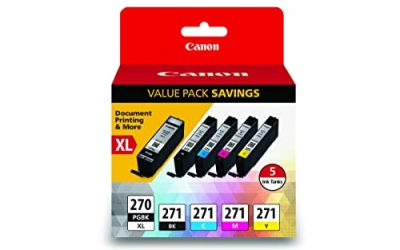
| Canon PGI-270 Pigment Black + CLI-271 CMYK 4-Pack | One genuine set covering four of the six slots | PGI-270 pigment black plus CLI-271 CMYK tanks |
| Canon CLI-271 Genuine Magenta Ink Tank | Photo printing where the magenta tank empties first | CLI-271 magenta dye tank, genuine Canon |
| E-Z Ink PGI-270XL CLI-271XL 6-Color Set with Gray | Black-and-white photo printing | 6-color XL set including the gray tank |
| Tekmall PGI-270XL CLI-271XL 5-Pack | A simple compatible five-pack | 5-pack, 270XL option, gray sold separately |
How to Choose
Match the Six-Tank Set, Including the Gray Tank
The MG7720 runs on six individual tanks: PGI-270 pigment black for text, plus CLI-271 tanks in black, cyan, magenta, yellow, and gray. The gray tank, CLI-271GY, handles black-and-white photo printing, smoothing tones that plain black leaves harsh. Canon lists the same PGI-270 and CLI-271 codes for the MG5720, MG6820, TS5020, TS6020, TS8020, and TS9020, but only the MG7720, TS8020, and TS9020 take the gray tank. Check the listing for your exact model name before ordering, and count the tanks in the box against the six slots in your printer.
Pick Standard Yield or XL Capacity
Every 270 and 271 tank comes in standard and XL sizes, and the difference is how often you open the printer lid. Standard PGI-270 pigment black yields up to 300 pages according to the Amazon listing, while XL tanks hold more ink and suit owners who print photos every week. The genuine Canon color singles in this guide come in standard fill, which suits a printer that prints photos a few times a month. Light users who print a few pages a week can stay with standard tanks, while heavy photo printers gain more from XL sizing and fewer interruptions.
Genuine Canon or a Compatible Pack
Genuine Canon tanks carry a smart LED that confirms correct installation and opens Creative Park Premium content, and they match the printer exactly by design. Compatible packs from brands like E-Z Ink and Tekmall use the same PGI-270XL and CLI-271XL codes at a lower outlay per tank, with chips that let the printer read ink levels. Color matching can vary slightly between brands, so photo printers who care about exact tones may prefer genuine tanks for final prints. Either route works if the listing names the MG7720 and the tank codes match.
Count the Tanks Before You Order a Pack
Value packs hide their biggest trap in the contents line: most five-color sets cover pigment black, black, cyan, magenta, and yellow, and leave out gray. That is fine for the MG6820, which uses only five tanks, but an MG7720 owner who prints monochrome photos still needs CLI-271GY. Read the package contents on the listing, not just the title, and confirm the count matches the six slots in your printer. Buying the gray tank at the same time avoids a second order and a printer that refuses to print until every slot is filled.
The 5 Best Options
Canon CLI-271 Genuine Cyan Ink Tank

Photo printing drains cyan faster than documents ever will, and this genuine Canon standard cyan tank is the single-tank answer to that pattern. The dye-based ink suits photo paper and color graphics, where the large pigment black handles plain-paper text instead, so it pairs naturally with the four-tank set in this guide. The standard fill suits a printer that prints photos a few times a month, since a light routine gains little from XL capacity sitting unused. It is the right pick when the other color tanks still print well and only cyan keeps running dry.
Specs
- Genuine Canon CLI-271 cyan ink tank
- Dye-based cyan ink for photos and color graphics
- Standard-yield fill, smaller than the XL cyan tank
- Compatible with PIXMA MG5720, MG6820, MG7720, TS5020, TS6020, TS8020, and TS9020
Best for: Replacing only the cyan tank on a lightly used MG7720.
Watch out for: This is a cyan tank only, so check magenta, yellow, and gray separately if prints come out off-color; confirm the CLI-271 code on the listing before ordering.
Canon PGI-270 Pigment Black Ink Tank + Canon CLI-271 CMYK Ink Tank 4-Pack

This genuine Canon set covers four of the six MG7720 slots in one box: the pigment black tank for crisp document text plus black, cyan, magenta, and yellow dye tanks for photos. The PGI-270 pigment black tank yields up to 300 pages according to the Amazon listing, which suits households that mix school forms and family photos. Buying the set together removes the guesswork of matching individual tank codes, and every tank carries the Canon smart LED. The gray tank is not in this box, so owners who work in monochrome still need CLI-271GY on the side.
Specs
- Includes 1 PGI-270 pigment black tank and 4 CLI-271 tanks in black, cyan, magenta, and yellow
- PGI-270 pigment black yields up to 300 pages per the Amazon listing
- Genuine Canon tanks with smart LED
- Compatible with PIXMA MG7720, MG6820, MG5720, TS5020, TS6020, TS8020, and TS9020
Best for: households mixing documents and photos that want one genuine Canon set.
Watch out for: The gray tank is not included, so add CLI-271GY separately if you print black-and-white photos.
Canon CLI-271 Genuine Magenta Ink Tank

Magenta is the color tank that empties quietly during photo batches, and this genuine Canon standard magenta tank keeps it filled for a lighter printing routine. The dye-based ink suits photo paper and color graphics, where skin tones and reds depend on a steady magenta supply, so it pairs naturally with the cyan tank in this guide. The standard fill suits a printer that prints photos a few times a month, since a light routine gains little from XL capacity sitting unused. It is the right pick when the other color tanks still print well and only magenta keeps running dry.
Specs
- Genuine Canon CLI-271 magenta ink tank
- Dye-based magenta ink for photos and color graphics
- Standard-yield fill, smaller than the XL magenta tank
- Compatible with PIXMA MG5720, MG6820, MG7720, TS5020, TS6020, TS8020, and TS9020
Best for: Replacing only the magenta tank on a lightly used MG7720.
Watch out for: This is a magenta tank only, so check cyan, yellow, and gray separately if prints come out off-color; confirm the CLI-271 code on the listing before ordering.
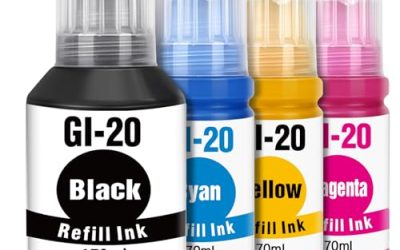
E-Z Ink PGI-270XL CLI-271XL 6-Color Set with Gray

Most compatible packs skip the gray tank, which leaves MG7720 owners hunting for CLI-271GY on its own. This E-Z Ink set is the exception the seller points buyers toward: it holds the full six-color XL set with pigment black, small black, cyan, magenta, yellow, and gray. That matters most for black-and-white photo printing, where the gray tank smooths gradations that plain black cannot. The set fits the MG7720, TS8020, and TS9020, the three models that take the gray tank. Confirm the listing names the gray-inclusive set before ordering, since the same brand sells a five-color version without it.
Specs
- 6-color XL set: pigment black, black, cyan, magenta, yellow, and gray
- Compatible with PIXMA MG7720, TS8020, and TS9020
- High-yield XL cartridges
- Gray tank included for black-and-white photo printing
Best for: MG7720 owners who print black-and-white photos and want every slot covered.
Watch out for: The seller also lists a five-color set without gray, so check the contents line before ordering.
Tekmall PGI-270XL CLI-271XL 5-Pack

This Tekmall listing covers three Canon families under one roof, and the 270XL option is the one MG7720 owners need. Selecting that option gives one large pigment black tank plus small black, cyan, magenta, and yellow XL tanks, matching five of the six MG7720 slots. The listing first appeared in March 2025, and it names the MG7720 among its compatible models while warning that gray ink is a separate purchase. That split suits owners who print color photos and documents and rarely touch monochrome, since they can skip the gray tank entirely.
Specs
- 270XL option includes 1 PGI-270XL pigment black, 1 CLI-271XL black, cyan, magenta, and yellow
- Compatible with PIXMA MG7720, MG5720, MG6820, TS5020, TS6020, TS8020, and TS9020 with the 270XL option
- Gray tank sold separately
- Date first available: March 14, 2025
- Item model number: TEL280
Best for: color photo and document printing where the gray tank is rarely needed.
Watch out for: The same listing sells 280 and 250 families, so select the 270XL option; gray is not included.
Which One Fits Your Situation
You Print Black-and-White Photos
Pick the E-Z Ink six-color set with gray, since it is the only pick here that covers all six MG7720 slots in one order. The gray tank smooths monochrome gradations in a way plain black cannot, and the XL sizing keeps you printing through a full photo batch. Add the genuine Canon CLI-271 cyan tank as a spare if color prints start shifting, which they often do on photo-heavy weeks.
You Print Documents Most Days
Pick the Canon four-tank set, which pairs the pigment black tank for crisp text with the color tanks for the occasional photo. Its PGI-270 pigment black yields up to 300 pages per the Amazon listing, a fair match for school forms and office paperwork. Keep the genuine Canon CLI-271 magenta tank in mind as your next single-tank order once the set starts running low.
You Print a Lot and Reorder Rarely
Pick the Canon four-tank set plus the genuine Canon cyan and magenta singles, which together cover five of the six MG7720 slots with genuine Canon ink. The separate tanks let you replace only the color that runs dry, which matters when cyan, magenta, and yellow drain at different rates during photo batches. Remember that gray is not inside any of these, so order CLI-271GY alongside them if monochrome photos are part of your routine.
You Want a Simple Compatible Five-Pack
Pick the Tekmall five-pack with the 270XL option selected, which covers pigment black, black, cyan, magenta, and yellow in one order. It fits owners who print color photos and documents and have no use for the gray tank. Double-check the option selector before checkout, since the same listing also sells the 280 and 250 families.
Common Mistakes
- Ordering PGI-280/CLI-281 tanks: they fit the TS6120, not the MG7720, and Canon confirms the 280 series will not fit.
- Ordering PG-245/CL-246 tanks for the MG2522, MG2922, and MG3022, or PG-240/CL-241 tanks for the MG3620: neither family fits the MG7720.
- Buying a five-color pack and assuming gray is inside: most five-packs leave out CLI-271GY, which the MG7720 needs for monochrome photos.
- Mixing up the two black tanks: PGI-270 is the large pigment black for text, while CLI-271 black is the small dye black for photos.
- Copying an MG6820 shopping list: the MG6820 uses five tanks with no gray slot, so its packs will not cover every MG7720 slot.
Frequently Asked Questions
What ink cartridges does the Canon PIXMA MG7720 use?
The MG7720 uses PGI-270 pigment black and CLI-271 dye tanks in black, cyan, magenta, yellow, and gray, six tanks in total. Standard and XL versions of each tank fit, and the XL versions hold more ink for owners who print often. Canon, Castle Ink, and the printer manual all list PGI-270 and CLI-271 as the matching family for this model.
Does the MG7720 need the gray cartridge?
Yes, the printer needs all six tanks installed, including CLI-271GY gray, before it will print. The gray tank matters most for black-and-white photo printing, where it smooths tones and gradations. Owners who print only documents and color photos can still install gray and leave it alone, but skipping it is not an option.
Can I use PGI-280/CLI-281 cartridges in the MG7720?
No, PGI-280 and CLI-281 cartridges do not fit the MG7720, and Canon community support confirms the 280 series will not fit this printer. The 280 and 281 tanks belong to models like the TS6120. PG-245/CL-246 and PG-240/CL-241 tanks do not fit either, since those families belong to the MG2522, MG2922, MG3022, and MG3620.
Do compatible PGI-270XL and CLI-271XL cartridges work in the MG7720?
Yes, compatible cartridges work when the listing names the MG7720 and the tank codes match PGI-270XL and CLI-271XL. Brands like E-Z Ink and Tekmall include chips so the printer reads ink levels as usual. Check the contents line for the gray tank, and keep a genuine Canon tank as a fallback if the printer ever refuses a compatible one.
FAQ
What ink cartridges does the Canon PIXMA MG7720 use?
Does the MG7720 need the gray cartridge?
Can I use PGI-280/CLI-281 cartridges in the MG7720?
Do compatible PGI-270XL and CLI-271XL cartridges work in the MG7720?
More from Amazon
Programs that pair well with the guide above. Offers and eligibility are set by Amazon and may change.
A free business account with business pricing and bulk-buying tools for work, shop or home office.
Create a business accountFree shipping on eligible items, Prime Video and more. Eligible new members can start with a free trial.
Start a Prime free trialAudiobooks and podcasts to listen to on the go. Eligible new members can start with a free trial.
Try Audible freeAd-free music streaming. Eligible new subscribers can start with a free trial.
Try Music Unlimited freeAs an Amazon Associate we earn from qualifying purchases.

Write Your Review
No reviews yet. Be the first to share your experience!