
Key takeaways
- Five small business printers with an automatic document feeder: a fast mono laser, color lasers, an ink tank and an inkjet, compared for busy teams.
A small business printer earns its keep when paperwork stops piling up and starts moving through the machine on its own. The automatic document feeder is the feature that makes that happen, because it pulls a whole stack of invoices, contracts, or signed forms through the scanner while your team gets on with other work. Without one, every multi-page document has to be fed sheet by sheet, which turns a quick scan into a long interruption.
This guide is for owners and office managers who need one shared machine that prints, copies, scans, and faxes without slowing the team down. It covers firms that handle daily paperwork, client-facing teams that print in color, and shops that run through reams of forms each month. Each printer below was picked from its Amazon listing name and listed specifications, with the feeder, print speed, and paper capacity checked against what the listing shows.
Quick Picks
As an Amazon Associate we earn from qualifying purchases
| Product | Best for | Key spec from title |
|---|---|---|
| Brother MFC-L2820DW | Black-and-white invoices and contracts | Mono laser with 50-sheet ADF |
| HP Color LaserJet Pro MFP M283fdw | Color proposals and branded documents | Color laser with 50-sheet ADF |
| Canon imageCLASS MF656Cdw | Two-sided scanning of signed contracts | Color laser with duplex ADF |
| Epson EcoTank ET-4850 | High-volume color handouts and menus | Ink tank with 30-sheet ADF |
| HP OfficeJet Pro 9125e | Mixed color documents and duplex scans | Inkjet with duplex scanning ADF |
How to Choose
ADF Capacity and Duplex Scanning
Start with the feeder itself, because not every ADF handles the same workload. A 30-sheet feeder copes with short contracts and daily forms, while a 50-sheet feeder suits thicker packets and batch scanning at the end of the day. Check whether the feeder scans both sides of a page in one pass or makes someone flip the stack by hand, since single-sided feeders slow down double-sided originals. Also confirm the feeder accepts the sizes you handle most, such as letter and legal, and that it feeds cleanly without jamming on mixed stacks of older or slightly wrinkled pages.
Laser or Ink Tank for Your Volume
The print engine decides how the machine behaves under a busy week. A mono laser suits offices that print mostly text, because it produces crisp pages quickly and the toner lasts through long runs of invoices and reports. A color laser adds polished proposals and branded letterheads without stepping up to a large office machine. An ink tank model fits a business that prints a high volume of color pages, since refillable tanks hold far more ink than standard cartridges. Match the engine to the mix of text and color your team actually prints.
Paper Handling and Monthly Duty
A small business printer should hold enough paper to get through a morning without someone standing beside it. A 250-sheet tray is a sensible baseline for a shared machine, and a multipurpose tray helps when the team prints envelopes or letterhead. Check the recommended monthly volume on the listing and compare it with how much your office really prints, counting both routine documents and the busy weeks. A machine run far past its duty rating will jam more often and wear out sooner, so leave headroom for growth.
Sharing, Security, and Connectivity
One printer usually serves several people, so sharing has to work without fuss. Ethernet lets the machine sit on the office network where every desk can reach it, while dual-band Wi-Fi and mobile printing let staff send jobs from phones and laptops. Look for a touchscreen that makes copy and scan jobs easy for anyone to start, and check for features such as secure print, which holds a job until the owner enters a code at the machine. These details matter most in an office where client documents pass through a shared device every day.
The 5 Best Options
Brother MFC-L2820DW

The Brother MFC-L2820DW fits a small team that prints mostly black-and-white documents and wants one machine to handle printing, copying, scanning, and faxing without fuss. Its 34 ppm output keeps invoices and contracts moving during busy mornings, and the 250-sheet tray means the person nearest the printer is not refilling it every hour. Wireless, Ethernet, and USB connections let the whole office share it, and the 50-sheet automatic document feeder makes quick work of scanning signed paperwork. For a firm that needs dependable mono output above all else, this is a practical centerpiece.
Specs
- Monochrome laser all-in-one with print, copy, scan, and fax
- Print speed up to 34 ppm in black and white
- 250-sheet paper tray
- 50-sheet automatic document feeder
- Automatic duplex printing
- Connectivity: Ethernet, Wi-Fi, and USB
- Maximum media size 8.5 x 14 inches
Best for: A small team printing mostly invoices, contracts, and other black-and-white paperwork.
Watch out for: It prints in black and white only, so check whether your team needs color for marketing materials before committing.
HP Color LaserJet Pro MFP M283fdw

The HP Color LaserJet Pro MFP M283fdw suits a business that needs polished color documents, from client proposals to branded letterheads, without stepping up to a large office machine. It prints up to 22 ppm in both black and color, and the 2.7-inch color touchscreen makes copy and scan jobs easy for anyone in the office to run. The 50-sheet automatic document feeder and automatic duplex printing speed up multi-page jobs, while dual-band Wi-Fi and the HP app let staff print from phones and laptops. It is a strong fit for a shared desk where color quality matters.
Specs
- Color laser all-in-one with print, copy, scan, and fax
- Print speed up to 22 ppm in black and color
- 250-sheet input tray, 100-sheet output tray
- 50-sheet automatic document feeder
- Automatic duplex printing
- 2.7-inch color graphic touchscreen
- Connectivity: dual-band Wi-Fi, Ethernet, and USB
Best for: A business that prints color proposals, flyers, and branded documents from one shared machine.
Watch out for: The output tray holds 100 sheets, so long color runs may need emptying before the job finishes.
Canon imageCLASS MF656Cdw

The Canon imageCLASS MF656Cdw is built for a growing office that wants color laser output, a generous touchscreen, and room to expand without replacing the machine in a year. It prints up to 22 ppm in black and color, and its 5-inch color touchscreen puts copy, scan, fax, and secure print controls within easy reach. The 50-sheet automatic document feeder scans both sides of a page in one pass, which helps when a stack of signed contracts needs digitizing before lunch. With a three-year limited warranty on the listing, it suits firms that want a longer horizon from their purchase.
Specs
- Color laser all-in-one with print, copy, scan, and fax
- Print speed up to 22 ppm in black and color
- 250-sheet paper tray plus a multipurpose tray
- 50-sheet automatic document feeder with one-pass duplex scanning
- 5-inch customizable color touchscreen
- Connectivity: Wi-Fi, Ethernet, and USB, mobile-ready
- 3-year limited warranty
Best for: A growing office that wants color output, fast two-sided scanning, and a large touchscreen.
Watch out for: Confirm the toner cartridge type and yield listed for this model, since color laser supplies vary in capacity.
Epson EcoTank ET-4850

The Epson EcoTank ET-4850 fits a business that prints a high volume of color pages, such as menus, schedules, and customer handouts, and wants to stop swapping small cartridges. Its refillable ink tanks hold enough ink for thousands of pages, and the included bottles cover a long stretch of everyday printing before a refill is needed. It prints, copies, scans, and faxes, with a 30-sheet automatic document feeder and Ethernet for a shared office, plus a color touchscreen for quick jobs. For color-heavy workloads, the tank design changes how often supplies interrupt the workday.
Specs
- Cartridge-free EcoTank all-in-one with print, copy, scan, and fax
- Print speed up to 15.5 ppm black and 8.5 ppm color (ISO)
- Print resolution up to 4800 x 1200 dpi
- 30-sheet automatic document feeder and automatic two-sided printing
- Connectivity: Wi-Fi, Ethernet, and USB
- Color touchscreen control panel
- Works with the Epson Smart Panel app
Best for: A business that prints a lot of color pages and wants refillable tanks instead of cartridges.
Watch out for: Inkjet output is slower than laser on long black-and-white runs, so weigh your mix of text and color pages first.
HP OfficeJet Pro 9125e
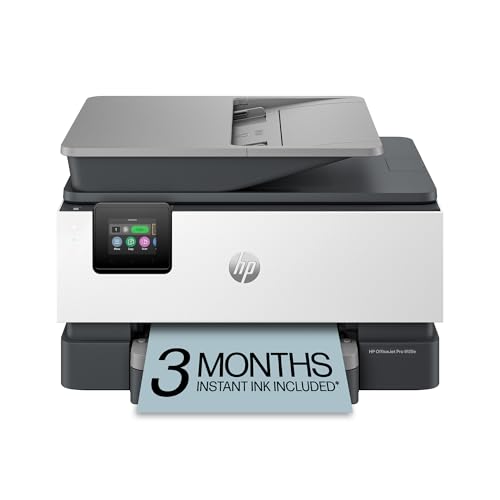
The HP OfficeJet Pro 9125e is the all-rounder of this list, built for a small office that mixes color documents, forms, and scans in a single day. Its 35-sheet feeder handles multi-page originals and scans both sides, so contracts and double-sided forms move through without manual flipping. The 250-sheet tray keeps refills rare, and automatic two-sided printing cuts paper use on long documents. Wireless printing from a phone or laptop keeps the machine useful from anywhere in the office, and the color touchscreen makes copy and scan jobs quick to start.
Specs
- Print, scan, copy, and fax in one machine
- 35-sheet automatic document feeder with duplex scanning
- Automatic duplex printing
- 250-sheet paper capacity
- Up to 22 ppm black and 18 ppm color
- Wireless all-in-one with color touchscreen
Best for: A small office that prints color documents and scans double-sided paperwork most days.
Watch out for: Check the ink plan terms before setup, since the included trial renews unless you change it.
Which One Fits Your Situation
You scan signed paperwork every day
Pick the Brother MFC-L2820DW if most of that paperwork is black and white, since its 50-sheet feeder and 34 ppm output clear stacks fast. If the documents need color, the Canon imageCLASS MF656Cdw is the better call, because its feeder scans both sides in one pass and its touchscreen keeps scan jobs simple for the whole team.
You print color proposals for clients
Choose the HP Color LaserJet Pro MFP M283fdw for polished color output from a compact shared machine, with a 50-sheet feeder for the pages you need to scan back in. If your team is growing and you want a larger touchscreen plus a longer warranty, step up to the Canon imageCLASS MF656Cdw instead.
You print a high volume of color handouts
Go with the Epson EcoTank ET-4850, because its refillable tanks are built for color-heavy workloads such as menus, schedules, and customer handouts. The 30-sheet feeder handles everyday scanning, and Ethernet sharing keeps the machine available to every desk without relying on a single computer. Refills cost less per page than cartridges, so a busy front desk saves money over the year.
You want one machine for a mixed workload
Take the HP OfficeJet Pro 9125e when the office prints a bit of everything: color documents, forms, and double-sided scans in the same day. Its duplex scanning feeder and 250-sheet tray cover varied jobs well, and wireless printing keeps it handy for staff working away from their desks. It also handles faxing, so one device covers the whole office routine.
Common Mistakes
- Buying a printer without an ADF and then scanning multi-page contracts one sheet at a time.
- Choosing a color machine when the office prints almost entirely black-and-white text.
- Ignoring the feeder capacity and picking a 20-sheet feeder for daily batch scanning.
- Placing the printer on Wi-Fi only when the office network would be steadier over Ethernet.
- Forgetting to check the toner or ink type before ordering supplies for a new model.
Frequently Asked Questions
What does ADF mean on a printer?
ADF stands for automatic document feeder, a tray on top of the scanner that pulls in a stack of pages one by one. It lets the printer scan or copy multi-page documents without anyone placing each sheet on the glass by hand, which saves a lot of time in a busy office.
Do I need duplex scanning in an ADF?
Duplex scanning matters when your originals are printed on both sides, such as signed contracts and tax forms. A duplex feeder scans both sides in one pass, while a single-sided feeder needs the stack flipped and run through again. For a small business that scans contracts daily, duplex capture saves real time every week.
Is an ink tank printer better than a cartridge printer for a small business?
An ink tank printer suits a business that prints a high volume of color pages, because refillable tanks hold far more ink than standard cartridges. A laser printer is usually the better choice for offices that print mostly black-and-white text at high speed.
Can these printers scan to a phone or computer?
Yes, all five models in this guide can scan to a computer over USB, Ethernet, or Wi-Fi, and each one supports mobile scanning or printing through its companion app. Check the listing for the exact app name and supported devices before you buy.
FAQ
What does ADF mean on a printer?
Do I need duplex scanning in an ADF?
Is an ink tank printer better than a cartridge printer for a small business?
Can these printers scan to a phone or computer?
More from Amazon
Programs that pair well with the guide above. Offers and eligibility are set by Amazon and may change.
A free business account with business pricing and bulk-buying tools for work, shop or home office.
Create a business accountFree shipping on eligible items, Prime Video and more. Eligible new members can start with a free trial.
Start a Prime free trialAudiobooks and podcasts to listen to on the go. Eligible new members can start with a free trial.
Try Audible freeAd-free music streaming. Eligible new subscribers can start with a free trial.
Try Music Unlimited freeAs an Amazon Associate we earn from qualifying purchases.
Write Your Review
No reviews yet. Be the first to share your experience!