
Our Short List of 3

- Best for: Home photographers and families printing albums, scrapbooks, and framed photos in volume.
- 6-color dye-based ink system, including red and gray inks
- Up to 3,800 4 x 6 inch color photos per full set of ink bottles
- Print, copy, and scan in one machine
- Wireless and high-speed USB connectivity

- Best for: Home offices that print documents daily and photos only now and then.
- Print, copy, scan, and fax in one machine
- Up to 6,000 black text pages or 7,700 color pages per full ink bottle set
- 35-sheet automatic document feeder
- 350-sheet paper capacity with front cassette and rear tray

- Best for: Photographers and creators who print large photos for framing or display.
- 6-color wide-format photo printing up to 13 x 19 inches
- 4.3-inch color touchscreen
- Scanner and copier built in
- Wi-Fi and Ethernet connectivity
All 3 Picks at a Glance
| Product | Specs | Action |
|---|---|---|
| Canon PIXMA G620 Wireless MegaTank Photo All-in-One Printer |
| Check price on Amazon |
| Canon PIXMA G7020 Wireless MegaTank All-in-One Printer |
| Check price on Amazon |
| Epson EcoTank Photo ET-8550 Wireless Wide-Format All-in-One Supertank Printer |
| Check price on Amazon |
Key takeaways
- Compare the Canon PIXMA G620 with two rival photo tank printers to find the best fit for home photo printing, albums, and everyday documents.
Choosing a photo printer for the home comes down to one honest question: will this machine spend most of its life printing photographs, or will it split time between photos and everyday documents? The Canon PIXMA G620 answers that question firmly in favor of photographs. Its six-color dye-based ink system, with dedicated red and gray inks, is built to produce vivid color prints and smooth skin tones, and a single set of ink bottles stretches to thousands of small photo prints. That focus brings trade-offs, though: document speeds are modest, and the printer takes up real desk space.
This guide is written for home photographers, scrapbookers, and families who print albums and framed photos regularly, as well as for anyone weighing the G620 against a more document-focused tank printer. Each printer below is identified by the name and specifications shown on its Amazon listing, so you can match the model to your printing habits before committing desk space and ink to one machine.
Quick Picks
As an Amazon Associate we earn from qualifying purchases
These three tank printers cover the main ways people print photos at home, from standard album sizes to wide-format display prints.
| Product | Best for | Key spec from title |
|---|---|---|
| Canon PIXMA G620 Wireless MegaTank Photo All-in-One Printer | High-volume home photo printing | Print, copy, scan all-in-one |
| Canon PIXMA G7020 Wireless MegaTank All-in-One Printer | Home office documents with occasional photos | Print, copy, scan, fax with ADF |
| Epson EcoTank Photo ET-8550 Wireless Wide-Format All-in-One Supertank Printer | Large-format photo prints up to 13 x 19 inches | 4.3-inch color touchscreen |
How to Choose
Ink System and Photo Color
Photo printers live or die by their ink. The G620 uses six dye-based inks, adding red and gray to the usual cyan, magenta, yellow, and black, which widens the color range and smooths gradients in skies and skin tones. Four-ink tank printers can still produce pleasant snapshots, but they struggle with deep reds and subtle shadow detail. When comparing models, look at how many inks the listing names and whether the printer handles borderless printing at the sizes you use most, such as 4 by 6 inches for albums or 8 by 10 inches for framing. A printer with separate photo black or gray ink also handles monochrome prints with less color cast, which matters for black-and-white portraits.
Print Volume and Ink Yield
A tank printer earns its keep when you print often. The G620 can produce up to 3,800 4 by 6 inch color photos from one full set of ink bottles, which suits families that print albums in batches or photographers who hand out prints after events. Document-heavy households should weigh a different number instead: black text pages per bottle set, where office-oriented tank models pull ahead. Check whether the listing states yields for photos, documents, or both, and match the stronger number to the job you print most. Families that print holiday cards or school projects in bursts should confirm how long an opened bottle stays usable.
Document Features Beyond Photos
Even a photo-first household copies school forms, scans old prints, and prints the odd letter. The G620 covers print, copy, and scan, but it has no automatic document feeder and no fax, so multi-page copying means feeding sheets one at a time. Office-oriented tank printers add a feeder that handles stacks of pages, plus fax for households that still need it. If your printer will double as the family office machine, weigh the feeder, paper capacity, and duplex printing as heavily as photo quality. A larger paper tray also helps here, since a small tray means constant refilling during a long copying session.
Size, Connectivity, and Paper Handling
Tank printers are bigger than cartridge models, and the G620 is no exception at nearly 20 pounds with a wide footprint, so measure your desk before ordering. Connectivity matters just as much: the G620 prints over Wi-Fi and high-speed USB and works with voice assistants, while some rivals add Ethernet for a wired home network. Paper handling decides what you can print, from glossy photo sheets to legal-size documents, so confirm the maximum media size and the sheet capacity on the listing before you buy. Check the listing for the paper sizes supported, since some tank printers cap out at legal size while wide-format models reach much larger sheets.
The 3 Best Options
Canon PIXMA G620 Wireless MegaTank Photo All-in-One Printer
- Best for: Home photographers and families printing albums, scrapbooks, and framed photos in volume.
- 6-color dye-based ink system, including red and gray inks
- Up to 3,800 4 x 6 inch color photos per full set of ink bottles
- Print, copy, and scan in one machine
- Wireless and high-speed USB connectivity
Home photographers and families printing albums, scrapbooks, and framed photos in volume.
Document printing runs at a modest pace, and the wide body needs a sturdy desk with room to spare.
The G620 is the printer to choose when photographs are the main event. Its six-color dye-based ink system, including red and gray inks, delivers vivid color and smooth tonal transitions that suit portraits, landscapes, and album pages alike. One full set of ink bottles stretches to thousands of 4 by 6 inch prints, so heavy photo months do not mean constant refills. Copying and scanning cover everyday household needs, and wireless printing from phones and computers keeps the workflow simple. It is a photo-first machine, and it shows in every print. Borderless printing at standard photo sizes keeps album pages clean, with no white edges to trim.
Watch out for: Document printing runs at a modest pace, and the wide body needs a sturdy desk with room to spare.
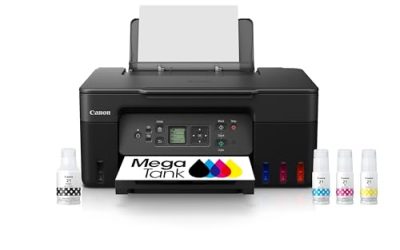
Canon PIXMA G7020 Wireless MegaTank All-in-One Printer
- Best for: Home offices that print documents daily and photos only now and then.
- Print, copy, scan, and fax in one machine
- Up to 6,000 black text pages or 7,700 color pages per full ink bottle set
- 35-sheet automatic document feeder
- 350-sheet paper capacity with front cassette and rear tray
Home offices that print documents daily and photos only now and then.
Four inks mean less color depth than the G620, so dedicated photo work is better served elsewhere.
The G7020 trades some photo specialization for office muscle, making it the stronger pick when documents dominate the print queue. It prints, copies, scans, and faxes, and its automatic document feeder handles multi-page jobs without babysitting. A full set of ink bottles stretches to thousands of black text pages or color pages, so a busy household can go long stretches between refills. Photo output stays pleasant for snapshots and school projects, even though the four-ink system cannot match the G620 for rich color depth. For mixed home-office use, this balance makes sense. Duplex printing saves paper on longer documents, and the large paper capacity means fewer tray refills.
Watch out for: Four inks mean less color depth than the G620, so dedicated photo work is better served elsewhere.
Epson EcoTank Photo ET-8550 Wireless Wide-Format All-in-One Supertank Printer
- Best for: Photographers and creators who print large photos for framing or display.
- 6-color wide-format photo printing up to 13 x 19 inches
- 4.3-inch color touchscreen
- Scanner and copier built in
- Wi-Fi and Ethernet connectivity
Photographers and creators who print large photos for framing or display.
The wide body and tall build need a large, level surface, and wide-format photo paper costs more than standard sizes.
The ET-8550 is the choice for photographers who want their work big. It prints wide-format photos up to 13 by 19 inches, turning favorite shots into display pieces without a trip to a print shop. Six inks, including gray and photo black, support smooth gradations and deep shadows, while the 4.3-inch color touchscreen makes settings easy to adjust. Scanning and copying cover household needs, and Ethernet joins Wi-Fi for flexible placement. It takes up serious space, but for large prints it earns every inch. Borderless wide-format output means no trimming, and the touchscreen keeps paper and quality settings close at hand.
Watch out for: The wide body and tall build need a large, level surface, and wide-format photo paper costs more than standard sizes.
Which One Fits Your Situation
Printing Albums and Scrapbooks at Home
The G620 is the natural pick here. Its six inks and high photo yield suit batch printing for albums, and borderless sizes cover the standard album formats. Keep a stack of glossy photo paper on hand and refill the visible tanks before a big session, and the printer will work through an album without interruption.
Running a Document-Heavy Home Office
Choose the G7020 when letters, forms, and school paperwork outnumber photos. The automatic document feeder and fax handle multi-page jobs, the large paper capacity means fewer refills, and the high black-text yield keeps the bottle set lasting through busy weeks. Photos stay acceptable for everyday use, while duplex printing saves paper on longer documents.
Making Large Prints for Framing or Display
The ET-8550 is built for this job. Wide-format output up to 13 by 19 inches turns landscapes and portraits into wall pieces, and the six-ink system keeps gradients smooth at large sizes. Plan desk space first, stock wide-format paper, and let the touchscreen guide paper and quality settings for each print.
Printing Photos from Phones and Tablets
Pick the G620 when most printing starts on a phone. Wireless printing and the Canon app make it easy to send photos straight from a camera roll, and the six-ink system rewards good phone shots with vivid prints. Keep the printer on the same Wi-Fi network as your devices and photo paper loaded, and printing becomes a one-tap habit.
Common Mistakes
- Buying a photo tank printer for mostly text documents, then finding document speeds and features fall short of an office model.
- Skipping a desk measurement and discovering the wide tank body crowds the workspace or blocks a drawer.
- Loading plain paper for photos and wondering why colors look flat and dull.
- Letting ink tanks run dry mid-batch instead of topping them up before a large album session.
- Ignoring paper size limits and ordering photo paper the printer cannot feed.
Frequently Asked Questions
Does the Canon PIXMA G620 print borderless photos?
Yes, the G620 handles borderless photo printing at common photo sizes, which suits album pages and framed prints. Use glossy photo paper matched to the size you want, set borderless output in the print settings, and leave finished prints to dry before stacking them. Borderless printing uses more ink at the edges, so keep the tanks topped up. Check the listing for the exact borderless sizes supported before ordering paper.
How many photos can one set of G620 ink bottles produce?
Canon states up to 3,800 4 by 6 inch color photos from one full set of ink bottles. Real totals vary with image content, paper choice, and print settings, since dense, dark images use more ink than bright, airy ones. Keep spare bottles on hand for large batches, and refill tanks before they run low. Print in standard quality for everyday snapshots to stretch each bottle further.
Can the G620 copy and scan as well as print?
Yes, the G620 is an all-in-one machine that prints, copies, and scans, covering routine household jobs alongside photo printing. It has no automatic document feeder, so multi-page copying and scanning need each sheet placed by hand. For occasional copies and scans of old photos, that manual step is a fair trade for photo quality. Scanning old photos at high resolution takes longer, so set aside time for large archiving jobs.
Which printer is better for photos, the G620 or the G7020?
The G620 is the stronger photo printer, thanks to its six-color dye-based ink system with red and gray inks that widen the color range. The G7020 suits document-heavy households with its feeder, fax, and higher text yields, but its four inks cannot match the G620 for color depth. Choose by the job you print most, not by the feature list alone.
FAQ
Does the Canon PIXMA G620 print borderless photos?
How many photos can one set of G620 ink bottles produce?
Can the G620 copy and scan as well as print?
Which printer is better for photos, the G620 or the G7020?
More from Amazon
Programs that pair well with the guide above. Offers and eligibility are set by Amazon and may change.
A free business account with business pricing and bulk-buying tools for work, shop or home office.
Create a business accountFree shipping on eligible items, Prime Video and more. Eligible new members can start with a free trial.
Start a Prime free trialAudiobooks and podcasts to listen to on the go. Eligible new members can start with a free trial.
Try Audible freeAd-free music streaming. Eligible new subscribers can start with a free trial.
Try Music Unlimited freeAs an Amazon Associate we earn from qualifying purchases.


Write Your Review
No reviews yet. Be the first to share your experience!