
Key takeaways
- Canon Ivy 2 Mini Photo Printer review: a pocket ZINK printer for sticky-back 2x3 prints from your phone, with Bluetooth pairing and no ink to replace.
The real decision with a mini photo printer is not resolution charts or print speed. It is whether the prints will actually leave your phone. The Canon Ivy 2 Mini Photo Printer is built around that single job: it turns a photo on your iOS or Android phone into a small 2×3 print with a peel-and-stick back, using ZINK paper that needs no ink cartridges at all. The version covered here is the standalone printer in Blush Pink, model 5452C017, sold on its own rather than in one of the larger paper bundles.
This review is for scrapbookers who want prints that stick straight onto a page, students decorating notebooks and lockers, and anyone who likes handing a physical photo to a friend on the spot. Every detail below comes from the specifications and box contents published on this printer’s Amazon product page, so you can judge the hardware on what Canon actually lists rather than on marketing claims.
Quick Picks
As an Amazon Associate we earn from qualifying purchases
| Product | Best for | Key spec from title |
|---|---|---|
| Canon Ivy 2 Mini Photo Printer (Blush Pink) | Sticky-back phone prints you can stick anywhere | ZINK 2×3 prints over Bluetooth, no ink needed |
How to Choose
Pick the color variant and set size deliberately
The Ivy 2 is sold in more than one color and in more than one package, and the listings are separate, so the first check is which one you are actually looking at. The printer covered in this review is the Blush Pink standalone unit, which ships with a starter pack of paper. A Pure White version exists, and there are also larger bundles that add a big stack of paper, a case, and a light bar. Those bundles are different listings with different contents, so confirm the color name and box contents before ordering rather than assuming every Ivy 2 box holds the same things.
Plan your ZINK paper supply before you start printing
This printer only works with Canon ZINK photo paper in the 2×3 size, and the box includes just ten sheets plus one SMART SHEET used for calibration. Ten prints disappear quickly at a party or during one scrapbooking session, so most buyers will want a refill pack on hand from day one. ZINK paper is sold in several pack sizes, and because the color dyes live inside the paper itself, there is no ink to buy separately. Check that any refill you add is genuine 2×3 ZINK paper for the Ivy line, since other paper sizes and brands will not feed or print correctly.
Check the app and Bluetooth pairing requirements
The Ivy 2 has no screen and no buttons for selecting photos. Everything runs through the Canon Mini Print app on a compatible iOS or Android smartphone, connected over Bluetooth. That means your phone is the control panel: you pick the photo in the app, add frames, filters, or text if you want them, and send it to print. Before buying, confirm your phone can install the Canon Mini Print app, that it runs a supported operating system version, and that you are comfortable keeping Bluetooth switched on while printing. There is no Wi-Fi or USB printing path from a computer, so a phone is not optional with this printer.
Understand the charging setup
The Ivy 2 runs on a built-in rechargeable lithium-ion battery and charges over the included USB cable, which runs from USB A on the charger end to USB C on the printer. No separate wall adapter is listed in the box contents, so most people will charge it from a laptop port, a power bank, or a phone charger they already own. Because the battery is internal and not swappable, heavy printing sessions away from home depend on starting with a full charge. Topping it up before a trip or an event is a simple habit that avoids a dead printer halfway through a stack of prints you promised to other people.
The Best Option
Canon Ivy 2 Mini Photo Printer (Blush Pink)
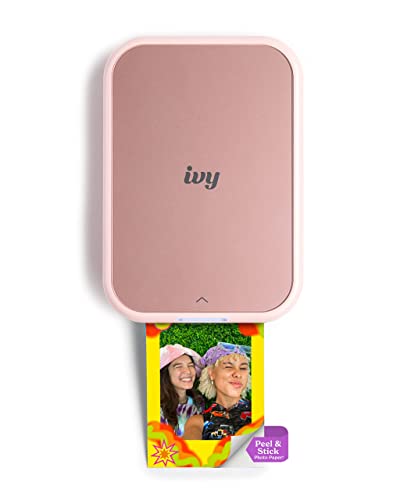
The Ivy 2 fits buyers who value immediacy over print size. It is small and light enough to ride in a jacket pocket or a small bag, pairs with your phone over Bluetooth, and produces a finished print you can peel and stick onto a journal, a laptop lid, a fridge, or a gift tag within moments of taking the picture. Canon lists improved print quality for this second-generation model, calling out optimized skin tones, contrast, and sharpness, which matters for a printer whose output is mostly faces and everyday snapshots rather than documents or artwork. Nothing in the workflow asks for extra supplies or a desk.
Specs
- Print technology: ZINK (Zero Ink), dye-based crystals embedded in the paper
- Print size: 2 x 3 inches, glossy photo paper with peel-and-stick backing
- Print resolution: 313 x 512 dpi
- Connectivity: Bluetooth, controlled through the Canon Mini Print app
- Compatible devices: iOS and Android smartphones
- Paper capacity: up to 10 sheets of ZINK photo paper
- Battery: built-in rechargeable lithium-ion, charges via USB
- Weight: 0.55 lb
- Model number: 5452C017
- In the box: Ivy 2 printer, ZINK photo paper pack (10 sheets and 1 SMART SHEET), USB charging cable (USB A to USB C)
Best for: Scrapbookers, journalers, and students who want small sticky-back prints straight from a phone, with no ink to manage.
Watch out for: The starter pack holds only ten sheets, the printer accepts nothing but 2×3 ZINK paper, and this listing is the Blush Pink printer on its own, not one of the larger paper-and-case bundles.
Which One Fits Your Situation
You fill scrapbooks and journals by hand
The Ivy 2 suits this work because the prints come out as stickers. There is no glue tape, no photo corners, and no trimming step between printing and placing a picture on the page. Print a shot, peel the backing, and press it down next to your handwriting. The small 2×3 size fits layouts built from many little moments rather than one large centerpiece photo.
You want prints at parties and family gatherings
A pocket printer changes the social math of a gathering: instead of promising to send photos later, you hand someone a physical print before they leave. The Ivy 2 handles this well because it needs no ink, no cables, and no setup beyond the app on your phone. Keep expectations matched to the format, though: these are small keepsakes for wallets, mirrors, and fridge doors, not framed enlargements.
You are buying it as a gift
The Blush Pink finish and tiny footprint make this an easy gift for a teenager, a student, or a friend who documents everything on their phone. Two things keep the gift from stalling on day one: the recipient needs a compatible smartphone for the Canon Mini Print app, and the included paper runs out after ten prints. Adding a refill pack of ZINK paper turns a fun first evening into a hobby that continues.
You travel light and print on the road
At just over half a pound with no ink system to leak or dry out, the Ivy 2 suits travel journaling better than larger portable printers. Print a day’s best shot each evening and stick it into a notebook while the details are still fresh. Plan around the battery and paper supply: charge from the same power bank you carry for your phone, and pack enough ZINK paper for the whole trip.
Common Mistakes
- Assuming any photo paper will work. The Ivy 2 prints only on 2×3 ZINK paper made for this printer family; standard photo paper, larger ZINK sizes, and rival sticker papers will not feed or produce an image.
- Forgetting the SMART SHEET step. Each new paper pack starts with a blue SMART SHEET that goes in first, ahead of the photo paper, so the printer can calibrate. Skipping it or loading it in the wrong order leads to prints with off colors.
- Mixing up the listings. The standalone printer, the Pure White version, and the big paper-and-case bundles are separate listings with different contents. Ordering the wrong one is the most common source of disappointment with this product.
- Expecting large-format quality from a 2×3 sticker. Group shots with many faces and detailed landscapes lose a lot at this size. Choosing close, simple compositions makes the small format look its best.
- Leaving the printer uncharged in a drawer for months. The built-in battery is not removable, so an Ivy 2 that sits empty for a long stretch may need a long charge before it wakes up again. A top-up charge before events keeps it ready, and storing it with some charge left is kinder to the battery than parking it completely flat.
Frequently Asked Questions
Does the Canon Ivy 2 need ink cartridges?
No. The Ivy 2 uses ZINK, which stands for Zero Ink. The color comes from dye-based crystals embedded in the paper itself, and heat from the printer activates them to form the image. There are no cartridges, ribbons, or toner to replace. Your only running supply is the ZINK photo paper, which is also why the printer stays small, clean, and simple to carry anywhere.
What size are the prints, and do they really stick?
Prints measure 2 by 3 inches, about the size of a credit card. Each sheet has a peel-off backing that exposes an adhesive surface, so a finished print works like a photo sticker for journals, laptops, phone cases, lockers, and walls. The paper is glossy, and because there is no liquid ink involved, the listing describes the prints as smudge-free and resistant to water damage once printed.
Which phones work with the Ivy 2?
The listing states the printer works with compatible iOS and Android smartphones through the Canon Mini Print app, connected over Bluetooth. The app is where you select photos and add decorations such as frames and text before printing. There is no printing path from a desktop or laptop computer, and the printer does not connect over Wi-Fi, so a supported phone is required to use it at all.
How much paper comes in the box?
The box includes one ZINK photo paper pack with ten sheets, plus a single SMART SHEET used to calibrate the printer when a new pack is loaded. Ten sheets are enough to learn the app and make your first prints, but most regular users will want a refill pack soon after. ZINK paper for this printer is sold separately in larger packs, all in the same 2×3 size.
FAQ
Does the Canon Ivy 2 need ink cartridges?
What size are the prints, and do they really stick?
Which phones work with the Ivy 2?
How much paper comes in the box?
More from Amazon
Programs that pair well with the guide above. Offers and eligibility are set by Amazon and may change.
A free business account with business pricing and bulk-buying tools for work, shop or home office.
Create a business accountFree shipping on eligible items, Prime Video and more. Eligible new members can start with a free trial.
Start a Prime free trialAudiobooks and podcasts to listen to on the go. Eligible new members can start with a free trial.
Try Audible freeAd-free music streaming. Eligible new subscribers can start with a free trial.
Try Music Unlimited freeAs an Amazon Associate we earn from qualifying purchases.



Write Your Review
No reviews yet. Be the first to share your experience!