
Key takeaways
- Compare the best SSD enclosures for turning a spare M.2 NVMe drive into portable storage, from tool-free 10Gbps cases to a fan-cooled 40Gbps USB4 model.
A spare M.2 drive sitting in a drawer is wasted storage. An SSD enclosure turns that drive into a pocket-sized external drive, ready for backups, game libraries, photo archives, or moving large files between machines. The enclosure is only a shell and a bridge chip, so the drive you put inside decides the real-world speed, while the enclosure decides the connection, the cooling, and how easy the drive is to swap. Pick the wrong one and a fast NVMe drive gets stuck behind a slow link, or a SATA drive does not fit at all.
As an Amazon Associate, we earn from qualifying purchases.
Quick Answer
The UGREEN 10Gbps Tool-Free enclosure is the pick for most buyers. It accepts M and B&M key NVMe drives in four sizes, needs no tools or drivers, and pairs a proven bridge chip with a slim aluminum shell and a protective silicone case. Buyers who need Thunderbolt speed should look at the fan-cooled ACASIS TBU405 Pro instead.
How to Choose
Start with the drive you already own. NVMe and M.2 SATA drives share the same connector shape but speak different protocols, and many enclosures accept only one of them. A listing that says NVMe only will reject a SATA drive, and a dual-protocol enclosure accepts both. Check the keying too: M-key drives are NVMe, while B&M-key drives can be either, so confirm the protocol before ordering.
Match the link speed to the host port. A 10Gbps USB-C enclosure is the sensible default for most laptops and desktops, and it is fast enough for backups, media libraries, and everyday transfers. A 20Gbps or 40Gbps enclosure only shows its advantage on a matching USB4 or Thunderbolt port, and it still needs a Gen3 or Gen4 drive inside to come close to its headline link rate. The link rate is a ceiling, not a promise.
Check the supported lengths. Most enclosures accept 2280 drives, and the better ones also take 2230, 2242, and 2260. Short drives from handhelds and compact laptops need that flexibility. Capacity support matters less than it used to, since most current enclosures accept drives up to 8TB, but older designs may cap out lower.
Decide how often the drive will change. A tool-free enclosure with a buckle or flip-open lid suits frequent swaps, cloning jobs, and troubleshooting. A screw-fixed enclosure is fine for a drive that goes in once and stays there. Cooling matters for long copies: an aluminum shell sheds heat better than plastic, a thermal pad pressed against the drive helps more, and a small fan is the strongest option for sustained writes. Finally, confirm the cable in the box is a full data cable rated for the enclosure speed, since a charge-only cable will throttle even the best enclosure.
Best SSD Enclosures
UGREEN 10Gbps Tool-Free M.2 NVMe Enclosure — Best Overall
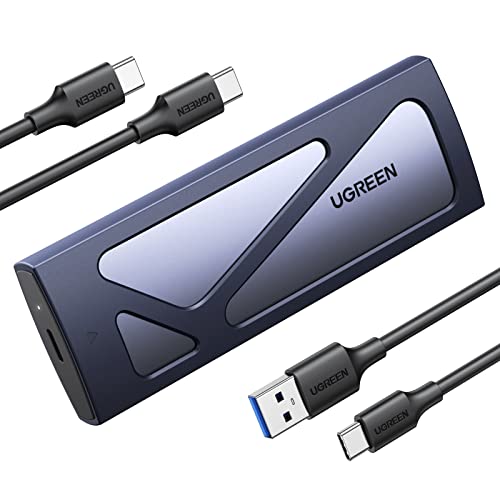
The UGREEN tool-free enclosure is the easiest recommendation in this guide because it removes the usual friction points. The buckle design opens without tools, the drive clicks into place, and the enclosure connects over USB-C with no drivers to install. It is the kind of case that works well for a first enclosure and stays useful when the drive inside gets upgraded later.
Specs
- Interface: USB 3.2 Gen 2, 10Gbps
- Protocol: NVMe only, M and B&M keys
- Sizes: 2230, 2242, 2260, 2280
- Capacity: Up to 8TB
- Chip: RTL9210 with UASP and Trim support
- Build: Aluminum shell with silicone case
- Compatibility: Windows, Mac OS, Linux, Android, iOS
Speed is honest rather than spectacular. The 10Gbps link is the ceiling, and the RTL9210 bridge chip supports UASP and Trim, which keeps transfers steady instead of spiky. The listing states plainly that SATA NGFF and mSATA drives are not supported, so this case is strictly for NVMe drives. That clarity is a plus: there is no guessing about which spare drive fits.
Portability is a genuine strength. The shell is ultra-slim aluminum, and the included silicone case adds grip and bump protection for travel. Four drive lengths are supported, which covers full-size desktop drives as well as short drives pulled from handhelds and compact laptops. Backward compatibility with USB 3.1 and USB 3.0 keeps it working on older machines, though the link drops to the older port speed. For most buyers, this is the enclosure to buy first.
Sabrent EC-PNVO USB-C NVMe Enclosure and Reader — Best Flip-Open Design

The Sabrent EC-PNVO opens like a small clamshell: lift the cover, drop the drive in, lock it down, and close. There are no screws to lose and no sliding tray to fight, which makes it the best choice for anyone who swaps drives often, whether for cloning, diagnostics, or moving a project between machines.
Specs
- Interface: USB 3.2 Gen 2, 10Gbps
- Protocol: NVMe only, not compatible with M.2 SATA
- Sizes: 2230, 2242, 2260, 2280
- Capacity: Up to 8TB
- Build: Aluminum alloy top with reinforced ABS frame
- Cooling: Thermal pad pressed against the drive
- Compatibility: Laptops, desktops, gaming handhelds, USB-C devices
Cooling is where this design earns its place. The aluminum top presses the thermal pad directly against the drive, which moves heat out better than the loose fit of a slide-in case. That matters during long transfers and heavy workloads, when a hot drive throttles and speeds fall off. The enclosure is slim and light, and the reinforced frame protects the drive in a bag.
The trade-off is scope. This is an NVMe-only enclosure, so a SATA drive has no home here. Within that scope it is generous: four sizes, up to 8TB, bus-powered over USB-C, and no drivers or external power. It suits creators and gamers who move large files and want the drive swap to take seconds rather than minutes.
Sabrent EC-SNVE Tool-Free NVMe and SATA Enclosure — Best Slim Dual-Protocol Case
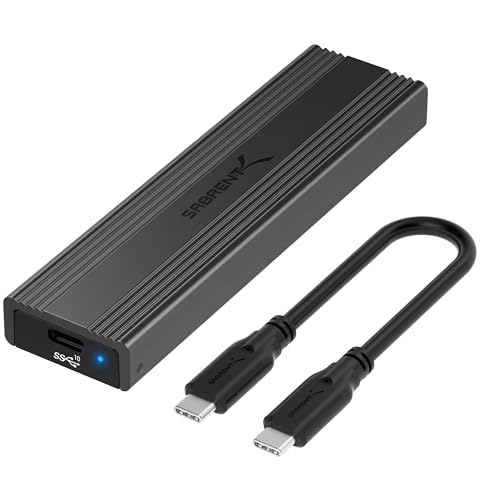
The EC-SNVE is the pick for mixed drive collections. It accepts both NVMe and M.2 SATA drives, so a spare drive of either type fits. That flexibility is rare at this size, and it makes the enclosure useful long after a single drive has been retired, since whatever comes out of the next upgrade is likely to fit.
Specs
- Interface: USB 3.2, 10Gbps
- Protocol: NVMe and M.2 SATA
- Sizes: 2242, 2260, 2280
- Build: Ultra-slim aluminum case with ABS frame
- Install: Fully tool-free
- Power: Bus powered, no drivers required
- Stated transfer speed: Up to 1000 MB/s
Installation is fully tool-free, and the case is ultra-slim aluminum with an ABS frame, which keeps it light enough for a pocket or a small tech pouch. The enclosure is bus powered, so there is no power brick to carry, and it needs no drivers on common systems. The listing quotes transfer speeds up to 1000 MB/s, which is the practical neighborhood for a 10Gbps link.
The one gap is the shortest size. The EC-SNVE takes 2242, 2260, and 2280 drives but not 2230, so a short drive from a handheld or a compact device needs a different case. For desktop and laptop drives, that limit rarely matters. If the drawer holds one NVMe drive and one SATA drive, this single enclosure serves both.
SSK Aluminum M.2 NVMe SSD Enclosure — Best Accessory Bundle

The SSK enclosure is the veteran of this group, and it earns its place on build and completeness. The aluminum shell is slim and rigid, and the kit includes thermal pads and a screwdriver, so everything needed for the install is in the box. It is a straightforward case for a drive that goes in and stays in.
Specs
- Interface: USB 3.1 Gen 2, 10Gbps
- Protocol: NVMe PCIe M-Key only
- Sizes: 2242, 2260, 2280
- Build: Aluminum, 4.53 x 1.54 x 0.43 inches
- Install: Screw-fixed with included screwdriver
- Extras: Thermal pads included
Protocol support is narrow by design. The listing states plainly that the case fits only NVMe PCIe drives, so SATA drives and B-key media are out. Sizes stop at 2242 on the short end, which excludes 2230 drives. Within those limits it is a solid performer: the 10Gbps link, the aluminum shell, and the included thermal pads cover the basics well.
Age is the caveat. This listing dates back to late 2018, which means the design predates current tool-free trends and the newest host ports. It remains a capable enclosure for a standard 2280 NVMe drive, and the accessory bundle is genuinely useful. Buyers with a 2230 drive or a SATA drive should pick a different case from this guide.
ACASIS TBU405 Pro 40Gbps M.2 NVMe SSD Enclosure — Best 40Gbps Actively Cooled

The ACASIS TBU405 Pro is the enclosure for hosts that can actually use it. It runs a 40Gbps USB4 link on a certified Intel JHL7440 chip, and it pairs that link with a built-in cooling fan and heat-dissipation holes. That combination targets sustained transfers, where passive cases heat up and slow down.
Specs
- Interface: USB4, 40Gbps
- Chip: Intel JHL7440, certified
- Cooling: Built-in fan with heat-dissipation holes
- Protocol: NVMe, M-key
- Sizes: 2230, 2242, 2260, 2280
- Hosts: Thunderbolt 4, Thunderbolt 3, USB4, USB 3.2, 3.1, 3.0
- Compatibility: M1, M2, and M3 Mac, Windows, Linux, iPad Pro
- Build: Aluminum, compact travel-friendly form
Listed speeds reach 2805 MB/s read and 2734 MB/s write in the maker’s own check with a Samsung 980 Pro on a MacBook, which is the honest neighborhood for a tunneled NVMe link rather than the headline link rate. The enclosure is backward compatible with slower USB ports, but it only shows its advantage on a Thunderbolt or USB4 host. On a plain 10Gbps port it behaves like any other enclosure.
The fan is the defining feature and the main compromise. It keeps the drive cooler during long writes, but it adds a small amount of operating noise. The enclosure accepts all four common drive lengths, and the aluminum body stays compact enough for a laptop bag. One detail to confirm before ordering: the listing title names ACASIS while the brand field on the listing has shown a different seller name, so check that the listing shows the ACASIS name before buying.
Who Should Skip It
Skip an enclosure entirely if the drive will never leave the machine it is already in. An internal drive is always faster and simpler than the same drive in an external shell. Skip the 40Gbps models if the host has only standard USB-C ports, since the enclosure will run at the host speed and the extra cost buys nothing. Skip NVMe-only cases if the spare drive is a SATA model, and skip any enclosure that does not list the exact drive length on hand. Finally, anyone who needs a ready-to-use external drive with a warranty on the whole unit should buy a pre-built external SSD instead of a shell plus a bare drive.
FAQ
Can I use any M.2 drive in an SSD enclosure?
No. The drive must match the enclosure protocol and size. NVMe-only enclosures reject SATA drives, dual-protocol enclosures accept both, and the enclosure must list the exact drive length. Check the protocol, the keying, and the supported sizes on the listing before ordering.
Is a 40Gbps enclosure faster than a 10Gbps enclosure?
Only on a matching host. A 40Gbps enclosure needs a USB4 or Thunderbolt port and a fast Gen3 or Gen4 drive to show higher speeds. On a standard 10Gbps USB-C port it runs at the same speed as a 10Gbps enclosure, since the host port sets the ceiling.
Do SSD enclosures need drivers or external power?
Most current enclosures need neither. The cases in this guide are plug-and-play over USB-C and draw power from the host port. A driver is rarely required on modern Windows, Mac, and Linux systems, though very old systems may need one.
Does an enclosure slow down an NVMe drive?
The enclosure adds a bridge between the drive and the host, so the link speed becomes the ceiling. A Gen4 drive that runs far above 10Gbps inside a machine will top out near the enclosure link rate outside it. For backups and file transfers that ceiling is rarely the bottleneck in practice.
Final Verdict
Buy the UGREEN tool-free enclosure for the widest fit and the easiest install. It covers four drive sizes, needs no tools, and pairs a proven bridge chip with a protective case. Choose the Sabrent EC-PNVO if the drive changes often, the EC-SNVE if the drawer holds both NVMe and SATA drives, and the SSK if a complete kit with thermal pads matters more than tool-free access. Buyers with a Thunderbolt or USB4 host and long transfer jobs should step up to the fan-cooled ACASIS TBU405 Pro.
Product and ASIN Reference
| Product | ASIN |
| UGREEN 10Gbps Tool-Free M.2 NVMe Enclosure | B09T97Z7DM |
| Sabrent EC-PNVO USB-C NVMe Enclosure and Reader | B0F933F1G8 |
| Sabrent EC-SNVE Tool-Free NVMe and SATA Enclosure | B08RVC6F9Y |
| SSK Aluminum M.2 NVMe SSD Enclosure | B07MNFH1PX |
| ACASIS TBU405 Pro 40Gbps M.2 NVMe SSD Enclosure | B0C8CZB5S7 |
FAQ
Can I use any M.2 drive in an SSD enclosure?
Is a 40Gbps enclosure faster than a 10Gbps enclosure?
Do SSD enclosures need drivers or external power?
Does an enclosure slow down an NVMe drive?
More from Amazon
Programs that pair well with the guide above. Offers and eligibility are set by Amazon and may change.
A free business account with business pricing and bulk-buying tools for work, shop or home office.
Create a business accountFree shipping on eligible items, Prime Video and more. Eligible new members can start with a free trial.
Start a Prime free trialAudiobooks and podcasts to listen to on the go. Eligible new members can start with a free trial.
Try Audible freeAd-free music streaming. Eligible new subscribers can start with a free trial.
Try Music Unlimited freeAs an Amazon Associate we earn from qualifying purchases.
Write Your Review
No reviews yet. Be the first to share your experience!