
Key takeaways
- Compare 5 GaN chargers for MacBook Pro, from a 65W pocket plug to 100W multi-port bricks. Match wattage, ports, and cables to your model before you buy.
The real decision behind a GaN charger for a MacBook Pro is wattage, not brand. A 14-inch model asks for far less power than a 16-inch one, and a charger that tops out at 65W will still fill a smaller battery, just more slowly when the machine is rendering video or compiling code. Buy too little power and the laptop can drain under a heavy load; buy a 100W brick for a machine that only draws 70W and the extra headroom sits unused.
This guide is for MacBook Pro owners who want one compact brick for a desk, a bag, or both, whether that means a single-port charger with a cable in the box or a multi-port GaN unit that also feeds a phone and a tablet. Every charger below was chosen from the name and specifications on its Amazon listing, so the wattage, port layout, and included accessories reflect what the listing states.
Quick Picks
As an Amazon Associate we earn from qualifying purchases
| Product | Best for | Key spec from title |
|---|---|---|
| Anker Prime Charger 100W (A2688) | A compact three-device kit for laptop, phone, and accessory | 100W GaN, 2 USB-C + 1 USB-A, 6 oz |
| UGREEN Nexode 100W Charger (4-Port) | A desk or hotel outlet feeding four devices at once | 100W GaN, 3 USB-C + 1 USB-A, foldable plug |
| Anker Nano II 65W Charger | A pocket-size travel plug for a 13- or 14-inch MacBook Pro | 65W GaN II, single USB-C, 3.84 oz |
| Satechi 100W USB-C PD Compact GaN Charger | A three-port wall charger with a clear power split | 100W GaN, 2 USB-C + 1 USB-A, 60W + 30W split |
| Anker 317 Charger 100W | One laptop, one cable, and no sharing decisions | 100W single USB-C, 1.5 m cable included |
How to Choose
Match the Wattage to Your MacBook Pro
Start with the adapter that shipped with your MacBook Pro, because its wattage is the baseline your charger should meet. Apple pairs the 14-inch model with a 67W, 70W, or 96W adapter depending on the chip, while the 16-inch model ships with a 140W adapter, so a 65W charger suits a base 14-inch machine but leaves a 16-inch one charging slowly. A 100W charger covers every 14-inch configuration at full speed and still charges a 16-inch model, though it will not match the 140W adapter under heavy use. Check the wattage printed on your original adapter before you compare anything else.
Read the Shared-Power Split, Not Just the Headline
A multi-port charger divides one total output budget among every device plugged into it, so the headline wattage only applies when one port is in use. Anker lists the Prime at 100W with two ports in use and 89W with three, while Satechi lists a 60W plus 30W split across its two USB-C ports, and both figures change the laptop wattage the moment a phone joins. Put the laptop on the strongest USB-C port first, then add smaller accessories where the remaining budget allows. A buyer who runs two larger USB-C devices should favor the listing with an allocation figure for that exact combination.
Count the Ports You Actually Use
A single-port charger is the simplest choice when the laptop is the only device that needs power, and it removes every question about sharing. A three- or four-port charger earns its place when a phone, tablet, or watch charges in the same spot every day, because it replaces several wall bricks with one outlet. The trade is size and heat: more ports usually mean a larger body, and a charger that feeds four devices at once runs warmer than one feeding a single laptop. Count the devices that charge beside your MacBook Pro daily, then pick the port layout that fits them and nothing more.
Treat the Cable as Part of the Charger
The charger cannot push 100W through a cable that does not support 5A or 100W charging, so the cable in the box matters as much as the brick. Anker includes a 1.5 m USB-C to USB-C cable with the 317, while the Prime, the Nano II, and the Satechi ship without one, and Satechi states that an E-Mark cable is needed to reach 100W. A cable that came with a phone often tops out at far less than 100W, which quietly caps the whole setup. Check the cable marking before you buy, and add a 100W cable to the order when the listing says none is included.
The 5 Best Options
Anker Prime Charger 100W (A2688)
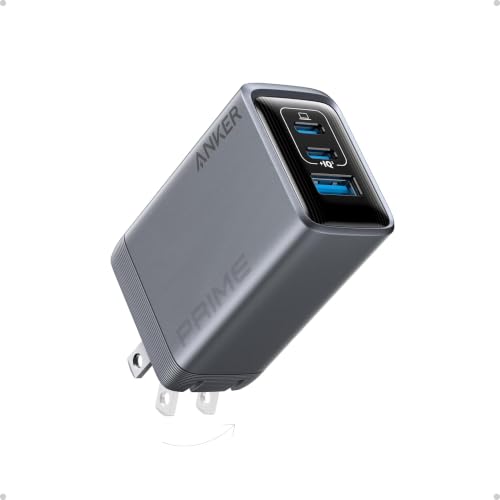
The Anker Prime is the most compact three-device charger in this guide, packing two 100W USB-C ports and one USB-A port into a body Anker describes as smaller than a credit card. Either USB-C port can deliver the full 100W to a MacBook Pro on its own, and Anker lists a 100W maximum with two ports in use, so a laptop and a phone can share the brick without the laptop dropping to a trickle. The foldable prongs and 6-ounce weight make it an easy travel companion, though no cable comes in the box.
Specs
- 100W total output; 2 USB-C ports at 100W max each when used alone, 1 USB-A port at 22.5W max
- Two ports in use: USB-C1 + USB-C2 at 65W + 35W; three ports in use: 89W max
- GaN technology; foldable plug
- Dimensions 1.7 x 1.1 x 2.7 inches, weight 6 ounces
- No USB-C cable included
- Model A2688
Best for: A compact three-device kit where a MacBook Pro, a phone, and an accessory share one small brick.
Watch out for: No cable is included, and the total drops to 89W when all three ports are in use, so the laptop loses headroom then.
UGREEN Nexode 100W Charger (4-Port)

The UGREEN Nexode is the four-port option for a desk or a hotel room where one outlet has to serve everything. Three USB-C ports and one USB-A port share a single 100W budget, and either of the top two USB-C ports can deliver the full 100W to a MacBook Pro when it charges alone. The foldable plug and the 2.7-inch square body keep it packable for a charger with this many connections, and UGREEN publishes a charging guide that shows how power divides across port combinations. No cable is included, so a 100W cable is a separate purchase.
Specs
- 100W total output; USB-C1 and USB-C2 at 100W max each when used alone
- 3 USB-C ports and 1 USB-A port; PD 3.0 and PPS protocol support
- GaN technology; foldable plug
- Dimensions 2.7 x 2.7 x 1.3 inches, weight about 8.3 ounces
- No USB-C cable included
- Model 40737
Best for: A desk or shared outlet where a MacBook Pro plus a phone, tablet, and accessory all charge at once.
Watch out for: The 100W total is shared, so a laptop charging beside three other devices gets less than 100W, and the cable is not in the box.
Anker Nano II 65W Charger
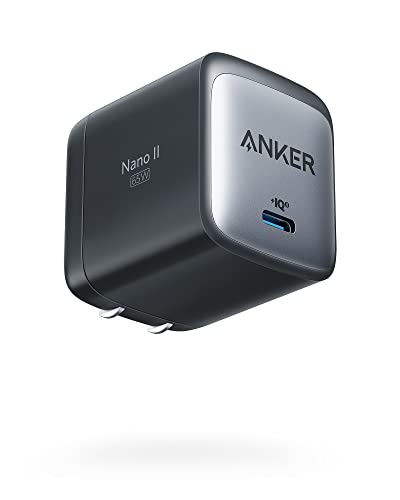
The Anker Nano II is the smallest charger in this guide, a single-port 65W brick that fits in a pocket and charges a 13-inch or base 14-inch MacBook Pro at full speed. GaN II technology keeps the body to 1.65 by 1.42 by 1.74 inches, and the foldable plug means nothing snags in a bag. It also handles a phone or tablet at high speed when the laptop stays home, so it doubles as the one charger for a light travel kit. The single port is the whole point: there is nothing to share and nothing to plan.
Specs
- 65W max output from a single USB-C port; 20V at 3.25A
- GaN II technology; foldable plug
- Dimensions 1.65 x 1.42 x 1.74 inches, weight 3.84 ounces
- Charges MacBook Pro 13-inch at full speed, according to the listing
- No cable included; cables sold separately
- Model A2663
Best for: A pocket-size travel plug for a 13- or 14-inch MacBook Pro that needs full-speed charging from one port.
Watch out for: A 16-inch MacBook Pro draws more than 65W under load, and the single port cannot charge a phone beside the laptop.
Satechi 100W USB-C PD Compact GaN Charger
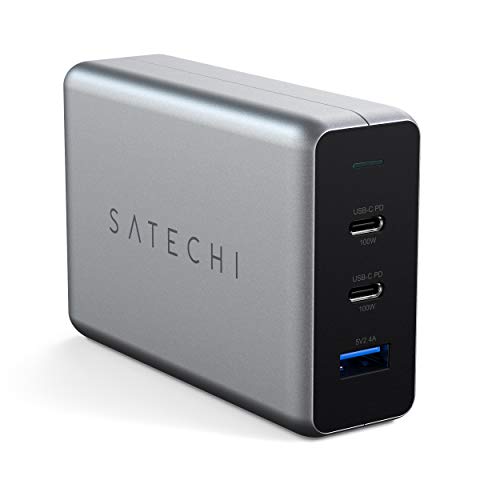
The Satechi is the clearest multi-port charger in this guide, because its listing spells out exactly how the 100W budget splits. One USB-C port delivers up to 100W to a MacBook Pro on its own, two USB-C ports divide into 60W plus 30W, and the USB-A port adds up to 12W alongside them. That published split makes it easy to plan a laptop plus tablet plus phone setup before anything is plugged in. The trade is bulk: at 11.2 ounces it is the heaviest charger here, and the E-Mark cable needed for 100W is sold separately.
Specs
- 100W total output; one USB-C port up to 100W when used alone
- 2 USB-C ports and 1 USB-A port; two USB-C ports split 60W + 30W; USB-A up to 12W
- GaN technology
- Dimensions 3.75 x 2.5 x 1.25 inches, weight 11.2 ounces
- E-Mark cable needed for 100W charging, sold separately
- 2-year limited warranty
- Model ST-TC100GM
Best for: A three-device desk setup where a published power split matters more than the lightest body.
Watch out for: At 11.2 ounces it is the heaviest charger in this guide, and the E-Mark cable for full 100W charging is not included.
Anker 317 Charger 100W

The Anker 317 removes the allocation question entirely, because it has one USB-C port and one job. It delivers up to 100W at 20V and 5A to a MacBook Pro, with PPS support from 3.3V to 21V at up to 5A for phones and tablets that use it. Anker includes a 1.5 m USB-C to USB-C cable in the box, so the kit is complete the moment it arrives and there is no separate cable to remember. It suits a spare laptop kit, a meeting room, or a travel bag where the laptop is the whole job.
Specs
- 100W max output from a single USB-C port; 20V at 5A
- PPS support from 3.3V to 21V at up to 5A
- GaN technology
- 1.5 m USB-C to USB-C cable included
- Model A2672
Best for: One MacBook Pro with a cable in the box and no power sharing to think about.
Watch out for: The single port leaves no connection for a phone or tablet, so a second device needs its own charger.
Which One Fits Your Situation
A Base 14-Inch MacBook Pro That Travels Light
Pick the Anker Nano II 65W for the lightest bag. It charges a 13-inch or base 14-inch MacBook Pro at full speed from a single port, folds flat, and weighs under 4 ounces. Add a 100W cable if you do not own one already, and remember that a 16-inch model will charge more slowly on 65W.
A Laptop, Phone, and Tablet at One Outlet
Pick the Anker Prime A2688 for the most compact three-device kit, since either USB-C port can feed the laptop at 100W and the total stays at 100W with two ports in use. Pick the UGREEN Nexode when a fourth device joins the outlet, and the Satechi when you want the power split printed in advance.
A Desk Charger That Never Moves
Pick the Satechi ST-TC100GM for a fixed desk, where its 11.2-ounce body stays put and its published 60W plus 30W split makes planning easy. The UGREEN Nexode is the alternative when four ports matter more than a printed split, since it adds one more USB-C connection in a smaller square body.
One Laptop and Nothing Else
Pick the Anker 317 for the simplest setup. It gives a MacBook Pro the full 100W from its only port and includes the 1.5 m cable, so there is nothing to share and nothing extra to buy. The Nano II is the smaller alternative when the laptop is a 13- or 14-inch model and the bag has no room to spare.
Common Mistakes
- Buying a 65W charger for a 16-inch MacBook Pro and expecting it to hold a charge under a heavy load.
- Reading the 100W headline as the power every port delivers at once, when a multi-port charger shares one total budget.
- Using a phone cable that tops out below 100W, which quietly caps a 100W charger no matter which brick you buy.
- Forgetting that several chargers ship without a cable, then discovering the missing cable on the first trip.
- Plugging the laptop into the weakest port on a multi-port charger, so it charges slowly while a phone takes the strong port.
Frequently Asked Questions
Is a 65W charger enough for a MacBook Pro?
It depends on the model. A 65W charger covers a 13-inch MacBook Pro and a base 14-inch model at full speed, since those machines draw 65W or less in normal use. A 16-inch MacBook Pro ships with a 140W adapter, so 65W will charge it more slowly and may lose ground under a heavy load. Match the charger to the wattage on your original adapter first.
Can one GaN charger replace the Apple adapter?
Yes, when the wattage matches. A 100W GaN charger with USB-C Power Delivery can replace the adapter that shipped with a 14-inch MacBook Pro, and it can also charge a phone and tablet from its extra ports. The laptop negotiates the power it needs, so a stronger charger will not force extra wattage into the battery. Check the cable marking too, since a weak cable caps the whole setup.
Do I need a special cable for 100W charging?
Yes. A 100W connection needs a USB-C cable that supports 5A or 100W charging, and Satechi states that an E-Mark cable is needed to reach 100W. Many cables that ship with phones support far less, so they limit the charger even when the brick is strong enough. The Anker 317 includes a suitable 1.5 m cable, while the other chargers here ship without one.
Why does my MacBook Pro charge slowly on a multi-port charger?
A multi-port charger shares one total output budget, so the laptop wattage drops when another device joins. The Anker Prime falls to 89W with three ports in use, and the Satechi splits its two USB-C ports into 60W plus 30W. Put the laptop on the strongest USB-C port first, then add accessories, and check the listing allocation chart before you buy.
FAQ
Is a 65W charger enough for a MacBook Pro?
Can one GaN charger replace the Apple adapter?
Do I need a special cable for 100W charging?
Why does my MacBook Pro charge slowly on a multi-port charger?
More from Amazon
Programs that pair well with the guide above. Offers and eligibility are set by Amazon and may change.
A free business account with business pricing and bulk-buying tools for work, shop or home office.
Create a business accountFree shipping on eligible items, Prime Video and more. Eligible new members can start with a free trial.
Start a Prime free trialAudiobooks and podcasts to listen to on the go. Eligible new members can start with a free trial.
Try Audible freeAd-free music streaming. Eligible new subscribers can start with a free trial.
Try Music Unlimited freeAs an Amazon Associate we earn from qualifying purchases.






Write Your Review
No reviews yet. Be the first to share your experience!