
Our Short List of 3
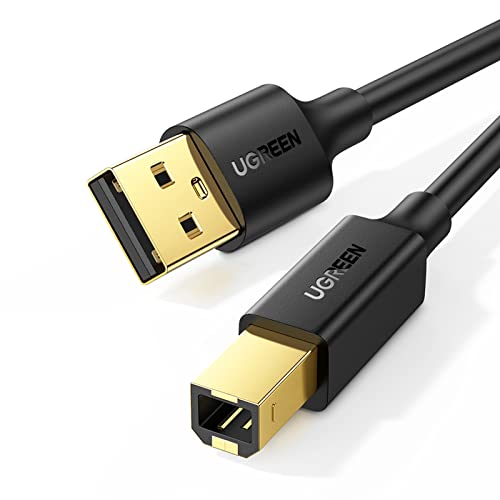
- Best for: Standard desks with a USB-B printer nearby.
- Connectors: USB Type-A male to USB Type-B male
- Length: 5 feet
- Standard: USB 2.0, up to 480 Mbps
- Shielding: Foil and braid; gold-plated connectors

- Best for: Long runs and printers on a separate stand.
- Connectors: USB Type-A male to USB Type-B male
- Length: 10 feet (3 meters)
- Standard: USB 2.0, up to 480 Mbps
- Shielding: Multi-shielded; gold-plated connectors

- Best for: Several USB-B devices, or anyone wanting a spare.
- Connectors: USB Type-A male to USB Type-B male
- Length: 6 feet each, 3 cables included
- Standard: USB 2.0, up to 480 Mbps
- Shielding: Foil and braid; bare copper conductors
All 4 Picks at a Glance
| Product | Specs | Action |
|---|---|---|
| 1. UGREEN USB A to B Printer Cable, 5 Feet |
| Check price on Amazon |
| 2. Amazon Basics USB 2.0 Printer Cable, 10 Feet |
| Check price on Amazon |
| 3. Cable Matters USB Printer Cable 3-Pack, 6 Feet |
| Check price on Amazon |
 4. Cable Matters USB-C to USB-B Printer Cable, 6.6 Feet |
| Check price on Amazon |
Key takeaways
- Find the best USB printer cables and adapters for HP, Canon, Brother and Epson printers. Compare lengths, speeds and connectors before you buy.
A printer that will not connect is usually not broken. Often the weak link is the cable: a loose connector, a cable that is too short, or the wrong plug type can cause failed print jobs, a printer that vanishes from the device list, or a scanner that refuses to respond. The right USB printer cable or adapter fixes these problems before they appear.
Most printers still use a square USB Type-B port, while your computer may have USB Type-A or USB-C. This guide covers five picks for real setups: a standard desktop connection, a long run across the room, a USB-C-only laptop, a household with several printers, and an older printer with a parallel port.
Disclosure: As an Amazon Associate, this site earns from qualifying purchases.
How to Choose a USB Printer Cable or Adapter
Check three things before you buy. First, look at the port on the back of your printer. Most HP, Canon, Brother, and Epson printers use a USB Type-B port, a squarish socket with bevelled corners. Some newer models use USB-C instead, so confirm the shape first.
Second, check your computer. A desktop usually has USB Type-A ports, while a modern ultrabook or MacBook may have only USB-C ports, which a USB-A cable will not fit. Measure the distance and add slack for routing behind a desk: a tight cable strains both connectors.
Third, weigh shielding and build quality. USB 2.0 runs at up to 480 Mbps, more than enough for printing. What matters is gold-plated connectors that resist corrosion, foil and braid shielding against interference from nearby power cables, and thick strain relief where cable meets plug. A parallel-port printer needs a dedicated USB to parallel adapter.
1. UGREEN USB A to B Printer Cable, 5 Feet
- Best for: Standard desks with a USB-B printer nearby.
- Connectors: USB Type-A male to USB Type-B male
- Length: 5 feet
- Standard: USB 2.0, up to 480 Mbps
- Shielding: Foil and braid; gold-plated connectors
Standard desks with a USB-B printer nearby.
The UGREEN USB A to B Printer Cable is our top pick for most home offices. It connects a computer with a USB Type-A port to any printer, scanner, or multifunction device with a USB Type-B port, and it works with HP, Canon, Brother, Epson, Samsung, Dell, Lexmark, and Xerox models.
At 5 feet, it reaches from a desktop tower or laptop to a printer beside it, without a coil of spare cable. It supports USB 2.0 speeds up to 480 Mbps, so large files move to the printer without delay. Foil and braid shielding keeps the signal clean near power strips, and the gold-plated connectors survive repeated plugging and unplugging. Setup is plug and play on Windows and macOS.
2. Amazon Basics USB 2.0 Printer Cable, 10 Feet
- Best for: Long runs and printers on a separate stand.
- Connectors: USB Type-A male to USB Type-B male
- Length: 10 feet (3 meters)
- Standard: USB 2.0, up to 480 Mbps
- Shielding: Multi-shielded; gold-plated connectors
Long runs and printers on a separate stand.
When the printer lives on a separate stand, a shelf, or the other side of a desk, the Amazon Basics USB 2.0 Printer Cable gives you twice the reach of a standard cable. At 10 feet, it covers runs a 5 or 6 foot cable cannot, with no active repeater or extra hardware.
This classic A-male to B-male USB 2.0 cable has gold-plated connectors and multi-layer shielding, supports speeds up to 480 Mbps, and works with printers, scanners, and external hard drives that use a USB-B port. Ten feet is the practical limit for a passive USB 2.0 cable, so it is the longest run to attempt without an active cable. Molded strain relief at both ends keeps it durable.
3. Cable Matters USB Printer Cable 3-Pack, 6 Feet
- Best for: Several USB-B devices, or anyone wanting a spare.
- Connectors: USB Type-A male to USB Type-B male
- Length: 6 feet each, 3 cables included
- Standard: USB 2.0, up to 480 Mbps
- Shielding: Foil and braid; bare copper conductors
Several USB-B devices, or anyone wanting a spare.
If your household or small office has more than one printer, the Cable Matters 3-Pack is the practical buy. You get three identical 6 foot USB A to B cables: connect a printer and a scanner, and keep one as a backup for the day a cable gets damaged.
Each cable is a full-spec USB 2.0 cable with gold-plated connectors, bare copper conductors, and foil-and-braid shielding, with speeds up to 480 Mbps and backward compatibility with USB 1.0 and 1.1. Six feet suits most desks: long enough to route behind a monitor stand, short enough to avoid tangles. They also work with audio interfaces, MIDI controllers, and external drives that use a USB-B port.
4. Cable Matters USB-C to USB-B Printer Cable, 6.6 Feet
- Best for: USB-C-only laptops, including MacBook and Chromebook.
- Connectors: USB Type-C male to USB Type-B male
- Length: 6.6 feet (2 meters)
- Standard: USB 2.0, up to 480 Mbps
- Compatibility: USB-C laptops; USB-B printers and scanners
USB-C-only laptops, including MacBook and Chromebook.
Modern laptops increasingly ship with USB-C ports only, which a standard USB-A printer cable will not fit. This Cable Matters cable solves that directly: USB-C for the laptop, USB-B for the printer, with no dongle in between.
At 6.6 feet, it suits a laptop beside a printer, and it works with MacBook, Chromebook Pixel, and Windows laptops that use USB-C. It supports USB 2.0 speeds up to 480 Mbps, plenty for printing and scanning, and is fully plug and play.
It is also the neatest option for a USB-C laptop. A USB-C to USB-A adapter plus a standard printer cable adds a joint mid-connection, and every extra joint is a point where the connection can loosen. One purpose-built cable removes that weak point.
5. UGREEN USB to Parallel Port Printer Cable Adapter, 10 Feet
Some older printers, especially workhorse laser and label printers, have no USB port at all. They connect through a 36-pin Centronics parallel port, and modern computers have no parallel port to match. This UGREEN adapter bridges that gap: USB-A on the computer side, a CN36 parallel connector on the printer side, in one 10 foot cable.
It supports speeds up to 12 Mbps in standard and ECP parallel modes, works with Windows, macOS, and Linux, and is plug and play on most systems. A pure copper core and braided mesh shielding keep the signal stable over 10 feet.
It keeps a reliable older printer in service instead of forcing a replacement. Before ordering, confirm your printer has a 36-pin Centronics port, not a 25-pin DB25 port: the two are not interchangeable.
Specs
- Connectors: USB Type-A male to CN36 parallel male (IEEE 1284)
- Length: 10 feet
- Transfer speed: Up to 12 Mbps
- Modes: Standard and ECP parallel modes
- Shielding: Aluminum-magnesium braided mesh; pure copper core
- Compatibility: Windows, macOS, Linux; 36-pin Centronics printers
- ASIN: B01117NOYO
Best for: Legacy parallel printers meeting a modern computer.
Comparison: Which USB Printer Cable or Adapter Fits Your Setup?
| Cable or Adapter | Length | Computer Side | Printer Side | Best Use |
|---|---|---|---|---|
| UGREEN USB A to B | 5 ft | USB-A | USB-B | Standard desks |
| Amazon Basics USB 2.0 | 10 ft | USB-A | USB-B | Long runs |
| Cable Matters 3-Pack | 6 ft x 3 | USB-A | USB-B | Several printers |
| Cable Matters USB-C to USB-B | 6.6 ft | USB-C | USB-B | USB-C laptops |
| UGREEN USB to Parallel | 10 ft | USB-A | CN36 parallel | Legacy printers |
Match the two ends first, then choose the length. USB-A to USB-B covers most desktops, USB-C to USB-B covers modern laptops, and USB to parallel covers legacy printers. Measure the real route, including the drop behind the desk, and pick the shortest cable that reaches comfortably.
Keep cables away from power bricks, and avoid sharp bends at the plug. Most failures begin at the strain relief, so a gentle curve and a little slack extend the life of any cable here.
Frequently Asked Questions
Do I need a USB 3.0 printer cable for faster printing?
No. Printers move data far below the limits of USB 2.0, and 480 Mbps is more than fast enough for documents and photos. Shielding and connector quality matter more than a higher USB version. USB 3.0 Type-B connectors have a different shape and do not fit USB 2.0 printer ports.
Will a USB printer cable work with any printer brand?
A standard USB A to B cable works with any printer that has a USB Type-B port, regardless of brand. HP, Canon, Brother, Epson, and most other brands use the same USB-B socket. Check your own printer first: a few newer models use USB-C.
How long can a USB printer cable be?
A passive USB 2.0 cable works reliably up to about 16 feet, and 10 feet is a safe limit. Beyond that, the signal weakens and the printer may disconnect mid-job. If your printer is further away, move it closer or use a network connection.
Can I use a USB-C adapter with a regular USB printer cable?
Yes, but a dedicated USB-C to USB-B cable is neater and removes a connection point that can loosen. If you already own a good USB-A printer cable, an adapter is fine. If you are buying new, get the direct cable.
Why does my printer disconnect when I use a long or cheap cable?
The usual causes are a cable too long for passive USB 2.0, damaged strain relief, or interference from nearby power cables. Try a shorter shielded cable, route it away from power bricks, and seat both connectors fully.
Conclusion
The right USB printer cable is a small purchase that removes a whole category of home office frustration. For most people, the UGREEN 5 foot USB A to B cable is the first choice. Pick the 10 foot Amazon Basics cable when the printer sits further away, the Cable Matters 3-pack for several devices, the Cable Matters USB-C to USB-B cable for a USB-C-only laptop, and the UGREEN USB to Parallel adapter for an older printer with a parallel port.
Match the two connector types, measure honestly, and pick a cable with gold-plated connectors and proper shielding. It will quietly do its job for years.
More from Amazon
Programs that pair well with the guide above. Offers and eligibility are set by Amazon and may change.
A free business account with business pricing and bulk-buying tools for work, shop or home office.
Create a business accountFree shipping on eligible items, Prime Video and more. Eligible new members can start with a free trial.
Start a Prime free trialAudiobooks and podcasts to listen to on the go. Eligible new members can start with a free trial.
Try Audible freeAd-free music streaming. Eligible new subscribers can start with a free trial.
Try Music Unlimited freeAs an Amazon Associate we earn from qualifying purchases.
Write Your Review
No reviews yet. Be the first to share your experience!