
Key takeaways
- Compare the 5 best flatbed scanners for a home office, from compact USB-powered models to archive-grade film scanners, and pick the one for your desk.
A home office still runs on paper: signed contracts, tax forms, permission slips, old photographs, and receipts that exist nowhere else. A flatbed scanner turns that pile into searchable files without forcing every original through a feeder, which matters when the page is a bound booklet, a fragile photograph, or an identity card that cannot bend. The real decision is which flatbed matches the work you actually do: fast document scans, careful photo archiving, or a mix of both.
This guide is for people setting up or upgrading a home office: remote workers clearing daily paperwork, parents digitising school forms and artwork, and family archivists rescuing boxes of prints. Every scanner below was picked from its Amazon listing name and specifications, so the resolution, bed size, and features described here come from the product page rather than a guess. Read the buying criteria first, then match your situation to the pick that fits it.
Quick Picks
As an Amazon Associate we earn from qualifying purchases.
| Product | Best for | Key spec from title |
|---|---|---|
| Epson Perfection V39 II | Everyday documents and photos on a small desk | 4800 dpi optical resolution |
| Canon CanoScan LiDE 400 | Fast, sharp scans with one USB-C cable | 4800 x 4800 dpi resolution |
| Canon CanoScan LiDE 300 | Simple budget scanning for occasional use | 2400 x 2400 dpi resolution |
| HP ScanJet Pro 2600 f1 | Mixed originals plus multi-page document stacks | Flatbed plus 60-sheet ADF, up to 1200 dpi |
| Epson Perfection V850 Pro | Archive-grade photo and film work at home | 6400 dpi with dual-lens system |
How to Choose
Match Resolution to the Originals You Scan Most
Resolution decides how much detail a scan keeps, so match it to the originals that cross your desk most often. For typed letters, forms, and receipts, 300 dpi output is plenty, and any modern flatbed reaches it with ease. Photographs you plan to enlarge or reprint deserve 4800 dpi or better, because extra detail gives you room to crop without the image falling apart. Film and slides demand the most: look for 6400 dpi and a transparency unit, since a reflective-only bed cannot read a negative at all. Buying more resolution than your originals need only slows each scan and swells file sizes, so spend the extra capability where it changes the result.
Check the Lid, Bed Size, and Footprint Before You Buy
A flatbed earns its keep on originals a feeder cannot touch, so the lid and bed matter as much as the sensor. A high-rise or Z-style lid that lifts above the glass lets you scan thick books, bound notebooks, and stacks of paper without pressing the spine flat or leaving a dark edge on one side. Check that the bed covers letter and A4 originals, since a bed that crops the margins forces you to rescan or accept missing text. Then measure the desk: slim USB-powered models slide onto a shelf or stand upright between uses, while a deep pro bed needs a permanent home. A scanner that fits the space gets used; one that blocks the desk gets ignored.
Decide Between USB Power, Wi-Fi, and a Feeder
Most flatbeds in this guide draw power from a single USB cable, which keeps the desk tidy and the setup simple: plug it into a laptop and scan. That simplicity has a limit, because a USB-only scanner cannot serve a second computer or a phone on its own, and it ties scanning to one machine. If two people share the desk, or you scan from a phone or tablet, look for a model with wireless or network support instead. A flatbed also scans one page at a time by hand, so anyone clearing a weekly stack of multi-page documents should pair it with a feeder or choose a hybrid model that combines both. Honest volume math beats optimism here.
Look at the Software, Not Just the Hardware
Two scanners with the same resolution can feel completely different, and the difference is usually software. Good bundled software saves multi-page PDFs, runs text recognition so documents become searchable, and sends files straight to cloud storage without extra steps. Photo tools that restore faded colours and remove dust save hours when you digitise an old album. Before buying, confirm the software still supports your operating system version, since older drivers quietly drop support for new releases and leave a working scanner stranded. Check too whether the scanner works with the apps you already use, because a tool that fits your existing workflow gets used far more than a clever one that demands a new habit.
The 5 Best Options
Epson Perfection V39 II

The V39 II is the easy default for a home office that scans a little of everything. Its 4800 dpi sensor handles documents, receipts, and photographs with room to spare, while the high-rise removable lid lets thick books and bound notebooks sit flat on the glass. One USB cable carries both power and data, so the desk stays free of extra adapters, and scan-to-cloud support moves files where they belong without extra steps. At roughly three pounds and a footprint smaller than a laptop tray, it tucks onto a shelf when the workday ends. Choose it when you want one compact scanner that simply works.
Specs
- Optical resolution: 4800 dpi
- Colour depth: 48-bit internal, 24-bit external
- Power: USB-powered, 2.5 watts
- Scan speed: letter-sized scans in about 10 seconds at 300 dpi
- Lid: high-rise, removable
- Dimensions: 14.4 x 9.9 x 1.5 inches
- Weight: 3.1 pounds
- Features: Easy Photo Fix, scan to cloud, one-touch buttons
Best for: Everyday home-office documents, receipts, and photos from a compact desk.
Watch out for: No transparency unit, so film and slides need a different scanner; confirm your operating system is supported before ordering.
Canon CanoScan LiDE 400

The LiDE 400 suits a home office where speed and desk space both matter. Its 4800 dpi sensor captures fine print and photograph detail alike, and scans finish in as little as eight seconds, so a morning stack of letters clears quickly. A single USB Type-C cable handles power and data, and the slim body stands upright on its own stand when the desk needs to breathe. Five EZ buttons cover PDF, Auto Scan, Copy, and Send, and Auto Scan reads the original and picks the settings for you. It is the pick for anyone who scans daily and hates clutter.
Specs
- Optical resolution: 4800 x 4800 dpi
- Colour depth: 48-bit
- Scan speed: as fast as 8 seconds
- Connectivity: USB Type-C, one cable for power and data
- Buttons: 5 EZ buttons, Auto Scan mode
- Output: searchable multi-page PDFs with OCR, send to cloud
- Dimensions: 14.5 x 7.7 x 0.4 inches
- Weight: 3.6 pounds
Best for: Daily home-office scanning where speed and a slim footprint matter.
Watch out for: Reflective originals only, with no film support; check that your computer has a suitable USB port for the Type-C cable.
Canon CanoScan LiDE 300

The LiDE 300 is the straightforward choice for a home office that scans occasionally and wants nothing fussy. Its 2400 dpi sensor is ample for letters, forms, receipts, and photographs meant for screens or standard prints, and each scan takes about ten seconds. The Advanced Z-lid lifts up to 21 millimetres above the glass, so thick books and magazines scan without crushed spines or shadowed edges. Four EZ buttons handle PDF, Auto Scan, Copy, and Send, and a single USB cable powers the whole unit. It does the ordinary jobs well and asks for almost no desk space in return.
Specs
- Optical resolution: 2400 x 2400 dpi
- Scan speed: about 10 seconds
- Lid: Advanced Z-lid lifts up to 21 mm
- Buttons: 4 EZ buttons, Auto Scan mode
- Power: USB-powered, no separate adapter
- Dimensions: 14.5 x 9.9 x 1.7 inches
- Weight: 3.6 pounds
- Model number: 2995C002
Best for: Occasional home-office scanning on a tight budget and a small desk.
Watch out for: No transparency unit for film; confirm your operating system is supported before ordering.
HP ScanJet Pro 2600 f1

The ScanJet Pro 2600 f1 is the flatbed for a home office that scans books and cards one minute and a thick stack of forms the next. Its glass bed handles bound originals and identity cards, while a 60-sheet automatic document feeder takes multi-page batches through a single-pass duplex scan at up to 25 pages per minute. The 1200 dpi flatbed resolution covers photographs and detailed documents, and a daily duty cycle of up to 1,500 pages suits a busy household desk. Choose it when a slim photo scanner cannot keep up with your paperwork volume.
Specs
- Scanner type: flatbed with automatic document feeder (ADF)
- Optical resolution: up to 1200 x 1200 dpi (flatbed, colour and mono)
- ADF resolution: up to 600 x 600 dpi (colour and mono)
- ADF capacity: 60 sheets, two-sided single-pass
- Scan speed: up to 25 ppm / 50 ipm
- Daily duty cycle: up to 1,500 pages
- Maximum scan size: 8.5 x 122 inches (long-document maximum)
- Originals: books, magazines, and ID cards from the ADF or the flatbed
Best for: Home offices that scan both bound originals and multi-page document stacks.
Watch out for: HP lists limited stock, and the Amazon listing has shown only a handful left, so confirm the listing is still in stock before ordering; confirm your operating system is supported.
Epson Perfection V850 Pro
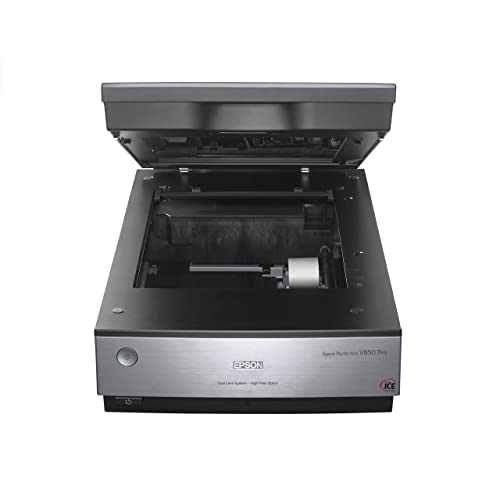
The V850 Pro is the serious pick for a home office that doubles as a studio or archive. Its dual-lens CCD system switches between reflective originals and film, and a 4.0 Dmax holds shadow detail that lesser scanners lose. Film holders cover 35mm, medium format, and 4 x 5 inch originals, while the bundled SilverFast software and calibration target give careful control over colour. At 6400 dpi it resolves fine print, grain, and texture with room to spare. It is the most involved scanner here, and the right one when scan quality decides whether the work sells or the archive lasts.
Specs
- Optical resolution: 6400 dpi
- Sensor: CCD with dual-lens system
- Dmax: 4.0
- Colour depth: 48-bit
- Film holders: 35mm, medium format, and 4 x 5 inch film
- Connectivity: USB 2.0
- Software: SilverFast SE Plus, Epson Scan 2, Digital ICE
Best for: Archive-grade photo and film scanning from a home studio.
Watch out for: The most involved setup here, with a larger footprint; confirm desk space and operating-system support before ordering.
Which One Fits Your Situation
You Scan a Few Pages a Day on a Small Desk
Pick the Epson Perfection V39 II or the Canon CanoScan LiDE 400. Both run from a single USB cable, take up little desk space, and cover documents and photographs at 4800 dpi. The V39 II suits mixed originals thanks to its high-rise lid, while the LiDE 400 wins on speed and its upright storage stand. Either one clears a daily handful of letters, forms, and receipts without a permanent footprint.
You Work With a Tight Budget and Scan Occasionally
Pick the Canon CanoScan LiDE 300. Its 2400 dpi sensor handles letters, forms, receipts, and photographs meant for screens or standard prints, and the Z-lid still copes with thick books. Four EZ buttons keep the workflow simple, and USB power means no extra adapter to lose. Save the higher-resolution models for photo archiving; for ordinary paperwork, the LiDE 300 does the job.
You Are Digitising Photos and Film as Well as Paperwork
Pick the Epson Perfection V850 Pro when quality decides the outcome. Its dual-lens CCD system, 4.0 Dmax, and film holders cover prints, slides, negatives, and medium-format film at 6400 dpi, with calibration tools for faithful reproduction. For everyday photographs alongside paperwork, the HP ScanJet Pro 2600 f1 scans prints at up to 1200 dpi from the flatbed while its ADF clears document stacks. Both still handle daily documents, so neither sits idle between archive sessions.
You Share the Scanner With the Whole Household
Pick the Canon CanoScan LiDE 400. Its Auto Scan mode reads each original and chooses the settings, so family members do not need to learn the software, and five EZ buttons cover the common jobs in one press. USB Type-C power keeps setup to a single cable, and the slim body stands upright out of the way when nobody is scanning. It is the least fussy way to serve several people from one desk.
Common Mistakes
- Buying a reflective-only flatbed and then discovering the family negatives need a transparency unit.
- Scanning everything at maximum resolution, which slows each scan and swells file sizes for no visible gain on plain text.
- Forgetting to check that the bundled software still supports your current operating system version.
- Choosing a deep pro bed for a desk with no permanent space, then leaving the scanner in a cupboard.
- Placing originals crooked on the glass and rescanning the whole batch instead of aligning the first page.
Frequently Asked Questions
Is a flatbed scanner better than a sheet-fed scanner for a home office?
It depends on the originals. A flatbed handles bound books, fragile photographs, identity cards, and thick items a feeder cannot bend, and it scans one page at a time with full control. A sheet-fed scanner is faster for multi-page stacks. Many home offices do best with a flatbed for mixed originals and a feeder for bulk batches, or a hybrid model that combines both.
What resolution do I need for home-office documents?
For typed letters, forms, and receipts, 300 dpi output is plenty and keeps files small and searchable. Photographs you plan to reprint or enlarge deserve 4800 dpi, which gives room to crop without losing detail. Film and slides need 6400 dpi and a transparency unit. Match the resolution to the original, not the maximum number on the box.
Can a flatbed scanner scan books without damaging them?
Yes, when the lid suits the book. A high-rise or Z-style lid lifts above the glass, so a thick volume rests naturally instead of being pressed flat, which protects the spine and keeps the pages near the glass for a sharp scan. Scan one spread at a time, keep the glass clean, and avoid forcing the lid down on a volume that will not close.
Do I need Wi-Fi on a home-office flatbed scanner?
Not always. A USB-powered flatbed suits one person at one computer, and a single cable keeps the desk tidy. Wi-Fi matters when several people share the scanner, or when you scan from a phone or tablet without a computer nearby. Check how the model handles wireless scanning before buying, since some only send files to a computer app rather than working standalone.
FAQ
Is a flatbed scanner better than a sheet-fed scanner for a home office?
What resolution do I need for home-office documents?
Can a flatbed scanner scan books without damaging them?
Do I need Wi-Fi on a home-office flatbed scanner?
More from Amazon
Programs that pair well with the guide above. Offers and eligibility are set by Amazon and may change.
A free business account with business pricing and bulk-buying tools for work, shop or home office.
Create a business accountFree shipping on eligible items, Prime Video and more. Eligible new members can start with a free trial.
Start a Prime free trialAudiobooks and podcasts to listen to on the go. Eligible new members can start with a free trial.
Try Audible freeAd-free music streaming. Eligible new subscribers can start with a free trial.
Try Music Unlimited freeAs an Amazon Associate we earn from qualifying purchases.
Write Your Review
No reviews yet. Be the first to share your experience!